
Community building software development fails when teams treat community as a place to send users after the product is already built. A forum gets added. A Discord opens. A feedback board appears. Then nothing compounds.
Teams think the problem is community tooling. The real problem is workflow design.
If you are building a software product in 2026, community is no longer a cute growth channel on the side. It is part of how users learn, trust, contribute, complain, request, validate, and stay. That changes the conversation. The practical question is not which community platform should we use. It is how does community behavior flow back into product decisions, launch cadence, and support operations.
This guest contribution draws on the work of the team at d0rz.com, who focus on building and sustaining real communities and local networks. The point is simple: community building software development should be treated like an operating system for shipping, not a marketing add-on.
Table of contents
- Community building software development is a shipping system, not a feature list
- Start with the community job before the product backlog
- Design the core loop before the launch page
- Choose software primitives, not shiny community tools
- Build trust and moderation into the architecture
- Instrument community health without vanity metrics
- Connect community building software development to the roadmap
- What breaks when community features are implemented badly
- A practical implementation sequence for product teams
- Where sh1pt fits in a community-led shipping workflow
Community building software development is a shipping system, not a feature list
The mistake teams make is starting with the visible object. They ask whether they need a forum, Slack, Discord, Circle, GitHub Discussions, a custom feed, or comments under changelogs. Those choices matter, but they are downstream.
Community building software development is really about designing the path from person to participant to contributor to retained user. If that path is unclear, the software becomes a waiting room.
Feature-first builds create empty rooms
A feature-first team ships community infrastructure because it feels like a launch milestone. The checklist looks productive:
- Create channels.
- Add invite links.
- Post welcome messages.
- Ask users to introduce themselves.
- Drop product updates.
What breaks in practice is that nobody has a reason to return. Users do not join another community because the founder wants one. They join because a concrete job gets easier there.
For a developer tool, that job might be debugging implementation patterns with other builders. For a marketplace product, it might be finding trusted peers. For a creator tool, it might be seeing how other people package and sell their work.
Community-first builds create repeatable loops
A useful way to think about it is this: community is not a destination. It is a loop.
Someone arrives with a problem. They see proof that others like them are solving it. They contribute a question, artifact, use case, bug report, template, or opinion. The team responds. The product improves or the group gets smarter. The participant gets a reason to come back.
That loop can live across many surfaces: app UI, changelog, email, issue tracker, product roadmap, onboarding, events, or private groups. The tool is less important than the loop.
Practical rule: if you cannot describe the community loop in one sentence, do not build the community feature yet.
Why 2026 makes this harder
In 2026, users are more skeptical. They have joined too many ghost communities, watched too many launch threads disappear, and seen too many startups use community as a low-cost support queue.
At the same time, product teams have more ways to ship quickly. AI-assisted coding, template stacks, hosted auth, payment rails, and launch platforms reduce the cost of producing software. That means more products compete for the same user attention.
Community becomes a differentiator only when it reduces risk for the user. It should make the product easier to evaluate, easier to adopt, and easier to trust.
Start with the community job before the product backlog
Before choosing tools, define the community job. This is the specific exchange that makes participation worth it.
Most weak communities are vague. They are for users to connect. That sounds harmless, but it gives nobody a reason to act. Strong communities are specific. They help first-time founders get launch feedback in 48 hours. They help plugin developers debug edge cases. They help local organizers coordinate trusted service providers.
Who gathers here
Start with the narrowest useful group. Not everyone interested in your product category. Not everyone who might one day become a customer. The initial group should share a real constraint.
Good early segments sound like this:
- Solo founders launching paid micro-SaaS products for the first time.
- Product managers collecting customer evidence before roadmap review.
- Open-source maintainers trying to turn usage into commercial demand.
- Local operators who need trusted referrals and repeat coordination.
Bad early segments sound like everyone building products or people interested in productivity. Too broad means no shared language. No shared language means low contribution.
What exchange happens
Community needs an exchange of value. The exchange might be knowledge, access, feedback, reputation, distribution, accountability, templates, referrals, or shared context.
For software founders, the exchange often starts with one of these:
| Community exchange | Product value | Example surface |
|---|---|---|
| Feedback | Better roadmap inputs | Launch comments, beta threads |
| Support | Faster activation | Help channels, office hours |
| Proof | More trust | Case studies, shipped examples |
| Templates | Faster user success | Shared workflows, starter kits |
| Referrals | Growth | Member directories, intros |
The exchange should also benefit the product team. If it only helps users but never changes shipping decisions, it becomes a separate media project. If it only helps the company and not users, it becomes extraction.
What must become easier
The best community software removes friction from an existing behavior. It does not invent a behavior from scratch.
Ask:
- What are users already trying to ask?
- Where are they getting stuck?
- What do they currently screenshot, copy, email, or DM?
- What decision requires peer confidence?
- What artifact could be reused by the next user?
Practical rule: build around repeated user behavior, not around the founder's preferred community format.
Design the core loop before the launch page
A launch page can create attention. It cannot create a durable community by itself. The core loop determines whether attention turns into participation.
The mistake teams make is building the top of the funnel first and hoping the middle fills itself in. A waitlist, a Product Hunt launch, and a social post can drive visitors. But if there is no clear next action, those visitors become a spreadsheet of stale emails.
The minimum viable community loop
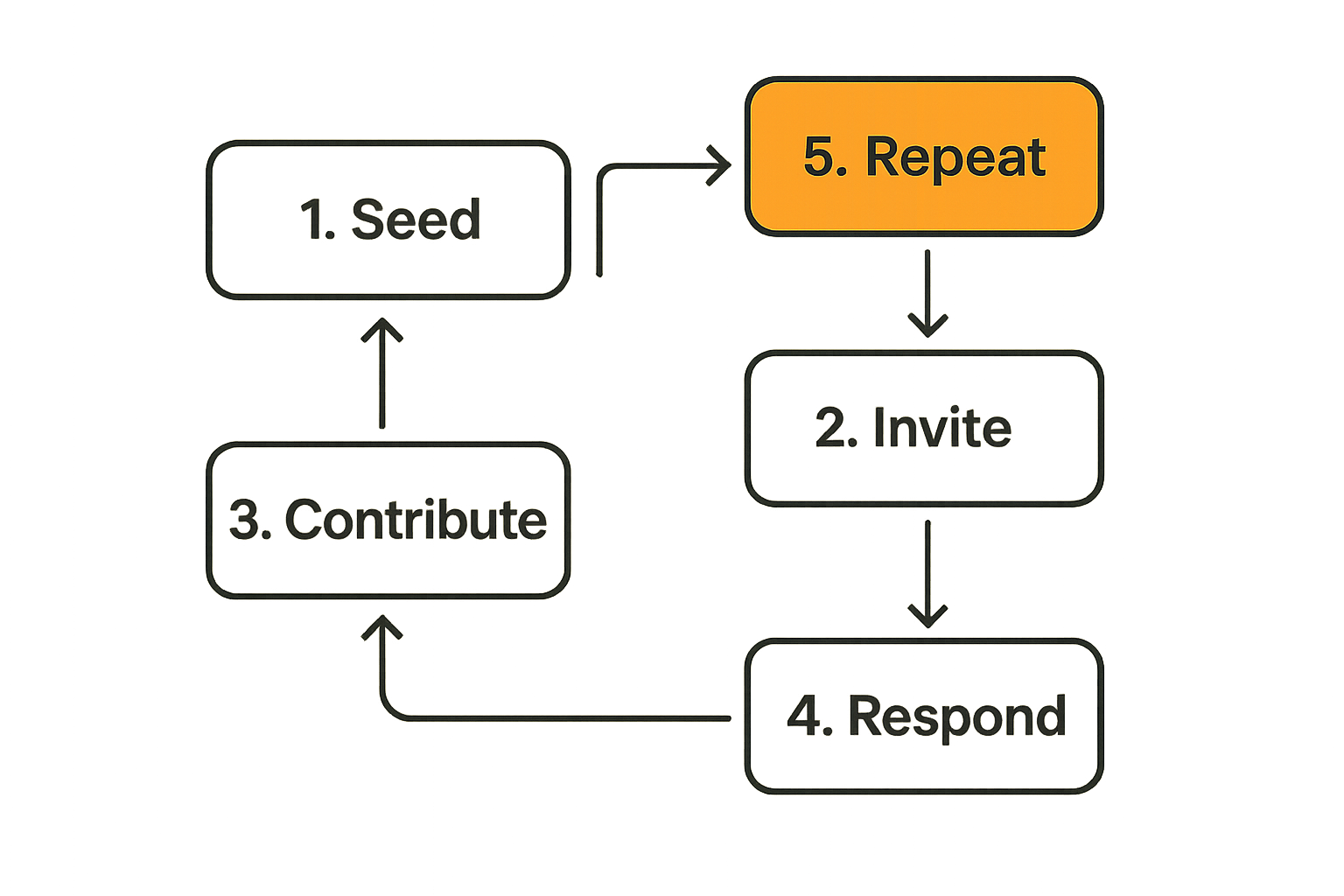
For most early software products, the minimum viable community loop has five parts:
- Seed a specific problem or artifact.
- Invite a narrow group of people who care.
- Ask for one concrete contribution.
- Respond visibly and usefully.
- Repeat on a predictable cadence.
This can be tiny. Ten people in a private beta can be enough if the loop is clear. A hundred people in a public chat can be useless if nobody knows what to do.
Example for a shipping platform:
- Seed: here are three launch pages from founders shipping this week.
- Invite: ask other founders to review positioning and offer one improvement.
- Contribute: each person leaves a short note on clarity, pricing, or audience.
- Respond: founders update the launch asset and share what changed.
- Repeat: every Friday, three new launches go through the loop.
That is community building software development in a practical sense: a behavior loop connected to product progress.
Map actions to product surfaces
Once the loop is clear, map each action to the smallest surface that supports it.
| Loop action | Lightweight surface | Heavier surface |
|---|---|---|
| Seed | Changelog, email, pinned post | Editorial hub |
| Invite | Direct invite, waitlist segment | Referral system |
| Contribute | Comment, form, reaction | Full discussion board |
| Respond | Reply, update note | Roadmap workflow |
| Repeat | Calendar cadence | Event platform |
Do not jump to the heaviest surface first. A founder can manually run the loop for a few cycles before turning it into software. Manual operation exposes edge cases that a premature feature spec usually hides.
Keep the loop small enough to operate
Community loops die when the team cannot operate them. If every contribution requires a founder to write a thoughtful essay, the loop will collapse during a busy sprint. If every user question becomes a custom support thread, the loop becomes a liability.
Design the loop so the team can respond with reusable artifacts:
- Public answers that help future users.
- Templates that turn common advice into repeatable guidance.
- Release notes that reference community input.
- Office-hour summaries instead of one-off private replies.
Practical rule: if a community action cannot produce reusable learning, it probably belongs in support, not community.
Choose software primitives, not shiny community tools
Tool debates get noisy because every platform markets itself as the home for your people. The better question is which primitives your product needs.
A primitive is a foundational capability: identity, spaces, permissions, notifications, moderation, events, search, profiles, contributions, reputation, and analytics. You can buy them, build them, or stitch them together. But you should know which ones matter.
Identity is the first primitive
Identity decides who someone is across the product and the community. If a paying user asks a question under a different email in a chat tool, your team loses context. If a beta user reports a bug without product usage history, your product team loses signal.
Early teams can start simple:
- Use one primary email identity across product, support, and community.
- Tag users by lifecycle stage: prospect, beta, active, paid, churned.
- Record community participation next to product usage when possible.
- Avoid anonymous participation unless there is a strong safety reason.
Identity does not have to mean heavy profiles. It means your team can connect who said something with what they are trying to do.
Spaces define the shape of participation
Spaces are where interaction happens. They can be channels, threads, rooms, boards, comments, events, or embedded product areas.
The wrong space creates the wrong behavior. A real-time chat is good for urgency, but bad for evergreen knowledge. A forum is good for searchable answers, but may feel slow for a small beta. A public comment thread can create proof, but may discourage honest criticism.
| Space type | Works well for | Fails when |
|---|---|---|
| Chat | Fast help, small groups | Knowledge needs to persist |
| Forum | Searchable discussion | Early audience is too small |
| Comments | Feedback on artifacts | Discussion needs structure |
| Events | Trust and momentum | Follow-up is not captured |
| In-app prompts | Contextual input | Users need peer exchange |
The mistake teams make is copying the space used by a larger company. Large communities can support broad categories. Early communities need constraints.
Notifications are product architecture
Notifications are not a growth hack. They are a promise. Every notification tells the user: this is worth your attention.
Bad notification design trains users to ignore you. Good notification design brings them back for a reason they recognize.
Useful notification triggers include:
- Someone responded to your question.
- A feature you requested shipped.
- A launch you reviewed changed based on feedback.
- A new template matches your use case.
- An event summary is ready.
Avoid notifying everyone about everything. Community attention is scarce. Spend it like product trust, not like ad inventory.
Build trust and moderation into the architecture
Community features create surface area for abuse, spam, confusion, and social friction. This is not a reason to avoid them. It is a reason to design ownership before the problem arrives.
The practical question is not whether your early community will need moderation. It will. The question is whether moderation is a panic response or a defined workflow.
Trust states should be explicit
Trust states help the system treat participants differently based on context and behavior. They do not need to be complex.
A simple model might include:
- New: can read and make limited contributions.
- Verified: has confirmed identity or product usage.
- Contributor: has made useful contributions.
- Trusted: can help review, answer, or host.
- Restricted: has triggered review or limits.
This matters because not every action should be available to every participant on day one. Posting links, mass messaging, creating events, or tagging many users can all become abuse vectors.
Reports need an owner and a state
A report button without an operational workflow is theater. If a user reports spam, harassment, bad advice, or a broken community norm, what happens next?
At minimum, define:
- Who receives the report.
- How quickly it should be reviewed.
- What states it can move through.
- What actions moderators can take.
- What the reporting user sees.
A lightweight state model is enough:
- New report.
- Under review.
- Action taken.
- No action.
- Escalated.
The key is not bureaucracy. The key is not losing trust because nobody knows who owns the issue.
Founder visibility is not the same as founder control
Early founders often want to personally oversee everything. That works for a while. Then it becomes a bottleneck.
Founder visibility means the team can see important signals, risks, and patterns. Founder control means every decision routes through the founder. The first is healthy. The second does not scale.
Give trusted members clear roles when the community matures. Let support own common questions. Let product own roadmap signals. Let moderators own behavior issues. Let founders stay close to the pattern without approving every action.
Practical rule: moderation is part of product operations. If nobody owns it, the community feature is not ready for scale.
Instrument community health without vanity metrics
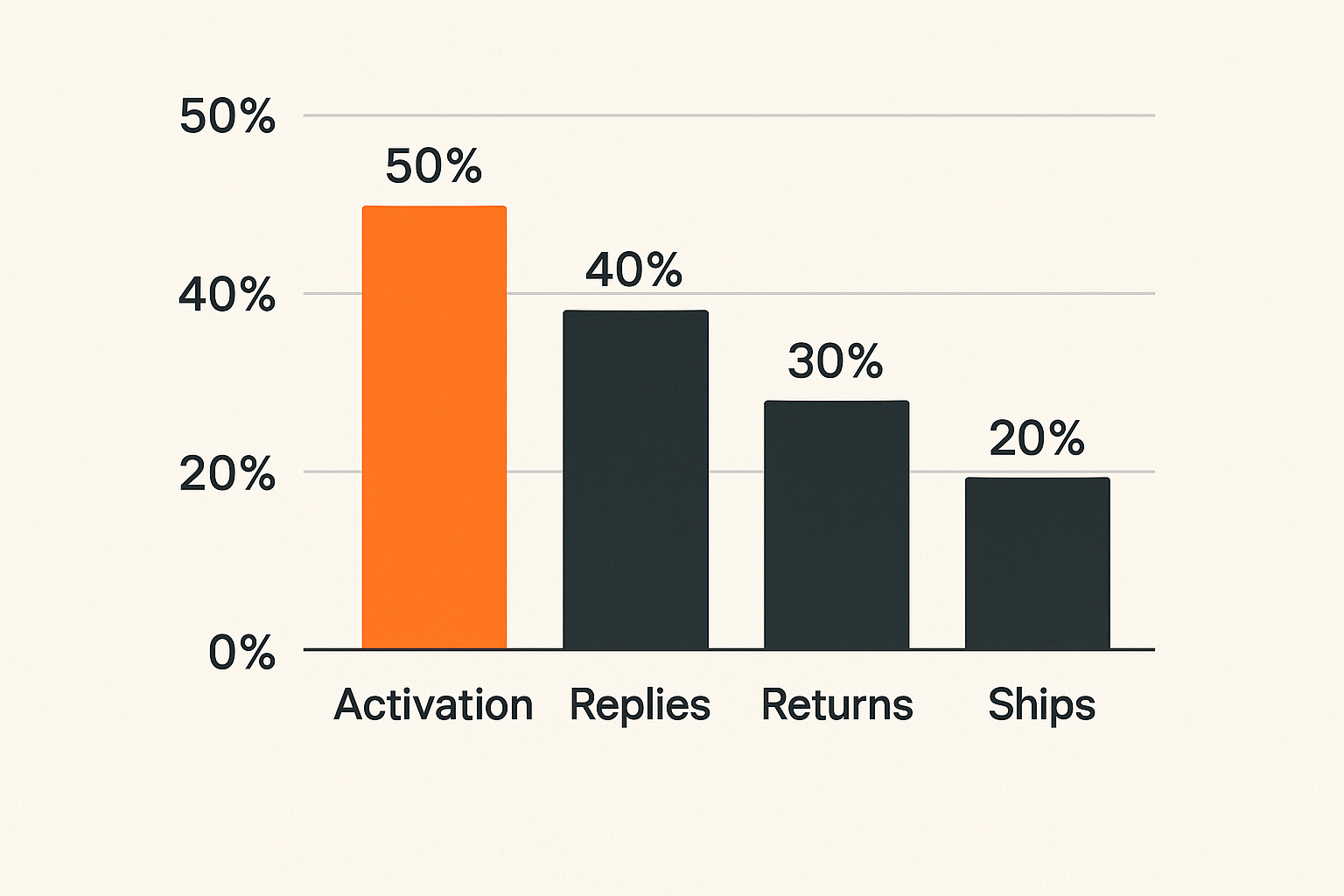
Many teams measure community with numbers that look good in a slide and explain nothing in production. Members, followers, impressions, and channel count are easy to count. They do not tell you whether the community is helping the product ship better.
The useful metrics are behavior metrics tied to the loop.
Activation is a behavior, not a signup
A signup means someone entered the system. Activation means they experienced the community job.
Depending on your product, activation might be:
- Asked one useful question.
- Received an answer from a peer or team member.
- Reviewed another user's launch.
- Shared a template.
- Joined an office hour and took one next step.
- Commented on a roadmap item with context.
Do not define activation as joining a channel. That is attendance, not participation.
Contribution quality matters more than volume
A community can look active and still be low value. Endless introductions, shallow reactions, and repetitive questions create motion without progress.
Track contribution quality with simple operational labels:
- Reusable answer.
- Product feedback.
- Bug signal.
- Use-case example.
- Peer support.
- Off-topic.
- Needs support follow-up.
This is not about perfect analytics. It is about teaching the team what type of community behavior helps users and informs the roadmap.
Retention should be tied to useful return reasons
A returning member is valuable when the return is tied to a useful reason. They came back because someone responded, a launch needed review, an event summary shipped, a feature request changed status, or a peer shared something relevant.
Useful retention questions:
- What brought this person back?
- Did they contribute or only consume?
- Did the return happen because of a product event?
- Did the return reduce support load or improve activation?
- Did the return create evidence for a roadmap decision?
If you cannot answer these, you may have engagement but not community health.
Connect community building software development to the roadmap
Community building software development becomes powerful when community signals influence product decisions without hijacking the roadmap.
The mistake teams make is treating community feedback as either noise or command. Both are wrong. Feedback is input. The team still has to interpret it through strategy, user segment, business model, and technical cost.
Triage community signals like product inputs
Create a simple triage model. Every useful community signal should land in a category.
| Signal type | Example | Owner | Product action |
|---|---|---|---|
| Bug | Workflow breaks on import | Engineering | Reproduce and prioritize |
| Friction | Users misunderstand setup | Product | Improve onboarding |
| Demand | Repeated request from target segment | PM or founder | Validate and scope |
| Proof | User shipped a good result | Marketing or growth | Turn into artifact |
| Risk | Spam, abuse, confusion | Community or support | Moderate and adjust rules |
This prevents the common founder trap: screenshotting feedback into a private chat and calling it customer development.
Close the loop when you ship
Users contribute more when they see that contribution matters. Closing the loop is not complicated:
- Link a shipped change to the original signal.
- Thank the people who helped clarify the issue.
- Explain what changed and what did not.
- Share the next step if the request is only partially solved.
This is where community and launch practice overlap. A changelog is not just a product update. It is evidence that participation has consequences.
Separate feedback from governance
Listening to users does not mean handing over the roadmap. Early communities can become loud. A few highly engaged people may push for features that do not match the product's direction.
Set expectations:
- Feedback is welcome.
- The team decides priorities.
- Not every request will ship.
- Decisions will be explained when possible.
- The roadmap serves the target customer and business model.
That boundary keeps the community useful without letting it become a committee.
What breaks when community features are implemented badly
Bad community implementation rarely fails all at once. It drifts. Channels get quieter. Founders stop posting. Support questions pile up. The roadmap gets noisier. New users see an empty room and assume the product is weak.
What breaks in practice is not just engagement. It is trust.
What fails
Common failure modes include:
- Empty launch communities: the team opens a space before there is a reason to gather.
- Unowned channels: nobody is responsible for response time or quality.
- Notification fatigue: every update goes to everyone.
- Support leakage: private support issues get dumped into public community spaces.
- Roadmap distortion: loud users overpower the target segment.
- Tool sprawl: feedback lives across chat, email, docs, comments, and spreadsheets with no source of truth.
- Moderation panic: rules are written only after a visible incident.
The failure is usually architectural. The team did not define ownership, state, permissions, response paths, or how community input becomes product work.
What works
Working systems are usually boring in a good way:
- One clear purpose for the community.
- One primary loop for participation.
- One owner for each operational path.
- Clear escalation for support and moderation.
- Lightweight analytics tied to behavior.
- Regular release communication that references user input.
- Reusable artifacts created from repeated questions.
The best early community may not look busy. It may look focused. A small group producing high-signal feedback is better than a large group creating noise.
The hidden cost is support debt
Support debt appears when community interactions create unresolved obligations. Someone asks a question. Nobody answers. Someone reports a bug. Nobody tracks it. Someone suggests a feature. The founder says interesting and never follows up.
Each loose end lowers confidence. Over time, users learn that the community is not a reliable place to get help or influence the product.
Treat unanswered community items like open tickets. They need closure, even if the closure is not now or this belongs in support.
A practical implementation sequence for product teams
Here is a practical sequence for a small team that wants to add community to a software launch without creating a second company inside the company.
First 2 weeks
Use the first two weeks to prove the loop manually.
- Define the target participant in one sentence.
- Define the community job in one sentence.
- Pick one contribution type: feedback, question, example, review, template, or referral.
- Invite 10 to 30 people who match the segment.
- Run one structured prompt per week.
- Respond to every useful contribution.
- Capture repeated signals in a single product backlog or research doc.
Do not build custom software yet unless the community is the product. Use simple tools. The goal is learning, not infrastructure.
Next 30 days
After the first cycles, start adding structure.
- Create a basic state model for community items: new, acknowledged, routed, resolved, archived.
- Assign owners for support questions, product feedback, moderation, and launch artifacts.
- Publish a lightweight participation guide.
- Create reusable answers for repeated questions.
- Add notification rules for replies, shipped requests, and scheduled loops.
- Review community signals during product planning.
- Close the loop publicly when a change ships.
At this point, you can choose whether to keep using external tools or embed parts of the loop into your product.
After launch
After launch, the community workflow should support retention and product improvement.
Run a weekly review:
- Which community inputs changed product decisions?
- Which questions became reusable documentation?
- Which participants are becoming trusted contributors?
- Which notifications drove useful returns?
- Which channels or surfaces are dead weight?
- Which issues need moderation or policy changes?
This is the operating cadence. Without it, the community becomes a content calendar with comments attached.
Where sh1pt fits in a community-led shipping workflow
For founders and product teams, the launch itself is one of the most useful community moments. A launch creates artifacts: positioning, screenshots, demos, pricing, roadmap notes, early feedback, objections, and proof.
The mistake is treating those artifacts as one-time promotional material. They should become inputs into the next shipping cycle.
Use launch artifacts as community artifacts
A product launch gives your community something concrete to react to. Instead of asking vague questions like what do you think, ask for specific review:
- Is the target user obvious?
- Is the problem clear in the first screen?
- Does the demo show the actual workflow?
- What objection would stop you from trying it?
- What proof is missing?
That feedback can improve the product page, onboarding, roadmap, and messaging. It also gives participants a reason to return when the next version ships.
Product fit checklist
Community-led shipping is a good fit when:
- Your users benefit from seeing how peers solve similar problems.
- Feedback quality improves when users see each other's context.
- Launch artifacts can be reviewed, reused, or remixed.
- Product trust depends on visible progress.
- Your roadmap needs qualitative signal, not just analytics.
- You can commit to closing the loop after users contribute.
It is a bad fit if you only want a broadcast channel. In that case, write updates and build an email list. Do not call it community.
Community building software development works when the launch workflow, product workflow, and community workflow reinforce each other. That is the closing point: community building software development is not about adding more places to post. It is about creating a system where people help the product get better and can see that their participation mattered.
Try sh1pt.com
If you are building and launching software products, sh1pt.com helps you think through the shipping process with practical product launch guidance, platform deep-dives, and operator-focused workflows. Try sh1pt.com.