
A screen sharing product launch looks simple from the outside. Record a polished demo, publish the landing page, post on launch channels, and wait for remote teams to try it.
Then real users arrive with messy devices, locked-down browsers, corporate networks, confused invite flows, audio issues, permissions fatigue, and a second participant who did not read your launch copy.
Teams think the problem is getting attention. The real problem is turning that attention into a successful first shared session.
That changes the conversation. A screen sharing product launch is not primarily a marketing event. It is an architecture and workflow problem: how do you move strangers from curiosity to a trusted collaborative session without losing them to friction, fear, or failure?
Table of contents
- Screen sharing product launch is a workflow problem
- Define the launch wedge before you build the demo
- Build the launch around trust, not just features
- Package the product for the first session
- Instrument the launch like an operating system
- Create a launch workflow your team can actually run
- Write launch messaging for skeptical remote teams
- Prepare support, incidents, and edge cases
- Turn feedback into the post-launch roadmap
- Where screen sharing fits in a shipping stack
- Closing checklist for a screen sharing product launch
Screen sharing product launch is a workflow problem
Most launch plans over-focus on distribution. Where will we post? Which communities will care? Who can amplify it? Those questions matter, but they do not solve the hardest part of launching a screen sharing app.
The practical question is: what happens after someone clicks?
For a collaboration product, the user does not get value alone. They need another person, a working session, enough trust to share a screen, and a clear reason to come back. That makes your launch closer to launching a marketplace or workflow tool than a single-player utility.
As guest contributors from the team at pairux.com, we see this pattern often with remote collaboration products: the launch announcement creates interest, but the first live session determines whether the product feels credible.
Launching collaboration is different
A note-taking app can impress one person in isolation. A design tool can show value with sample files. A developer tool can run a local command and prove its point.
Screen sharing needs a shared moment. One person starts. Another joins. The browser asks for permissions. The app must handle network variance, device differences, user hesitation, and social awkwardness.
The mistake teams make is treating this as a UI conversion funnel. It is not just signup, invite, join. It is a trust funnel.
Practical rule: If your launch depends on two people succeeding together, design the launch around the weaker participant, not the power user who found you first.
That weaker participant may be a client, a customer, a teammate, a student, a support agent, or a non-technical stakeholder. They are not evaluating your launch copy. They are asking whether clicking this link is safe and whether they can leave if something feels wrong.
What buyers actually test
Founders often assume users will compare feature lists: HD sharing, remote control, annotations, recording, browser support, team rooms, permissions, integrations.
In practice, many buyers test operational questions:
- Can I start a session quickly under pressure?
- Can the other person join without installing something painful?
- Do permissions make sense?
- Can I recover when audio, browser, or network conditions are bad?
- Do I understand who has control?
- Would I trust this with a customer on the call?
- Can my team explain this without training?
A useful way to think about it is that your launch is not promising screen sharing. It is promising reduced coordination cost. The feature is the mechanism. The value is less back-and-forth, faster debugging, cleaner onboarding, better remote support, or smoother collaboration.
Define the launch wedge before you build the demo
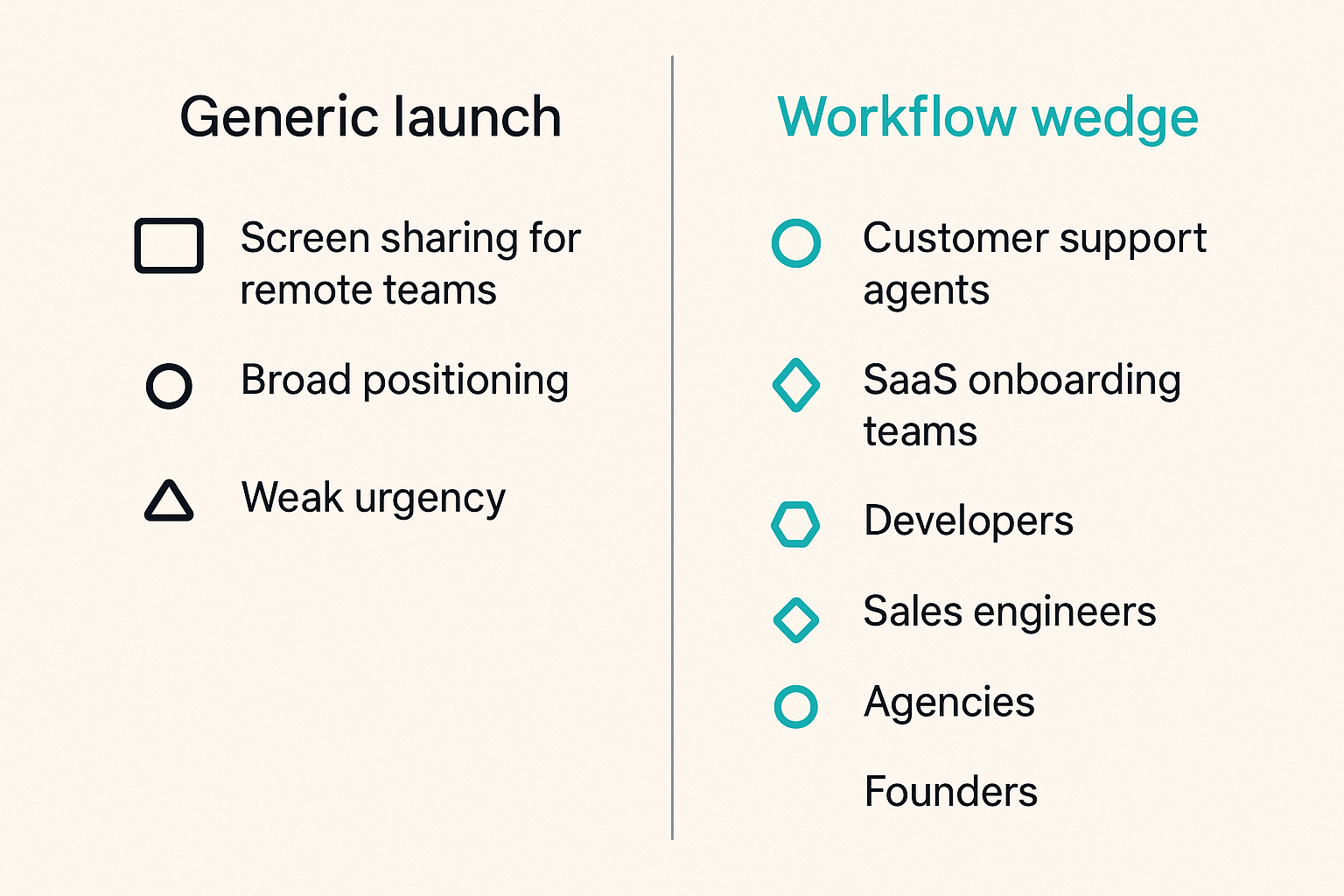
A generic screen sharing product launch is hard because everyone already has a default tool. Video meeting platforms, browser-based meeting links, remote support tools, internal collaboration suites, and operating system features all occupy some part of the category.
Your launch wedge has to explain why someone should change behavior now.
Pick one painful collaboration moment
Do not launch as the universal screen sharing solution for everyone who works remotely. That sounds broad, but broad positioning usually creates weak urgency.
Pick a moment with high frustration and clear existing workarounds:
- Customer support agents need to see what users see without a long meeting setup.
- SaaS onboarding teams need to guide new customers through configuration.
- Developers need quick remote debugging with a non-technical teammate.
- Sales engineers need to co-navigate a product environment with prospects.
- Agencies need to review client work without endless screenshot threads.
- Founders need to help early users while learning where onboarding breaks.
The wedge should be specific enough that the first user thinks, yes, this is exactly the annoying moment I deal with.
Compare the two approaches:
| Launch approach | What it says | What users hear | What breaks in practice |
|---|---|---|---|
| Generic category launch | Screen sharing for remote teams | I already have that | Low urgency, vague differentiation |
| Workflow wedge launch | Start a support screen share from a browser link in under a minute | This solves a specific interruption | Easier demo, clearer feedback, stronger adoption signal |
The second approach does not prevent you from expanding later. It gives the launch a job.
Translate the wedge into product promises
Once you choose the wedge, convert it into promises you can test.
For a customer support wedge, the promises might be:
- No account required for the customer joining.
- Clear consent before screen access.
- Agent can request remote control, not assume it.
- Session links expire.
- The customer can stop sharing at any time.
- Support notes can be attached after the session.
For an internal engineering wedge, the promises might be different:
- Fast session start from Slack or a browser.
- Low-latency cursor and control handoff.
- Easy switching between windows.
- Reliable performance on imperfect home networks.
- Minimal ceremony for repeated use.
Practical rule: A launch wedge is not a persona slide. It is a set of constraints that tells your team what to optimize and what to ignore during the first release.
This is where many launches drift. The landing page says one thing, the onboarding optimizes another, and the demo shows a third. Keep the wedge tight enough that product, marketing, support, and analytics are all measuring the same moment.
Build the launch around trust, not just features
Screen sharing asks for unusual user trust. You are asking someone to expose their screen, application state, customer data, private tabs, desktop notifications, or internal tools. If remote control is involved, the trust bar is even higher.
The mistake teams make is burying trust decisions behind generic interface polish. A beautiful UI does not fix uncertainty about who can see what.
Permission, control, and recovery
Trust needs visible state. Users should never have to infer whether they are sharing, recording, controlling, or being controlled.
At launch, prioritize these product details:
- Clear pre-share screen explaining what will be visible.
- Browser-native permission prompts supported by plain-language context.
- Persistent sharing indicator during the session.
- Obvious stop sharing and revoke control actions.
- Separate states for viewing, presenting, requesting control, and controlling.
- Expiring links or session boundaries for external participants.
- Recovery path if a participant accidentally shares the wrong screen.
Remote control deserves special care. The user granting control needs a clear confirmation step, not a surprising transition. The user receiving control needs boundaries. Can they type? Can they click outside the shared window? Can they use keyboard shortcuts? What happens when the sharer moves the mouse?
If these states are unclear, users will not complain about your permission model. They will just leave and call the product risky.
Latency, quality, and fallback paths
Trust is not only privacy. It is also reliability.
A laggy first session creates doubt. A failed permission flow creates doubt. A browser incompatibility with no explanation creates doubt. The user may not know whether the issue is your app, their device, their network, or their browser, but they will attach the feeling to your product.
Build fallback paths before the launch spike:
- Detect unsupported browsers before users enter the session.
- Provide a copyable fallback link if invite delivery fails.
- Explain when audio is not part of the session, if that is your model.
- Offer a reconnect button instead of forcing users to restart from scratch.
- Show network quality state when performance drops.
- Let hosts switch from full-screen share to window share if needed.
Practical rule: If a user cannot tell whether the session is broken or still connecting, the launch experience is already broken.
The launch is not the time to discover that your happy path depends on perfect browser support, clean corporate permissions, and two users who both know what WebRTC is.
Package the product for the first session
Your first session is the real landing page. The public page creates intent, but the session creates belief.
A strong screen sharing product launch packages that first session as a guided workflow, not a blank room.
The first 90 seconds matter
The first 90 seconds should answer five questions:
- What am I about to do?
- Who will see my screen?
- What exactly can they access?
- How do I stop?
- What should I do next?
You do not need a long tutorial. You need timely reassurance.
A good first-run sequence might look like this:
- User clicks start session.
- Product explains the session type in one sentence.
- User chooses what to share.
- Product shows an obvious waiting state and invite link.
- Guest joins with minimal required fields.
- Both participants see clear role labels.
- Product offers one suggested action based on the wedge.
For example, if your wedge is support, the suggested action might be request view access. If your wedge is onboarding, it might be guide the customer through setup. If your wedge is debugging, it might be grant temporary control.
Design for the second participant
The second participant is often ignored because they are not the account owner. That is dangerous.
They may be the buyer, customer, executive sponsor, frustrated end user, or person who decides whether your tool feels professional. They are also the participant with the least context.
Design their path carefully:
- Avoid forcing account creation unless it is absolutely required.
- Show who invited them.
- Explain whether they are viewer, presenter, or controller.
- Make leave session obvious.
- Use short labels instead of product jargon.
- Avoid surprise email capture before value is clear.
What breaks in practice is social trust. If the guest sees an unfamiliar screen with unclear permissions and a demand to sign up, the host now has to explain your product while trying to accomplish their own work. That is a bad launch moment.
Instrument the launch like an operating system
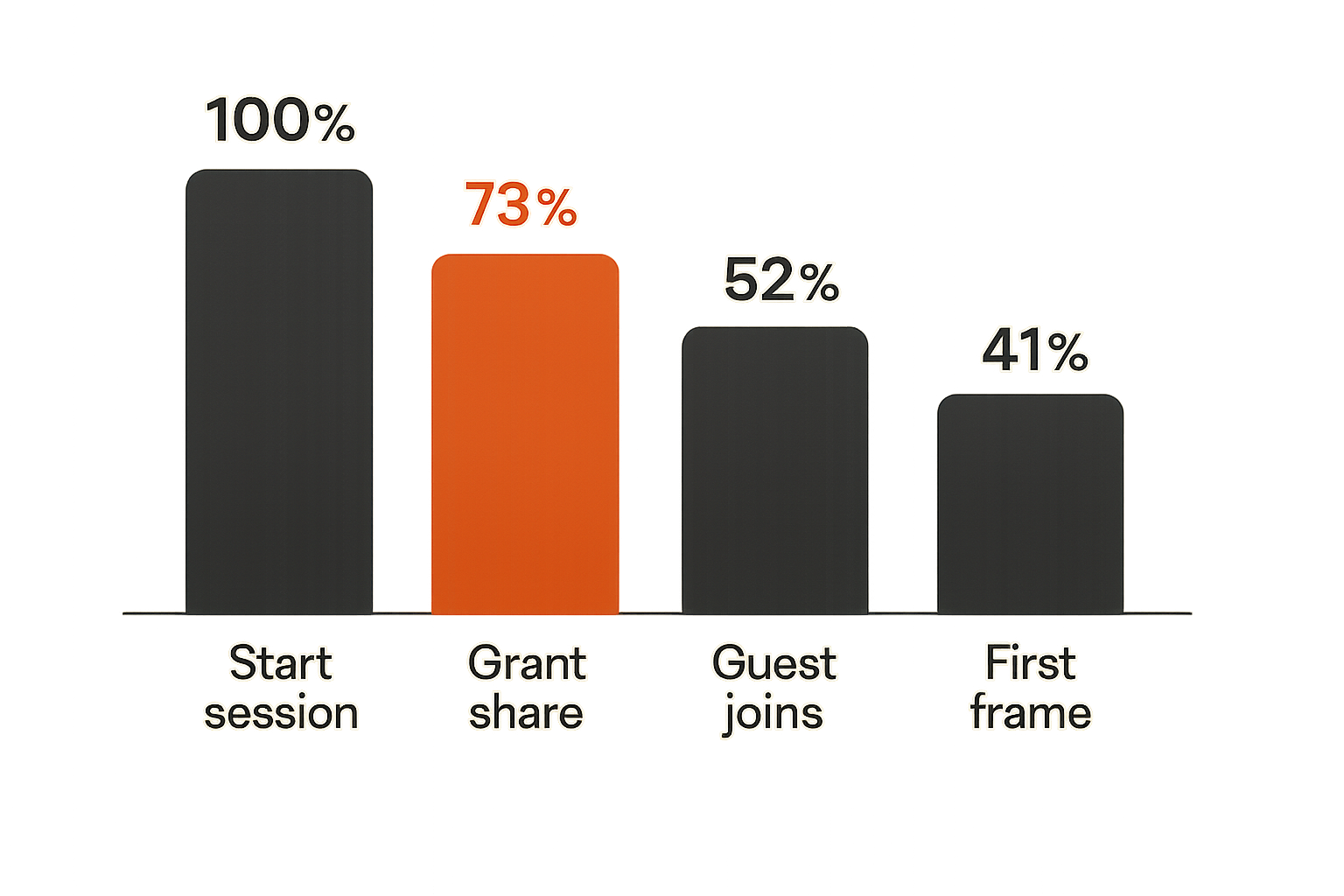
A launch without instrumentation turns every user report into a mystery. Someone says the session did not work. You do not know whether they failed at signup, invite, permission, browser selection, connection, sharing, remote control, or reconnection.
The practical question is not whether you have analytics. It is whether you can reconstruct the first session journey.
Events that matter
Track the operational events that explain collaboration success:
- Landing page viewed by source.
- Start session clicked.
- Host account created or skipped.
- Browser compatibility check passed.
- Share permission prompt shown.
- Share permission granted or denied.
- Invite link copied or sent.
- Guest opened invite.
- Guest joined session.
- First frame received.
- Remote control requested.
- Remote control granted or denied.
- Session ended normally.
- Session ended after error or disconnect.
- Reconnect attempted.
- Feedback submitted.
You are looking for the first meaningful shared moment. For most products, that is not signup. It is the point where another participant can actually see the shared screen or take the intended collaborative action.
A simple event model is enough at launch:
session_started:
  actor: host
  source: launch_page
  browser: chrome
  wedge: support

screen_share_granted:
  actor: host
  permission_surface: browser_prompt
  shared_surface: window

first_guest_frame_received:
  actor: guest
  latency_bucket: medium
  session_id: generated_session_id
Keep identifiers privacy-aware. You do not need to log screen contents. You need state transitions.
Metrics that mislead
Launch dashboards often make teams feel better without telling them what to fix.
Raw visits, signups, upvotes, impressions, and social replies can all be useful. They just do not prove that your product works.
Better launch metrics for screen sharing include:
- Start-session rate from qualified traffic.
- Permission grant rate.
- Invite completion rate.
- Guest join rate.
- First shared frame success rate.
- Median time from start to shared session.
- Session restart rate.
- Remote control grant rate, if relevant.
- Support tickets per successful session.
- Repeat session rate within seven days.
The mistake teams make is celebrating traffic while ignoring session failure. A spike that produces many failed first sessions is not just wasted acquisition. It teaches the market that your product is unreliable.
Create a launch workflow your team can actually run
A launch plan should be boring enough to execute under pressure. If the plan only exists in a founder's head, the team will improvise when the spike arrives.
The useful output is a launch operating workflow: who watches what, who fixes what, who replies where, and how decisions get made during the first hours and days.
A practical launch sequence
Here is a practical sequence for a screen sharing product launch:
- Define the wedge. Choose the collaboration moment you are launching around.
- Freeze the demo path. Decide the exact first session flow you want users to experience.
- Run device and browser rehearsals. Test common combinations, not only the founder's laptop.
- Instrument critical events. Make sure you can see where sessions fail.
- Prepare support macros. Write short responses for permissions, browser issues, audio assumptions, and invite failures.
- Launch to a controlled group first. Use friendlies or a small community before a bigger public push.
- Watch sessions in aggregate. Monitor state transitions, not private content.
- Triage issues by launch risk. Fix blockers before polish.
- Update messaging daily. If users misunderstand the same thing, change the page or onboarding.
- Review the first repeat usage. The launch is not done until some users come back.
This sequence is deliberately operational. It connects product, engineering, support, and marketing into one loop.
Ownership map
Do not let every issue become a founder interrupt. Assign ownership before the launch.
| Area | Owner | Launch responsibility | Decision rule |
|---|---|---|---|
| Positioning | Founder or PM | Keep wedge and copy aligned | Change if users misunderstand value |
| Session reliability | Engineering | Watch connection, browser, and permission failures | Fix blockers before feature work |
| Onboarding | Product/design | Improve first-session completion | Remove steps before adding education |
| Support | Support/founder | Respond quickly to launch friction | Turn repeated questions into UI changes |
| Distribution | Marketing/founder | Manage launch channels and replies | Send traffic to the most stable path |
| Feedback | PM/founder | Classify requests by job and urgency | Do not build from loudness alone |
Practical rule: During launch week, every repeated support question is either a product bug, a messaging bug, or a missing state in the workflow.
This ownership map also prevents the common failure where distribution succeeds and product learning fails. You want every launch conversation to improve the system.
Write launch messaging for skeptical remote teams
Remote teams have seen many collaboration tools. They do not need another vague promise about working better together.
Your messaging should make the workflow obvious and reduce perceived switching cost.
What works
Strong launch messaging usually includes:
- A specific job: debug with a customer, onboard a client, review work, guide a user.
- A concrete start point: send a link, open a room, request a share, join from browser.
- A trust statement: consent, control, stop sharing, session boundaries.
- A time-to-value claim you can actually support.
- A short product animation or real session clip.
- A clear audience: support teams, founders, agencies, educators, product teams.
Example positioning lines:
- Start a customer screen share from a browser link, without turning every support issue into a meeting.
- Guide new users through setup with temporary remote control and clear consent.
- Review client work live without another screenshot thread.
- Help a teammate debug what they see, not what they can describe.
These lines are not clever. They are useful. That is the point.
What fails
Weak messaging usually tries to sound larger than the product is ready to be.
Watch for these traps:
- All-in-one collaboration platform before the workflow is proven.
- Works for everyone, which tells no one why to care.
- Feature pileups that do not explain the first session.
- AI language that distracts from trust and reliability.
- Enterprise-grade claims without enterprise-grade controls.
- Fast and secure claims with no visible behavior to back them up.
The launch page should not make users decode the product. If the page says seamless collaboration but the first action is unclear, the copy is borrowing credibility from a future product.
Prepare support, incidents, and edge cases
What breaks in practice is rarely the happy-path feature. It is the edge around the feature: browser prompts, IT restrictions, permissions, mobile expectations, guest confusion, and network instability.
A serious screen sharing product launch plans support before the first public wave.
Common failure modes
Expect these failure modes:
- Host denies screen permission and does not know how to retry.
- Guest opens the link on mobile when desktop is required.
- Corporate browser settings block capture or connection.
- User shares the wrong window and panics.
- Audio is expected but not supported in the current flow.
- Remote control request feels surprising or unsafe.
- Invite email is delayed or filtered.
- Session reconnect loops after network change.
- Two users join but neither understands who should act next.
- Product works technically but feels too slow for the job.
A useful support model separates user education from product defects. If one user misses a step, support can help. If many users miss the same step, the product is unclear.
How to respond without panic
Create response paths for the common cases.
For permission denial:
- Explain how to restart sharing.
- Link the action from inside the product, not only docs.
- Detect denial state and show the next step.
For unsupported browser:
- Detect early.
- Show supported options.
- Preserve session intent so the user can retry without starting over.
For guest confusion:
- Show the inviter name.
- Show the session purpose.
- Show the participant role.
For remote control concern:
- Require explicit grant.
- Show how to revoke.
- Log state changes for audit or session history if appropriate.
The point is not to eliminate every issue before launch. That is impossible. The point is to make failure recoverable and observable.
Turn feedback into the post-launch roadmap
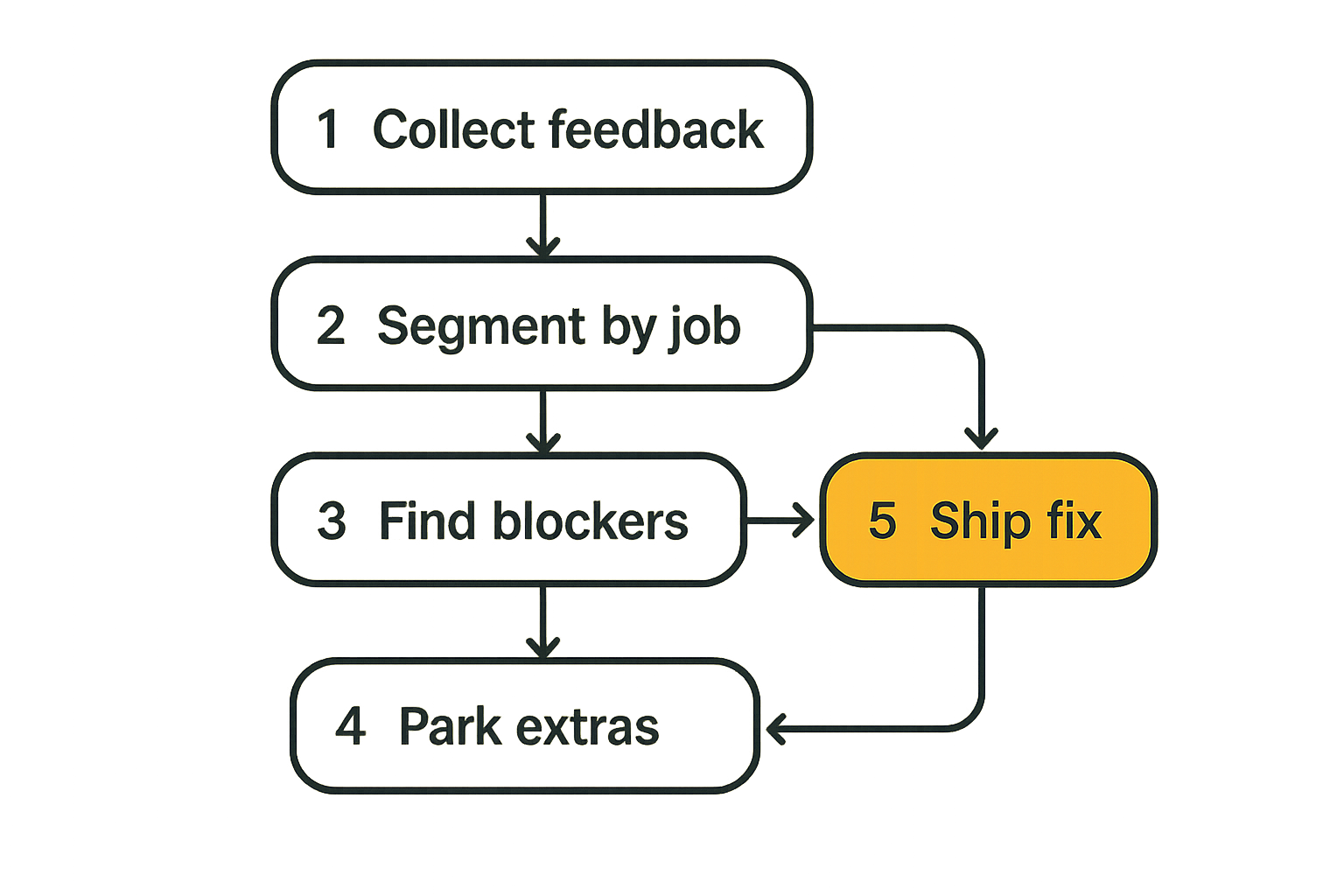
The first launch wave will produce messy feedback. Some of it will be valuable. Some will be category noise. Some will be requests from users who are not your wedge.
The mistake teams make is treating all feedback as a roadmap vote.
Segment feedback by job
Classify feedback by the job the user was trying to complete.
Use buckets like:
- Could not start a session.
- Could not get guest to join.
- Did not trust the permission model.
- Needed better performance.
- Needed remote control.
- Needed recording.
- Needed team administration.
- Needed integrations.
- Wanted a different product category.
Then tag by user type:
- Founder helping customers.
- Support team.
- Product manager.
- Agency operator.
- Developer.
- Educator.
- Enterprise evaluator.
This helps you separate launch blockers from expansion ideas. If your wedge is support and support users cannot get guests to join, that is urgent. If an enterprise evaluator asks for SSO on day one, it may matter later, but it should not automatically displace first-session reliability.
Decide what not to build
A screen sharing product can expand in many directions: video calls, recordings, annotations, remote control, co-browsing, file transfer, session notes, CRM integrations, help desk integrations, team permissions, audit logs, AI summaries, scheduling, and more.
That surface area is dangerous after launch because every request sounds plausible.
Use a simple filter:
- Does this improve the launch wedge?
- Does it increase first-session success?
- Does it reduce trust friction?
- Does it create repeat usage for the same user?
- Can we support it operationally?
If the answer is no, park it. Not forever. Just long enough to avoid building a scattered product before the core workflow works.
Practical rule: Post-launch roadmap discipline is mostly the discipline to protect the first successful workflow from adjacent nice-to-haves.
Where screen sharing fits in a shipping stack
A screen sharing product launch has more moving parts than a normal landing page launch. You are coordinating product readiness, launch assets, support coverage, analytics, user feedback, bug triage, and follow-up releases.
That is exactly where teams need a visible shipping system.
Use sh1pt.com to keep launch work visible
For indie hackers, startup founders, product managers, and solopreneurs, the launch plan often lives across notes, issues, chats, and memory. That works until the public launch creates pressure.
A tool like sh1pt.com is useful because a launch is not one task. It is a chain of product decisions and follow-through:
- What must be true before launch?
- Which launch assets are done?
- Which browser tests are still open?
- Which support macros are ready?
- Which feedback has been triaged?
- Which post-launch fixes are shipping next?
The practical benefit is not ceremony. It is keeping the launch workflow visible enough that you can ship, learn, and adjust without losing the thread.
Product fit for teams shipping collaboration tools
If you are launching a screen sharing app, co-browsing tool, remote support product, or collaborative workspace, your shipping process needs to match the product's operational reality.
You will have multiple loops running at once:
- Product loop: session reliability, permissions, UX, performance.
- Growth loop: positioning, distribution, demos, launch channels.
- Support loop: user issues, incident response, documentation.
- Learning loop: feedback, segmentation, roadmap decisions.
The mistake teams make is managing these loops separately. Engineering fixes bugs without seeing messaging confusion. Marketing drives traffic without seeing session failure. Support answers the same question repeatedly without a product change.
A launch stack should connect the loops. That does not require a heavy process. It requires a single place where launch work, decisions, and follow-up are visible.
Closing checklist for a screen sharing product launch
A good screen sharing product launch is not the loudest announcement. It is the launch where the right users reach the first collaborative moment, trust the session, recover from friction, and come back because the workflow solved a real problem.
Teams think the problem is making enough noise. The real problem is converting attention into a successful shared session.
Final operator checklist
Before launch, make sure you can answer these questions:
- What specific collaboration moment are we launching around?
- Who is the host and who is the guest?
- What does first-session success mean?
- Can a guest join without unnecessary friction?
- Are sharing, viewing, and control states obvious?
- Can users stop sharing or revoke control instantly?
- Do we detect unsupported browsers early?
- Can we see where sessions fail?
- Do we have support responses for predictable issues?
- Who owns reliability, onboarding, support, messaging, and feedback?
- Which feedback will change the roadmap, and which will be parked?
- What post-launch fix will we ship first if the data confirms the expected bottleneck?
If you can answer those clearly, your screen sharing product launch is no longer just a campaign. It is an operating system for learning from real collaborative use.
Try sh1pt.com
sh1pt.com helps builders plan, ship, and learn from software product launches without losing the operational thread. Try sh1pt.com.