
Remote product teams do not usually break because nobody can see the screen. They break because context moves slower than the bug, the launch checklist, or the customer problem.
That is why screen sharing software development matters in 2026. Not as a nicer meeting feature. As part of the product delivery system.
Teams think the problem is visibility. The real problem is shared control, shared context, and clean handoff between people who are trying to ship without sitting in the same room.
The mistake teams make is treating screen sharing like a last-minute rescue tool. Someone gets stuck, opens a call, shares a tab, and everyone watches the cursor until the loudest person decides what to do. That changes the conversation from shipping work to surviving meetings.
A useful way to think about it is this: screen sharing is a workflow layer. It touches debugging, design QA, sales engineering, customer support, onboarding, incident response, and product discovery. The practical question is not which tool has the smoothest pixels. The practical question is how your team uses shared screens to reduce time-to-context without creating a new source of noise.
Table of contents
- Why screen sharing software development is a shipping problem
- Where screen sharing fits in the build-to-launch workflow
- The core architecture of a useful screen sharing workflow
- Choosing tools without turning collaboration into tool sprawl
- Implementation workflow for product teams
- Security privacy and trust boundaries
- How screen sharing changes engineering rituals
- Metrics that tell you if the workflow is working
- Common failure modes in screen sharing software development
- Product-fit shipping faster without pretending collaboration is magic
Why screen sharing software development is a shipping problem
The hidden tax in remote product work
Every remote team pays a context tax. A founder records a Loom. An engineer replies with a screenshot. A PM writes three paragraphs in Slack. A designer marks up a state that is already outdated. Then someone finally says, can we just hop on a call?
That call is not free. It interrupts work, creates temporary alignment, and often leaves no durable artifact. In a launch week, that can be the difference between a clean release and a messy chain of private explanations.
Screen sharing software development becomes valuable when it shortens the path from problem to shared understanding. A broken checkout, a confusing onboarding step, or a staging bug becomes easier to diagnose when the right people can see the same state at the same time.
Practical rule: Use screen sharing when the cost of describing the state is higher than the cost of sharing it live.
Why video calls are not enough
Video calls are optimized for conversation. Software development work is optimized for state changes. Those are different systems.
A useful screen sharing workflow needs more than one person broadcasting a display. It needs permissions, handoff, remote control, notes, links to tickets, environment awareness, and a clear exit condition. Without that, the call feels productive but the product does not move.
What breaks in practice is the gap between live collaboration and asynchronous execution. A team solves the bug verbally, then nobody updates the ticket. A designer sees the issue, then the reproduction steps disappear. A support call reveals a product flaw, then the insight never reaches the roadmap.
The point is not to replace async work. The point is to use live shared context only where it compounds the rest of the shipping system.
Where screen sharing fits in the build-to-launch workflow
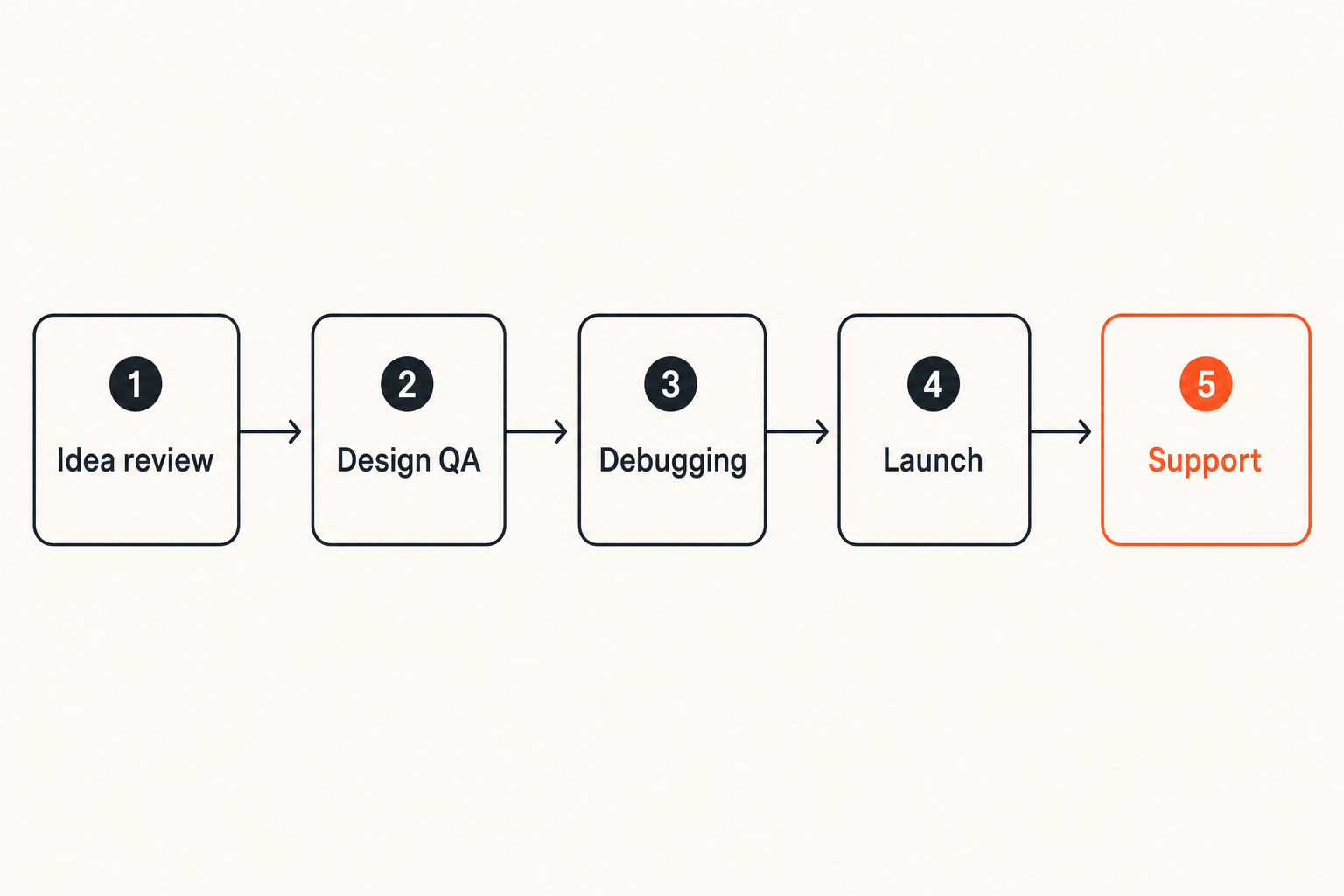
From idea review to production debugging
Screen sharing belongs across the product lifecycle, but not with the same rules everywhere.
During idea review, it helps founders and PMs test flow logic quickly. During design review, it exposes awkward states that static mockups hide. During implementation, it helps engineers pair on unfamiliar code or environment setup. During QA, it turns vague bug reports into reproducible evidence. During launch, it gives operators a fast path to diagnose customer-facing issues.
The mistake teams make is putting all of those use cases into the same meeting format. A design QA session should not run like an incident call. A customer support screen share should not grant the same permissions as an internal debugging session.
A practical workflow separates the use case before choosing the tool configuration.
The collaboration surface area
For a small product team, screen sharing touches more systems than it appears to at first:
- Code editor and local development environment
- Browser state and authenticated sessions
- Staging and production dashboards
- Analytics and event streams
- Customer support tools
- Design files and prototypes
- Issue trackers and launch checklists
- Password managers and secrets tooling
That changes the conversation. You are not just selecting a screen sharing app. You are deciding which parts of your product operation can be exposed live, who can control them, and what gets captured afterward.
For indie hackers and small teams, this matters because process debt arrives early. If every hard problem requires an improvised call, your ability to ship becomes dependent on memory and availability.
The core architecture of a useful screen sharing workflow
Session state matters more than pixels
Sharp video is nice. Low latency is nice. But the operational value comes from session state.
A session has participants, roles, permissions, artifacts, timestamps, context links, and outcomes. If your screen sharing workflow cannot answer who joined, what was shown, who controlled the session, what decision was made, and what changed afterward, it is weak as a development workflow.
Think of a screen share as a temporary shared workspace. The workspace should have a purpose and a lifecycle:
- Open the session for a specific problem.
- Confirm environment and permissions.
- Reproduce or inspect the state.
- Assign ownership for the next action.
- Close with an artifact attached to the right system.
This sounds basic. In production, basic is what keeps teams from losing half a day to re-explaining the same issue.
Remote control needs explicit ownership
Remote control is powerful because it moves collaboration from observation to action. It is also where risk enters.
If one engineer can drive another engineer's local environment, you need rules. If a support person can guide a customer through a browser, you need boundaries. If a founder is screen sharing analytics, billing, or admin tools, you need to avoid accidental exposure.
Practical rule: Remote control should be granted intentionally, revoked quickly, and scoped to the task being solved.
Ownership should be visible. The session should make it obvious who is driving, who is observing, and who is accountable for the next step. Ambiguous control creates mistakes: commands run in the wrong terminal, settings changed in the wrong account, or production data exposed to people who did not need it.
Recording and artifacts need boundaries
Recording every session feels like a safe default until it creates a privacy and storage problem. Not recording anything feels lightweight until the same bug is rediscovered three times.
The better pattern is selective capture. Record when the artifact is valuable for async review, onboarding, customer evidence, or incident analysis. Do not record when the session contains secrets, sensitive customer data, or exploratory debugging that would create more risk than value.
Useful artifacts include:
- A short clip of the reproduction path
- A screenshot with visible environment name
- A ticket link created during the session
- A decision summary in the issue tracker
- A checklist update in the launch plan
Artifacts should live where work already happens. If the recording sits in a random meeting folder, it is not part of the workflow.
Choosing tools without turning collaboration into tool sprawl
What works for small teams
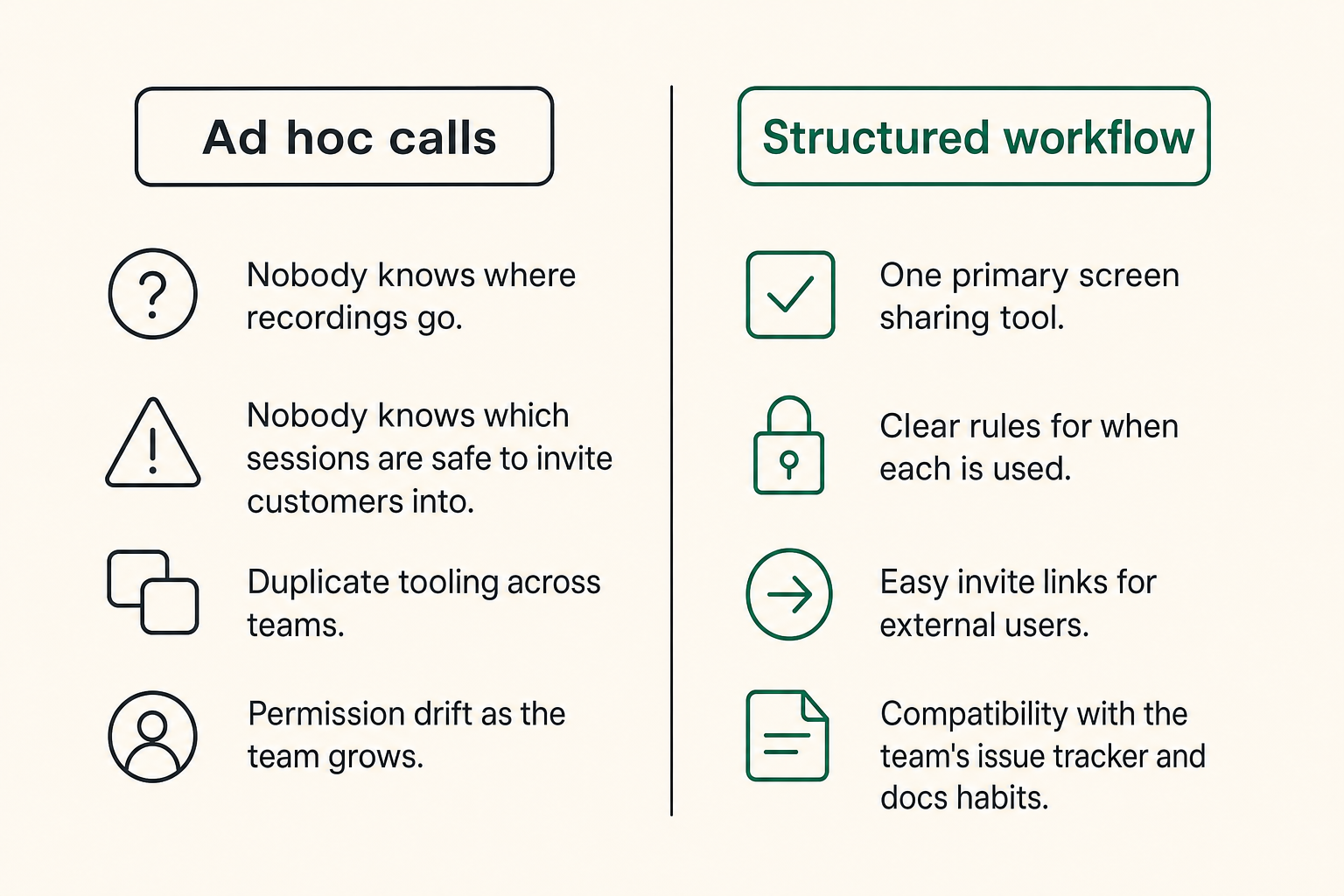
Small teams need speed, but they also need fewer places for work to disappear. The best setup is usually boring: one primary screen sharing tool for internal collaboration, one customer-safe option for support or sales, and clear rules for when each is used.
What works:
- Fast session start with minimal setup
- Browser and desktop sharing options
- Optional remote control
- Clear permission prompts
- Stable performance on average home internet
- Easy invite links for external users
- Basic recording or artifact capture
- Compatibility with the team's issue tracker and docs habits
For very small teams, the best tool is often the one people will actually use correctly. But correctly matters. If the tool encourages casual exposure of production dashboards or personal accounts, the convenience is hiding future cleanup.
What fails as the product grows
The first failure is duplicate tooling. Engineering uses one app. Sales uses another. Support uses a third. Founders use whatever is on their calendar. Nobody knows where recordings go. Nobody knows which sessions are safe to invite customers into.
The second failure is permission drift. People grant control casually because the team is small and trusted. Six months later, contractors, new hires, customers, and advisors are in the workflow. The old assumptions no longer hold.
The third failure is artifact sprawl. Screen recordings become unsearchable. Bug reproductions live in chat. Launch blockers are mentioned on calls but never added to the launch board.
Practical rule: If a screen sharing session changes product direction, fixes a bug, confirms QA, or reveals customer pain, it must leave a trace in the system of record.
Comparison table for founder teams
| Approach | What it optimizes | Where it helps | What breaks in practice |
|---|---|---|---|
| Ad hoc calls | Speed in the moment | Early founder collaboration | No artifacts, repeated context, unclear ownership |
| General video meetings | Familiarity | Team discussion and demos | Weak control model, poor handoff to tickets |
| Dedicated screen sharing workflow | Shared state and action | Debugging, QA, support, onboarding | Requires lightweight rules and discipline |
| Heavy enterprise remote access | Security and governance | Regulated or large environments | Too slow for fast product iteration |
The right answer depends on the stage of the product. A two-person team does not need enterprise ceremony. But it does need a workflow that can survive the next five hires and the first serious customer issue.
Implementation workflow for product teams
A practical setup sequence
The implementation should be simple enough to finish in an afternoon. If it requires a quarter-long rollout, it is too heavy for most startup teams.
- Map the use cases. List where screen sharing already happens: debugging, QA, support, demos, onboarding, incidents, and customer research.
- Separate internal and external sessions. Internal collaboration can allow more context. External sessions need stricter defaults and customer-safe behavior.
- Define roles. Decide who can host, who can grant control, who can record, and who can invite external participants.
- Set environment rules. Production admin panels, secrets, billing systems, and customer data need explicit handling.
- Connect artifacts to work. Decide where session notes, clips, screenshots, and decisions go.
- Create templates. Use a short session note format for bugs, QA, support, and incidents.
- Review after two weeks. Remove rules nobody follows and tighten the ones that prevent real risk.
The goal is not policy theater. The goal is fewer dropped handoffs.
The minimum policy you actually need
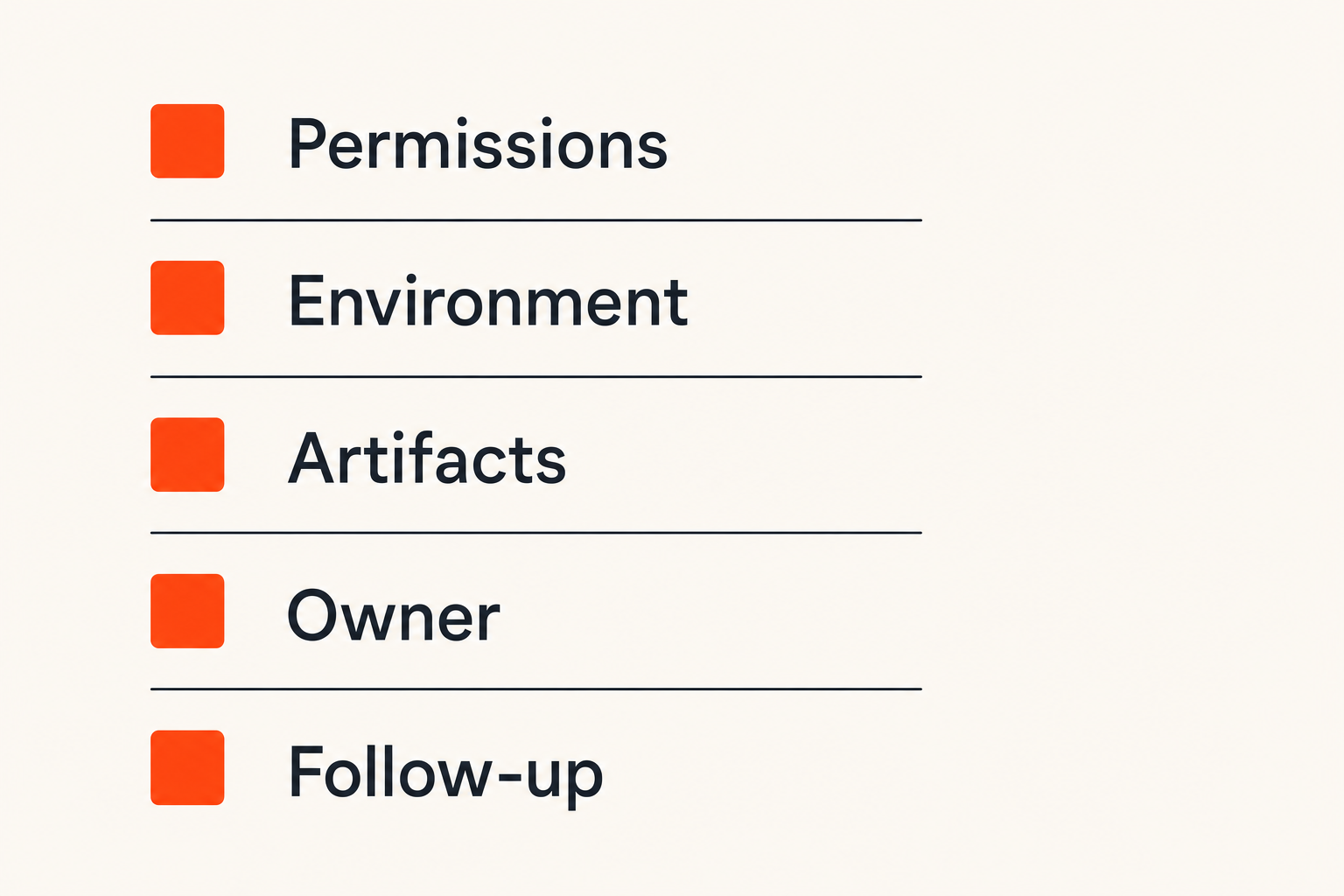
A lightweight policy can fit on one page. It should answer five questions:
- When should we use screen sharing instead of async comments?
- Who can control whose screen?
- What should never be shared or recorded?
- Where do artifacts go after the session?
- Who owns the next action when the session ends?
For a startup, this is enough. You do not need a 40-page remote collaboration manual. You need defaults that make good behavior cheaper than improvisation.
A useful session note template looks like this:
Session type: Bug reproduction / QA / Support / Incident
Environment: Local / Staging / Production
Participants:
Control granted: Yes / No / To whom
What we observed:
Decision made:
Next owner:
Ticket or launch item:
Artifact link:
This template is not glamorous. It prevents the classic problem where everyone remembers the session differently.
Security privacy and trust boundaries
Default-deny beats optimistic access
Most teams are too casual with live access because screen sharing feels temporary. Temporary does not mean harmless.
A shared screen can expose API keys, customer emails, internal metrics, private messages, browser history, financial dashboards, and unreleased product plans. Remote control can modify data, trigger deployments, or change account settings.
Default-deny does not mean paranoid. It means sensitive surfaces are closed unless they are needed. Before a session starts, close unrelated tabs, hide notifications, use test accounts where possible, and confirm whether recording is allowed.
Practical rule: Treat a live shared screen like a temporary production interface. If you would not paste it into a public issue, think before showing it.
Sensitive data handling during live sessions
Sensitive data creates two problems: exposure during the session and persistence after the session.
During the session, reduce what is visible. Use staging accounts, masked data, browser profiles, separate desktops, and notification suppression. If production data is required, state that explicitly and limit participants.
After the session, control what remains. A recording with customer data is not just a helpful artifact. It is now another object your team must store, protect, and eventually delete. Many teams create risk because they record first and think later.
For customer-facing sessions, be especially careful. Customers may share their own confidential information. Your team needs a clean way to pause, stop recording, or switch to a safer view.
Auditability without bureaucracy
Auditability is not only for big companies. A tiny team still benefits from knowing what happened during a critical debugging call.
Do not overbuild it. For most product teams, auditability can be lightweight:
- Session notes attached to the ticket
- Recording links only when needed
- Clear owner and timestamp
- Mention of whether production data was shown
- Decision summary in the launch checklist
This gives you enough traceability to understand past decisions without turning every collaboration moment into compliance theater.
How screen sharing changes engineering rituals
Pair debugging and incident response
Pair debugging is where screen sharing software development often proves its value fastest. One person has the failing state. Another has the mental model. A shared session collapses the distance between them.
The key is to avoid turning pair debugging into spectator mode. Assign roles. One person drives. One person observes and asks questions. One person, if needed, documents. Rotate control deliberately when the work changes.
For incidents, the stakes are higher. Use a dedicated bridge, limit participants, and keep the session focused on observation and mitigation. Do not invite the whole company to watch a production dashboard. More viewers usually means more interruptions.
What works is a tight loop: reproduce, inspect, decide, act, document. What fails is live archaeology with ten people watching logs scroll by.
Design QA and onboarding
Design QA benefits from screen sharing because many product issues are interaction issues. A button is technically present but visually buried. A loading state exists but appears too late. A mobile layout works in the mockup but not in the browser.
Live review lets designers, engineers, and PMs inspect the same product state. The important part is to capture decisions immediately. If a designer says this state is acceptable for launch, that should be reflected in the QA checklist. If it is not acceptable, it needs an owner.
Onboarding is similar. New hires and contractors learn faster when they can watch real workflows, but passive watching is not enough. Give them control after the first pass. Let them run the local app, inspect the logs, trigger the test case, and explain what they see.
Customer support as product discovery
Customer support sessions are not just support. They are product discovery with evidence.
When a customer shares their screen and struggles with setup, pricing, permissions, or onboarding, the team gets signal that surveys often miss. But that signal is only useful if it makes its way back into product work.
A support screen share should produce one of three outcomes:
- The issue is solved and documented for future support.
- The issue becomes a bug with reproduction steps.
- The issue becomes product feedback with evidence.
Anything else is a nice conversation that evaporates.
Metrics that tell you if the workflow is working
Track time-to-context not meeting volume
Do not measure screen sharing success by how many sessions the team runs. More sessions can mean better collaboration, or it can mean your product, docs, and tickets are unclear.
The metric that matters is time-to-context: how long it takes the right person to understand the state well enough to act. Screen sharing should reduce that time for complex, visual, or environment-dependent work.
Useful questions:
- Did the session reduce back-and-forth comments?
- Did it create a usable artifact?
- Did it move a ticket to a clear next state?
- Did it prevent a repeated explanation later?
- Did it reveal a product issue that was not obvious from text?
If the answer is usually no, the team may be using screen sharing as a meeting reflex.
Signals worth reviewing monthly
Once a month, review a small sample of screen sharing sessions or artifacts. You are looking for workflow health, not surveillance.
Good signals include:
- Bugs with clearer reproduction steps
- Faster onboarding for new contributors
- Fewer repeated support explanations
- More launch blockers captured before release
- Shorter debugging loops on environment-specific issues
- Better handoff between support, product, and engineering
Bad signals include:
- Long calls with no ticket updates
- Recordings nobody watches
- Sessions used to compensate for unclear requirements
- Frequent exposure of sensitive data
- The same issue explained live multiple times
The practical question is whether shared screens are improving the shipping system or becoming a parallel process outside it.
Common failure modes in screen sharing software development
The meeting becomes the process
This is the most common failure. The team gets used to solving everything live. Requirements are unclear? Call. Bug report is vague? Call. QA is messy? Call. Customer feedback is confusing? Call.
At first, it feels fast. Then the team realizes nothing is written down, every decision requires the same people, and async contributors are blocked.
Screen sharing should be a bridge to clarity, not a substitute for it. If the same topic needs repeated live explanation, fix the underlying artifact: the spec, the ticket, the docs, the test, or the product itself.
Nobody owns the follow-up
A session without ownership creates false closure. Everyone leaves feeling aligned, but the work does not move.
Every screen sharing session that affects product delivery should end with one owner and one next action. Not three possible owners. Not a general sense that engineering has it. One owner.
Use this closing script:
What did we decide?
What is the next action?
Who owns it?
Where is it tracked?
Do we need an artifact from this session?
This takes one minute and saves hours of cleanup.
Remote control turns into risk
Remote control can make collaboration feel magical. It can also create avoidable incidents.
Common problems include commands run in the wrong shell, database changes made through the wrong account, customer settings modified without approval, or credentials exposed while someone else is driving.
The fix is not to ban remote control. The fix is to create safer defaults. Use test environments. Confirm the active account. Keep production sessions read-only unless there is a clear incident process. Revoke control when the task changes.
The mistake teams make is assuming trust replaces workflow. Trust helps people collaborate. Workflow keeps trusted people from making expensive mistakes.
Product-fit shipping faster without pretending collaboration is magic
How sh1pt readers should frame the decision
If you are building toward launch, screen sharing software development should be evaluated like any other part of the shipping stack. Does it reduce cycle time? Does it improve quality? Does it preserve context? Does it help the team make better product decisions?
For founders, the best workflow is the one that keeps momentum without hiding problems. A screen share can help you debug a broken onboarding step before launch. It can help you watch a customer fail to understand pricing. It can help a contractor get productive in a new repo. But it should always feed the launch system, not replace it.
Think in terms of leverage:
- Use live sharing for high-context problems.
- Use async docs for stable knowledge.
- Use tickets for ownership.
- Use launch checklists for release readiness.
- Use recordings selectively when they create reusable context.
That is how screen sharing becomes part of shipping instead of just another meeting habit.
Where Pairux experience fits
This guest contribution comes from the team at pairux.com, where the focus is practical remote collaboration: shared screens, remote control, and helping distributed teams work through real product problems without turning every issue into a meeting marathon.
The big lesson is simple. The tool matters, but the workflow matters more. Teams that define roles, permissions, artifacts, and follow-up get compounding value. Teams that just add another call link get temporary relief and long-term process debt.
Screen sharing is best when it is treated as an operational capability. It should help a team move from unclear state to clear action.
Try sh1pt.com
If you are turning product work into a real launch, sh1pt.com helps you think through the shipping strategy, product process, and launch mechanics behind the build. For founders and product teams using screen sharing software development to move faster, the next step is making sure that collaboration turns into shipped work. Try sh1pt.com.