
Threat intelligence product management looks simple from the outside: collect indicators, enrich them, show a dashboard, ship alerts. Then the first pilot starts and the product gets quiet in exactly the wrong way. Analysts do not trust the signal. PMs cannot explain the outcome. Founders keep adding integrations because every buyer asks for a different one.
Teams think the problem is threat data. The real problem is decision design.
If you are building a security product in 2026, the practical question is not “how do we get more intelligence?” It is “how do we turn uncertain, noisy, time-sensitive signals into a workflow someone will pay to run every week?” That changes the conversation. Threat intelligence product management becomes less about feeds and more about architecture, ownership, launch scope, and proof.
This guide is written for builders: indie hackers exploring security tooling, startup founders validating a SOC product, PMs turning a prototype into a launch, and operators who need to explain why a feature matters. It treats threat intelligence as a shipping problem, not a glossary term.
Table of contents
- Why threat intelligence product management is a shipping problem
- Threat intelligence product management starts with user jobs
- Design the intelligence workflow before the feature
- What to build first and what to defer
- Threat intelligence product management needs a signal model
- Metrics that prove the product is useful
- Common failure modes in threat intelligence product management
- Launching and iterating with security buyers
- Where sh1pt.com fits in the shipping system
- Closing checklist for threat intelligence product management
Why threat intelligence product management is a shipping problem
Security founders often start with a strong technical insight: a better enrichment method, a cleaner way to cluster infrastructure, a fresh source of abuse data, or an AI layer that summarizes open-source reporting. Those can be useful. They are not a product by themselves.
A product exists when a customer can move from uncertainty to action with less effort than before. In threat intelligence, that action might be blocking an IP, opening an investigation, tagging an exposure, escalating to incident response, closing a false positive, or briefing leadership. The value is not the indicator. The value is the decision the indicator supports.
From feeds to decisions
A feed says, “Here is a domain.” A workflow says, “This domain is newly observed, related to infrastructure your company touched yesterday, seen by two independent sources, and should be reviewed by the cloud security owner before 4 p.m.”
That second sentence is a product requirement. It implies identity, context, confidence, ownership, priority, and time. It also implies that your product has to survive messy production realities: partial data, stale integrations, duplicate entities, different customer environments, and human judgment.
Practical rule: If the output does not change a customer decision, it is not threat intelligence product value. It is content.
Why product teams should care
Threat intelligence products are easy to demo and hard to operationalize. A dashboard with colorful nodes can look impressive in a launch video. In production, the buyer asks harder questions:
- Who owns this alert?
- Why should we trust this source?
- What should the analyst do next?
- How do we know this is better than our current queue?
- What happens when the signal is wrong?
The mistake teams make is treating those as support questions after launch. They are product architecture questions before launch. If you do not design for them, your roadmap becomes a pile of custom requests.
Threat intelligence product management starts with user jobs
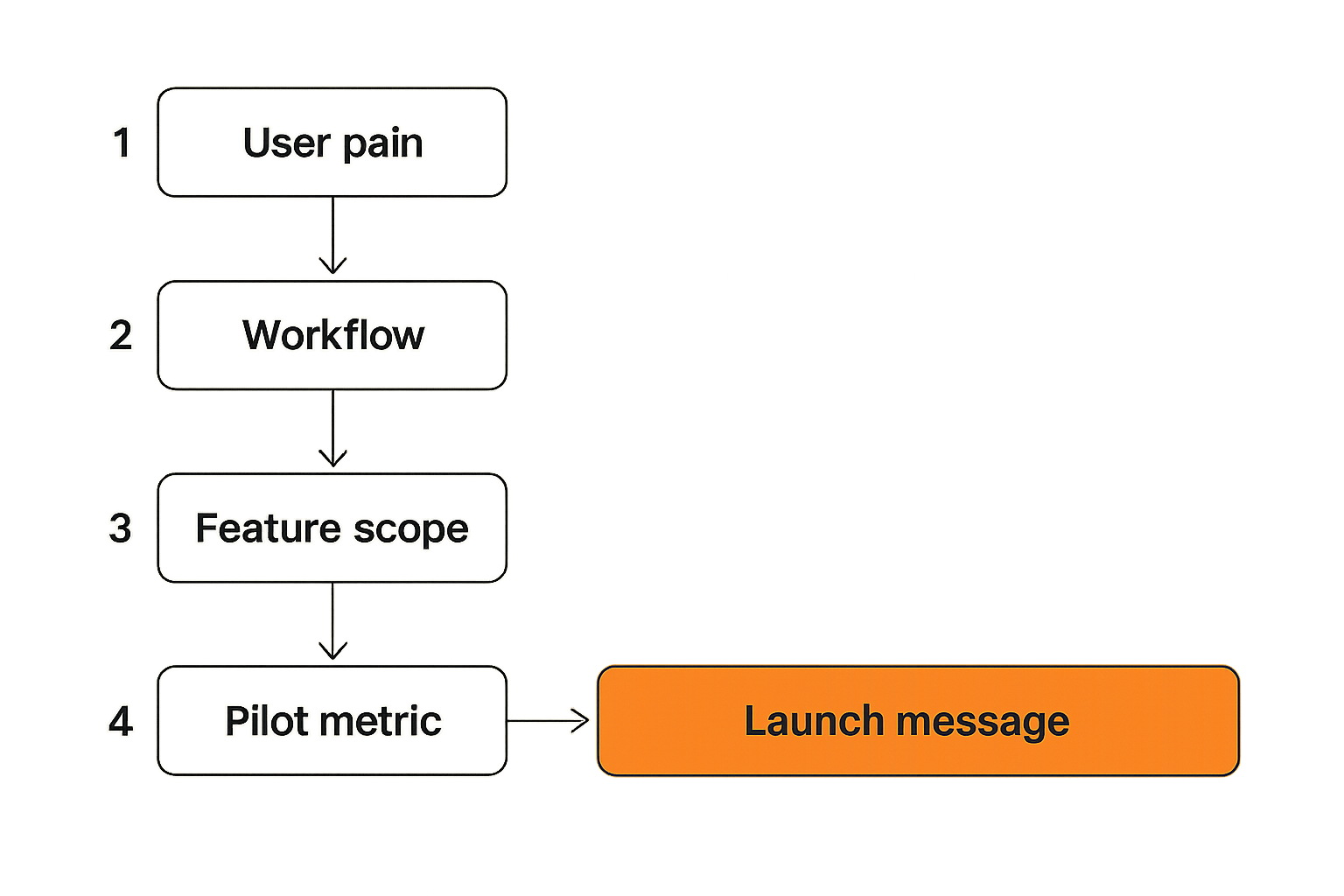
A useful way to think about it is jobs before objects. Do not start by listing indicators, feeds, graphs, and reports. Start by listing the jobs your user must complete under pressure.
For security operations teams, intelligence is rarely consumed in a calm research mode. It arrives while alerts are already piling up, while executives are asking about a new campaign, or while an incident channel is moving faster than documentation.
SOC analyst jobs
Common analyst jobs include:
- Triage an alert and decide whether it is worth investigating.
- Enrich an observable without switching between five tools.
- Understand whether a threat is relevant to the organization.
- Explain a decision to a manager or incident lead.
- Close the loop by blocking, escalating, or documenting.
Each job has a different product shape. Triage needs speed and prioritization. Enrichment needs source clarity and context. Relevance needs customer-specific mapping. Explanation needs evidence and auditability. Closure needs integration into ticketing, SIEM, SOAR, EDR, firewall, or cloud tooling.
If your product treats all of these as “show more intelligence,” it will feel broad but shallow.
Founder and PM translation
For founders and PMs, the user job becomes a scope control tool. Instead of saying, “We support threat intelligence,” say, “We help a tier-one analyst decide whether a suspicious domain is relevant in under three minutes.” That is narrower, but it is also shippable.
Here is a simple translation table:
| User phrase | Product interpretation | Shipping implication |
|---|---|---|
| “We need better context.” | The user lacks relevance and confidence. | Add asset mapping, source labels, and evidence trails. |
| “We have too many alerts.” | Prioritization is failing. | Build suppression, scoring, dedupe, and thresholds. |
| “Analysts do not trust it.” | The product cannot explain itself. | Expose source, timestamp, method, and reason codes. |
| “We need integrations.” | The workflow ends outside your UI. | Define the first two systems of record, not ten. |
| “Leadership wants reporting.” | Decisions need a narrative. | Capture outcomes and generate summaries from actions. |
The team at threatcrush.com works on this problem from the SOC side: reducing noise, connecting intelligence to response, and making security workflows easier to operationalize.
Design the intelligence workflow before the feature
Most weak security launches have the same smell: the UI exists before the workflow does. The product can display information, but it cannot explain what state an item is in, who owns it, or why it moved.
The practical question is: what happens from signal arrival to final disposition?
Intake, enrichment, and scoring
A basic intelligence workflow has five stages:
- Intake: collect indicators, reports, detections, customer telemetry, or external observations.
- Normalization: convert messy source formats into consistent entities.
- Enrichment: add context such as source, first seen, related infrastructure, malware family, asset exposure, or business unit.
- Scoring: calculate relevance and confidence using transparent rules.
- Disposition: assign an outcome: ignore, monitor, investigate, block, escalate, or report.
This sequence sounds obvious. What breaks in practice is state. Teams store the data but not the decision history. Then they cannot answer whether the product reduced repeat work, improved accuracy, or caused bad escalations.
Practical rule: Store the decision, the reason, and the actor. Threat intelligence without disposition history cannot improve as a product.
Ownership and handoff
Threat intelligence crosses boundaries. An analyst might identify the signal, but a firewall team blocks it. A cloud team owns the exposed asset. A product security team handles vulnerable software. Incident response owns confirmed compromise.
Your product needs a handoff model:
- Who receives the work?
- What evidence travels with it?
- What status comes back?
- What happens if nobody acts?
- What is visible to the original analyst?
This is where many products become sticky or disposable. A tool that helps a user complete the handoff becomes part of the operating system. A tool that only says “bad thing exists” becomes another tab.
What to build first and what to defer
A threat intelligence MVP should not try to look like a mature platform. It should make one workflow measurably better for one type of buyer. That is not a smaller ambition. It is a better launch strategy.
MVP surfaces
For most early products, the first version needs four surfaces:
- Queue: a place where new items arrive with priority and status.
- Detail view: evidence, enrichment, source confidence, and recommended action.
- Action path: a way to assign, export, block, escalate, or create a ticket.
- Outcome log: the final disposition and reason.
This is enough to run a pilot if the data is useful. It is also enough to learn. You can see which signals are ignored, which recommendations are trusted, and where users leave the workflow.
A practical MVP configuration might look like this:
signal_model:
  entity_types: [domain, ip, url, file_hash]
  required_fields: [source, first_seen, confidence, reason]
  customer_context: [asset_match, user_activity, business_unit]
workflow:
  states: [new, enriched, assigned, investigating, actioned, closed]
  dispositions: [false_positive, monitor, blocked, escalated, accepted_risk]
integrations:
  ticketing: jira
  detection: sentinel
  messaging: slack
The exact tools vary. The structure matters more than the vendor names.
Features that usually wait
The first release usually does not need:
- A full graph explorer.
- Every commercial feed integration.
- Custom dashboards for every persona.
- Automated blocking with no review path.
- AI summaries that cannot cite evidence.
- Multi-tenant role complexity before pilots prove the workflow.
These may become important later. Early on, they often hide the real question: does anyone trust the product enough to act?
Practical rule: Defer features that make the product look mature but do not increase decision quality, workflow completion, or buyer trust.
Threat intelligence product management needs a signal model
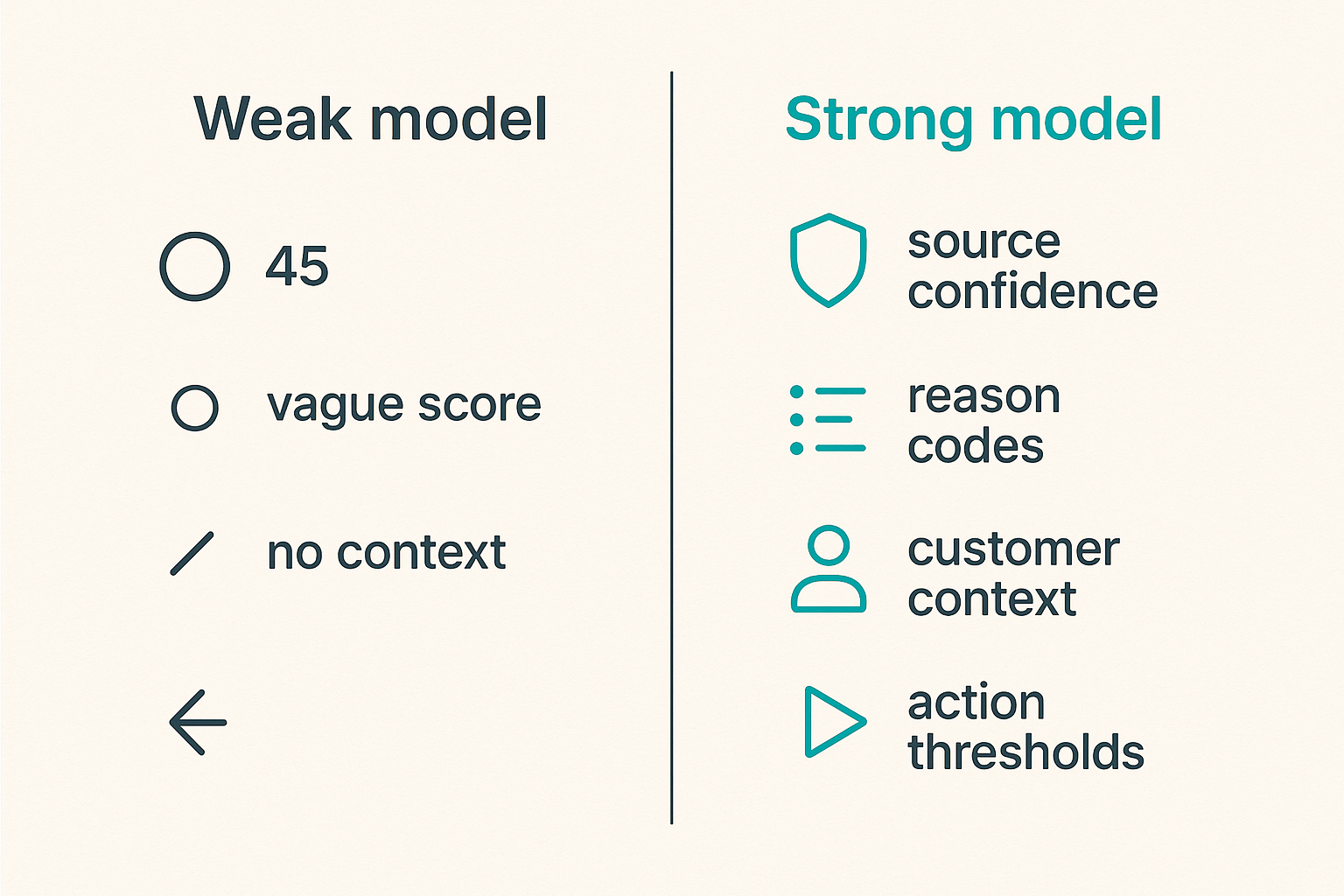
Threat intelligence product management fails when all signals are treated equally. A fresh indicator from a trusted source tied to a customer asset is not the same as an old indicator from an unknown list with no local evidence.
Your product needs a signal model that is boring, explicit, and explainable.
Source confidence
Source confidence is not a vibe. It should be represented in the product. At minimum, capture:
- Source name or category.
- Collection method, when safe to expose.
- First seen and last seen.
- Confidence assigned by the source.
- Confidence assigned by your system.
- Corroboration from independent sources.
- Known failure patterns.
Avoid pretending confidence is precision. A score of 87 can look scientific while being mostly arbitrary. In many products, labels such as low, medium, high, and confirmed are clearer if the reason codes are visible.
Example reason codes:
matched_customer_assetseen_in_recent_campaignsource_high_confidenceonly_single_sourceindicator_staleno_customer_exposure
Reason codes help analysts trust the system. They also help PMs debug adoption. If users reject many “high” items with only_single_source, your scoring model is misweighted.
Action thresholds
A signal model should map to action. Otherwise, it becomes decoration.
| Signal condition | Suggested state | Product behavior |
|---|---|---|
| High confidence and customer exposure | Investigate now | Assign owner, require disposition, notify channel. |
| Medium confidence and no exposure | Monitor | Keep visible, suppress urgent alerting. |
| Low confidence and stale | Archive | Hide from queue, keep searchable. |
| Confirmed malicious and approved control path | Block | Create change record or automation task. |
| Executive-relevant campaign | Report | Generate brief with evidence and local relevance. |
This does not mean every customer must use your default thresholds. It means your product ships with a point of view. Buyers can tune a system faster than they can invent one.
Metrics that prove the product is useful
Security buyers do not need another chart that proves the internet is dangerous. They need proof that your product improves their operation. That proof should be designed into the product before launch.
Operational metrics
Operational metrics show whether the workflow is working:
- Time from signal intake to first review.
- Time from review to disposition.
- Percentage of signals with an owner.
- Percentage of signals closed without action.
- Percentage escalated to incident response.
- Repeat indicators suppressed or deduplicated.
- Manual enrichment steps avoided.
These metrics are useful because they connect to cost and capacity. If your product reduces manual enrichment or shortens triage, the buyer can feel it in the queue.
Product metrics
Product metrics show whether users are adopting the product:
- Active analysts per week.
- Signals reviewed per analyst.
- Actions taken from the detail view.
- Recommendation acceptance rate.
- Override rate by reason code.
- Integration usage by workflow stage.
- Search-to-action conversion.
Be careful with vanity metrics. More alerts processed is not always good. More sources connected is not always good. More dashboard views may mean confusion, not value.
The mistake teams make is measuring platform activity instead of decision quality. A better product may create fewer alerts, fewer clicks, and fewer escalations.
Common failure modes in threat intelligence product management
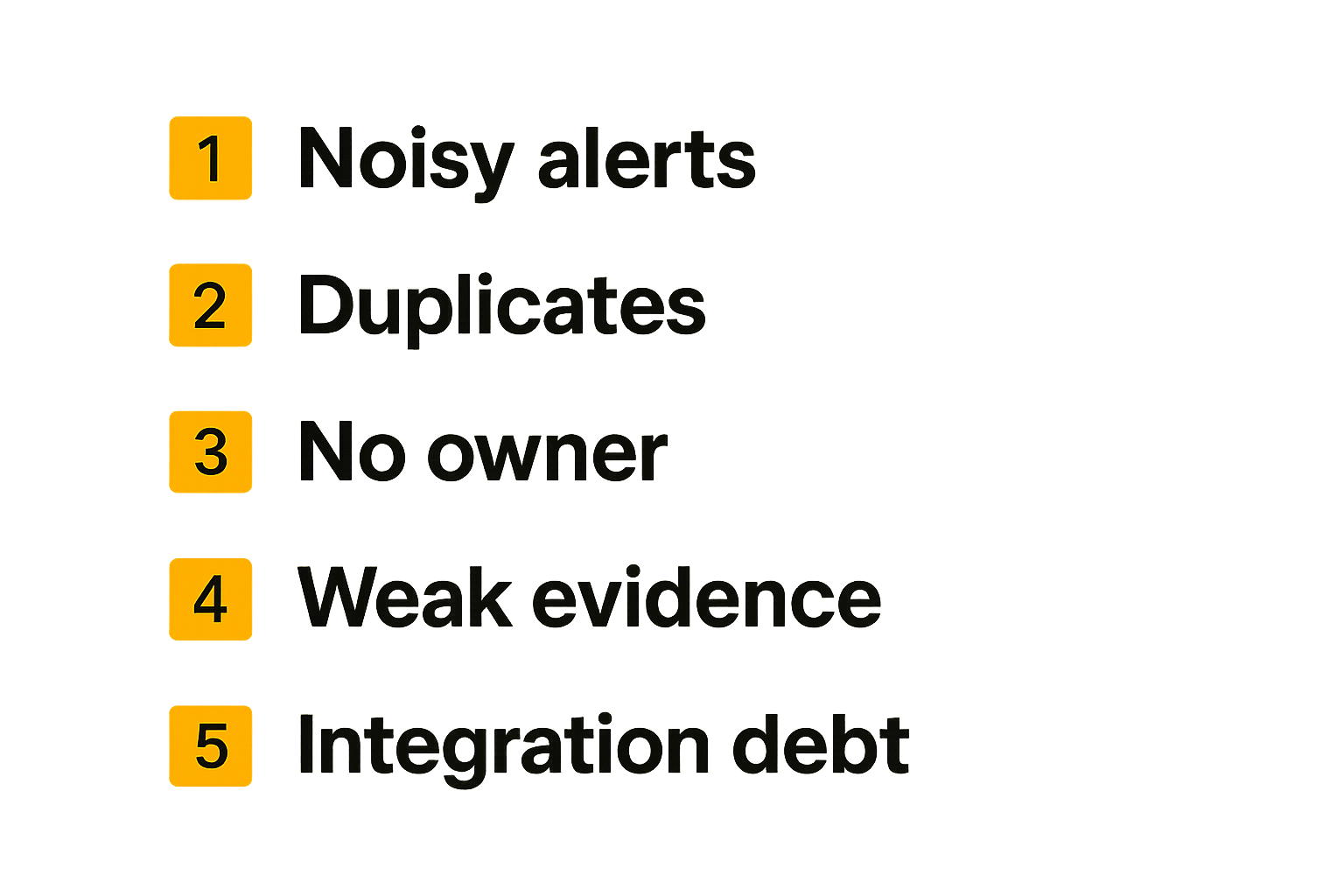
Common failure modes in threat intelligence product management are predictable. They usually come from shipping the visible part of the product while ignoring the operational contract underneath it.
Alert-shaped products
An alert-shaped product takes every signal and pushes it into a queue. It feels productive during development because there is always something to show. It fails in production because analysts already have queues.
Symptoms include:
- Every source creates a new finding.
- Duplicates appear across feeds.
- Severity is copied from the source with no customer context.
- Analysts cannot bulk close or suppress patterns.
- The product celebrates volume.
What works instead is a decision-shaped product. It asks: should this item interrupt someone, sit in a watchlist, attach to an existing case, or disappear until more evidence appears?
Integration debt
Security teams ask for integrations because their work lives across tools. Founders hear that and build connectors. The problem is not integrations; it is unmanaged integration debt.
What breaks in practice:
- Different integrations represent status differently.
- Ticket updates do not sync back.
- Automated actions happen without evidence trails.
- Customers expect bidirectional sync before the core workflow is stable.
- Each new connector becomes a support surface.
A better approach is to define integration roles:
- Source integrations bring signals in.
- Context integrations enrich signals.
- Action integrations send work out.
- Record integrations preserve outcomes.
Build one or two in each category only when the workflow demands it. Do not let the integration page become your product strategy.
Launching and iterating with security buyers
Security buyers are skeptical for good reasons. They have seen impressive demos become noisy tools. They have inherited abandoned platforms. They have been burned by automation that made cleanup harder.
That does not mean they will not try new products. It means your launch has to reduce uncertainty quickly.
Pilot design
A strong pilot is narrow and operational. Define it like this:
- Pick one workflow. Example: suspicious domain triage for cloud-exposed assets.
- Pick one user group. Example: two SOC analysts and one security engineering owner.
- Pick one success window. Example: four weeks, with weekly review.
- Pick three metrics. Example: triage time, accepted recommendations, manual enrichment steps avoided.
- Pick an exit decision. Example: expand, pause, or reject based on observed workflow value.
This makes the pilot easier to sell and easier to learn from. It also protects your roadmap from anecdotal feedback. One executive request should not outweigh twenty analyst actions.
Feedback loops
Feedback has to be captured at the moment of decision. A monthly call where users vaguely remember what happened is weak data.
Useful feedback mechanisms include:
- “Why did you close this?” required on disposition.
- One-click labels for bad source, stale indicator, no relevance, duplicate, already known.
- Comment capture on recommendation overrides.
- Weekly review of closed items, not just open issues.
- Product analytics tied to workflow states.
This is where PM discipline matters. Do not ask, “What features do you want?” Ask, “Where did the workflow fail?” That changes the conversation from preference to evidence.
Where sh1pt.com fits in the shipping system
Security products are still products. They need positioning, launch sequencing, feedback loops, and a way to turn messy building into visible progress. For founders and PMs working on threat intelligence tooling, the hard part is often translating operational complexity into a launch plan that buyers can understand.
Turn workflows into launch assets
A security workflow can become strong launch material if it is specific:
- “Reduce suspicious domain triage time” is clearer than “AI-powered threat intelligence.”
- “Show why a signal matters to your assets” is clearer than “contextual enrichment.”
- “Assign and close every high-confidence item” is clearer than “centralized visibility.”
This matters because buyers do not buy architecture diagrams. They buy a path from pain to action. Your launch page, demo, onboarding, and pilot plan should all reflect the same workflow.
For a team using sh1pt.com as part of its launch process, the useful move is to treat each workflow decision as a shipping artifact: positioning note, demo script, pilot checklist, objection handling, changelog entry, and customer feedback prompt.
Keep scope honest
Launch systems are valuable because they force tradeoffs. Threat intelligence products are especially prone to scope creep because every customer environment is different. Without a shipping system, “one more integration” and “one more enrichment source” can delay the learning you actually need.
A simple scope filter:
- Does this improve the pilot workflow?
- Does it increase trust in the recommendation?
- Does it reduce analyst effort?
- Does it help the buyer prove value internally?
- Can we support it without custom operations?
If the answer is no, it probably belongs after launch. Shipping is not about doing less forever. It is about learning in the right order.
Closing checklist for threat intelligence product management
Threat intelligence product management is the discipline of turning uncertain signals into repeatable customer decisions. That means the product is not the feed, the dashboard, or the model. The product is the workflow that helps an operator decide what to do next and prove why.
What works
Use this checklist before you launch:
- Define one user job tightly.
- Map signal intake to final disposition.
- Store source, confidence, reason, owner, action, and outcome.
- Make recommendations explainable.
- Design thresholds that map to action.
- Build fewer integrations with clearer roles.
- Measure decision quality, not content volume.
- Run pilots with explicit success criteria.
- Capture feedback at the moment of analyst judgment.
What fails
Avoid these patterns:
- Shipping a dashboard with no workflow state.
- Treating all intelligence sources as equally trusted.
- Creating alerts without ownership.
- Hiding scoring logic behind vague AI language.
- Letting integration requests define the roadmap.
- Measuring feed volume as product value.
- Automating blocking before trust and review paths exist.
The practical question is not whether threat intelligence matters. It does. The practical question is whether your product turns it into action better than the customer’s current process. If you can answer that with a narrow workflow, visible proof, and a launch plan, threat intelligence product management becomes a shipping advantage instead of a feature swamp.
Try sh1pt.com
Build a clearer path from product idea to launch plan. Try sh1pt.com to organize your shipping workflow, sharpen positioning, and move from security product concept to market.