
Most teams do not fail at building and launching apps because they cannot write code. They fail because the product, launch, feedback, and decision loops are disconnected.
The app gets built in one place. The launch plan lives in a doc. Customer feedback sits in DMs. Analytics arrive late. Support questions surprise the team. By the time anyone can see what happened, the launch window has already passed.
Teams think the problem is execution speed. The real problem is operating design.
Building and launching apps in 2026 is not a checklist problem. It is an architecture problem: how you turn market signals into scope, scope into a shippable product, product usage into learning, and learning into the next release without losing momentum.
Table of contents
- Building and launching apps is an operating system, not a checklist
- Start with the market signal, not the feature list
- Design the app around a launchable wedge
- Build the product development workflow before you build more product
- Engineer for launch operations
- Create the launch asset system
- Build the go to market loop before launch day
- Measure learning, not vanity
- What breaks in practice
- A practical implementation sequence for building and launching apps
- Where sh1pt.com fits
Building and launching apps is an operating system, not a checklist

The mistake teams make is treating the app and the launch as separate projects. Engineering asks, “When is the feature done?” Marketing asks, “When can we announce it?” Support asks, “What do we tell users?” The founder asks, “Why are we not learning faster?”
That separation creates handoff debt. Every handoff adds ambiguity: what changed, who it is for, how it should be explained, what success looks like, and what happens next.
A useful way to think about it is this: building and launching apps is a system for reducing uncertainty in public. The product is one part of that system. The surrounding workflow decides whether the product teaches you anything.
Why launches feel random
Launches feel random when teams only prepare the visible parts: landing page, announcement post, demo video, maybe an email. Those assets matter, but they are not the launch system.
What breaks in practice is the invisible layer:
- no clear owner for incoming feedback
- no prewritten rules for which bugs block rollout
- no shared definition of activation
- no plan for failed payments, login issues, or confused users
- no way to separate useful signal from launch-day noise
- no cadence for deciding the next product move
When those pieces are missing, launch day becomes performance theater. You get attention, but not a clean read on the business.
The architecture view
The practical question is not “How do we launch?” It is “What workflow converts attention into decisions?”
A launch architecture has five connected layers:
| Layer | What it answers | Common failure |
|---|---|---|
| Signal | Who has the problem and why now? | Building from preference, not demand |
| Scope | What is the smallest credible promise? | Cutting features but keeping vague positioning |
| Product | Can a user complete the core job? | Shipping screens without a complete path |
| Launch | Can the right people understand and try it? | Driving traffic before the offer is clear |
| Learning | What decision will the data support? | Measuring activity without changing behavior |
That changes the conversation. You stop asking whether the app is “ready” in the abstract. You ask whether the system is ready to produce a useful decision.
The minimum viable operating system
You do not need a huge process. Indie hackers and small teams should not copy enterprise release management. But you do need a minimum operating system.
At minimum, define:
- the user segment you are testing
- the specific job the app helps them do
- the first successful action inside the app
- the launch channel and expected conversation
- the response owner for bugs, objections, and sales questions
- the metric that decides whether you continue, adjust, or stop
Practical rule: If a launch cannot change a product decision, it is not a launch. It is a broadcast.
Start with the market signal, not the feature list
Most app plans start with features because features feel concrete. You can design them, estimate them, assign them, and ship them. Market signals are messier.
But signal comes first because it defines the shape of the product. Without it, scope decisions become taste battles.
Separate demand signals from opinions
An opinion sounds like this: “I would use that.” A demand signal sounds like this: “I tried to solve this last week, paid for something clumsy, and still had to use a spreadsheet.”
For early products, useful signals often show up as:
- repeated manual workarounds
- spending on imperfect alternatives
- public complaints in communities
- internal tools people rebuild at multiple companies
- painful migration or switching moments
- high-friction workflows with clear economic value
The mistake teams make is collecting compliments and calling it validation. Compliments are cheap. Switching behavior is expensive.
Define the job and the switching event
Before you build, write down the job in plain language:
When [situation happens], [user type] needs to [job],
because [cost of not solving it].
They currently use [alternative], but switch when [trigger].
Example:
When a solo founder has a working prototype, they need to collect payments,
explain the value, onboard early users, and see where users drop off,
because unclear launch feedback wastes the first traffic spike.
They currently use a landing page, Stripe, spreadsheets, and DMs,
but switch when support and analytics become too scattered.
The switching event matters. People do not adopt apps because your roadmap is elegant. They adopt when their current workflow becomes painful enough.
Turn research into launch constraints
Research is only useful if it constrains the build. If customer interviews do not remove features, sharpen copy, change onboarding, or alter pricing, they are just founder therapy.
Convert research into constraints like:
- “The first session must create a useful output in under five minutes.”
- “The product must work without inviting a team member.”
- “The pricing page must explain the difference from spreadsheets.”
- “The launch demo must show the before-and-after workflow, not a feature tour.”
Practical rule: Research should make the product smaller, sharper, and easier to explain. If it only expands the roadmap, you are probably collecting wishes.
Design the app around a launchable wedge
A launchable wedge is the smallest version of the app that can make a specific audience say, “This solves the problem I have right now.” It is not the smallest codebase. It is the smallest credible promise.
What a wedge is
A wedge has three properties:
- A narrow user.
- A painful job.
- A complete path to value.
For example, “project management for everyone” is not a wedge. “A weekly shipping board for solo SaaS founders who need to turn customer feedback into a release plan” is closer.
The wedge gives you leverage. It makes copy easier, onboarding shorter, support more predictable, and feedback more comparable.
Cut scope without cutting the promise
Bad scope cuts remove the thing users came for. Good scope cuts remove everything that is not required to experience the core promise.
| Decision | Bad cut | Better cut |
|---|---|---|
| Collaboration | Remove sharing entirely | Allow read-only share links before full roles |
| Analytics | Remove usage tracking | Track only activation, retention, and conversion events |
| Onboarding | Skip setup help | Replace custom setup with templates |
| Integrations | Build every integration | Start with CSV import and one high-demand integration |
| Automation | Promise full autopilot | Provide suggested next actions with manual approval |
This is where many MVPs go wrong. They are minimal, but not viable. They reduce engineering work while leaving the user with an incomplete workflow.
What fails when the wedge is vague
When the wedge is vague, everything downstream becomes expensive:
- the landing page has too many audiences
- the product has too many first-run paths
- pricing has no obvious anchor
- user feedback contradicts itself
- the roadmap becomes a collection of edge cases
A vague wedge also makes launch metrics misleading. You may get signups from curiosity, but you cannot tell whether the app is failing because the product is weak, the audience is wrong, or the promise is unclear.
Build the product development workflow before you build more product
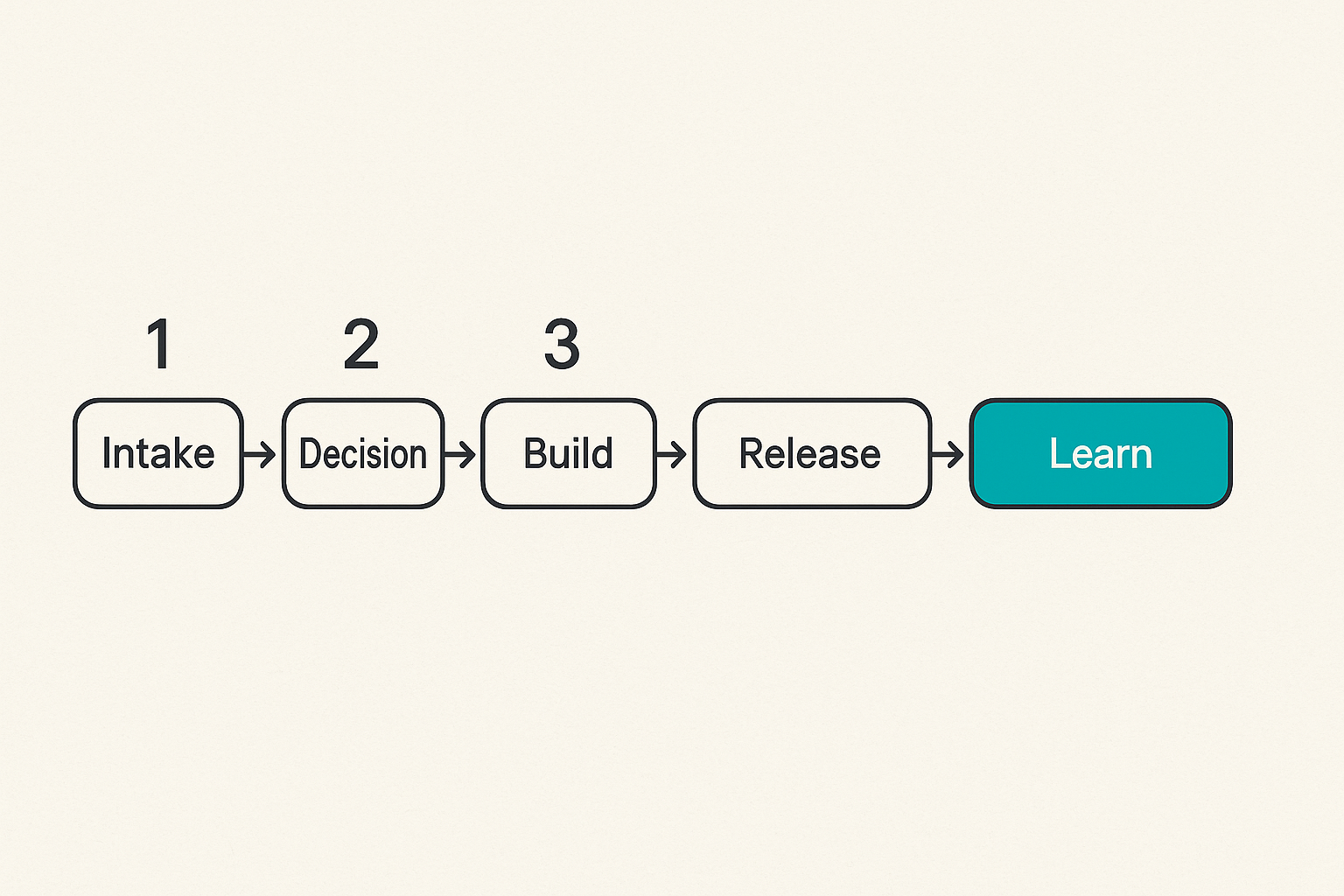
The product development workflow is the internal machine that keeps shipping from becoming random. It does not need to be heavy. It does need to be explicit.
If you want a deeper version of that operating model, sh1pt has a practical guide to building a product development workflow that connects signals, releases, feedback, and decisions.
Intake, decision, build, release, learn
A simple workflow has five states:
- Intake: capture bugs, requests, objections, sales notes, and usage patterns.
- Decision: choose what matters now and what to ignore.
- Build: implement the smallest coherent change.
- Release: ship with notes, migration rules, and support context.
- Learn: compare expected behavior against actual behavior.
The important part is not the tool. It can be Linear, GitHub Issues, Notion, Trello, a spreadsheet, or a text file. The important part is that every item has a path to either decision or deletion.
Practical rule: A backlog is not a strategy. If items enter faster than decisions leave, the backlog becomes a graveyard with search.
Ownership beats status updates
Status updates are often a substitute for ownership. A better system names owners for decisions, not just tasks.
For each launch-critical area, assign one owner:
- product scope
- technical readiness
- onboarding
- analytics
- launch messaging
- support and feedback triage
- pricing and conversion
In a solo project, the owner may always be you. Still write it down. It forces you to switch modes deliberately instead of letting the loudest problem take over the day.
A simple release cadence
Early teams benefit from a predictable cadence because it lowers decision friction. For example:
release_cadence:
  monday: review signals and pick release target
  tuesday_to_thursday: build and test
  friday: ship, write release notes, review metrics
  daily: triage blockers and customer feedback
launch_readiness:
  activation_event_defined: true
  support_owner_assigned: true
  rollback_plan_written: true
  pricing_copy_reviewed: true
The exact cadence is less important than the contract. Everyone knows when decisions happen and what evidence is required.
Related reading from our network: SaaS teams making infrastructure decisions face similar workflow tradeoffs around cost, integration, and operational fit in this guide to cloud computing software.
Engineer for launch operations
The UI is not the whole app. In production, users encounter account creation, billing, email delivery, permissions, errors, limits, invoices, password resets, loading states, and support paths.
The mistake teams make is engineering for the demo instead of the launch environment.
Accounts, billing, analytics, and support
Before launch, define the operational skeleton:
- How does a user create an account?
- What happens if email verification fails?
- Can a user invite someone else?
- What plan are they on by default?
- What happens when payment fails?
- Where do support questions go?
- How do you identify the user reporting an issue?
- What data is required to debug without asking five follow-up questions?
Many launches break in these boring areas. The core feature works, but the user cannot complete the surrounding workflow.
Instrument the critical path
Do not instrument everything first. Instrument the critical path.
For an early app, that usually means:
- visitor lands on page
- visitor starts signup
- user completes account creation
- user reaches activation moment
- user returns within a meaningful interval
- user invites, pays, exports, publishes, or shares, depending on the product
Name events in a way humans can understand:
signup_started
account_created
workspace_created
first_project_published
billing_checkout_started
subscription_started
support_request_created
Avoid event names like button_click_7. You will hate yourself later.
Cloud, collaboration, and deployment choices
Technical choices should match launch risk. If you are testing demand, you probably do not need exotic architecture. You need reliability, logs, deploy speed, backups, and a way to recover from mistakes.
For remote teams, collaboration infrastructure also matters. Related reading from our network: this piece on cloud computing screen sharing is a useful adjacent look at latency, control, permissions, and handoff in distributed workflows.
For most early apps, the practical deployment question is:
- Can we ship safely?
- Can we observe failures?
- Can we roll back?
- Can we support users without direct database spelunking?
- Can we change pricing, copy, or onboarding without a full rebuild?
If the answer is no, the app may be technically impressive but operationally fragile.
Create the launch asset system
Launch assets are not decorations. They are interfaces between the product and the market.
A launch asset system includes the landing page, product demo, onboarding emails, pricing page, changelog, help docs, comparison pages, launch posts, founder replies, and support macros. Together, they explain the promise and route users to the right next action.
Your page is a state machine
A good launch page moves the visitor through states:
- Recognize the problem.
- Understand the new approach.
- Believe the product can help.
- See the next action.
- Decide whether to try, buy, join, or ignore.
If the page jumps straight from headline to signup, it may work for warm traffic. It usually fails for colder audiences.
A practical page structure:
- painful before-state
- specific user and job
- product promise
- short workflow demo
- proof or credibility
- pricing or access model
- FAQ that handles objections
- clear call to action
This is also where checkout-like thinking helps. Related reading from our network: even a consumer savings workflow, such as testing Shutterfly promo codes, shows the same operational idea: users need a clear path, rules, exclusions, and a final confirmation moment.
Content should reduce support load
Content is not just acquisition. It should reduce repeated explanation.
Before launch, write the pages and snippets you will need when users ask:
- “Who is this for?”
- “How is this different from my current tool?”
- “What happens after I sign up?”
- “Can I cancel?”
- “Is my data safe?”
- “What is not supported yet?”
- “How do I migrate?”
If you answer these only in live conversations, you create support debt. Some manual support is good early. It teaches you. But repeating the same explanation without turning it into product or content is waste.
AI helps only when workflow owns it
AI can speed up launch assets, but it can also multiply unclear positioning. If the source strategy is vague, AI produces polished vagueness at scale.
Use AI for constrained work:
- rewrite one positioning angle for three audiences
- generate FAQ drafts from real objections
- turn release notes into launch posts
- summarize interviews into decision notes
- create support macros from repeated tickets
Do not use it to invent strategy. For a more controlled content-to-launch system, sh1pt has a practical workflow for AI publishing shipping software that keeps human approval and product context in the loop.
Build the go to market loop before launch day
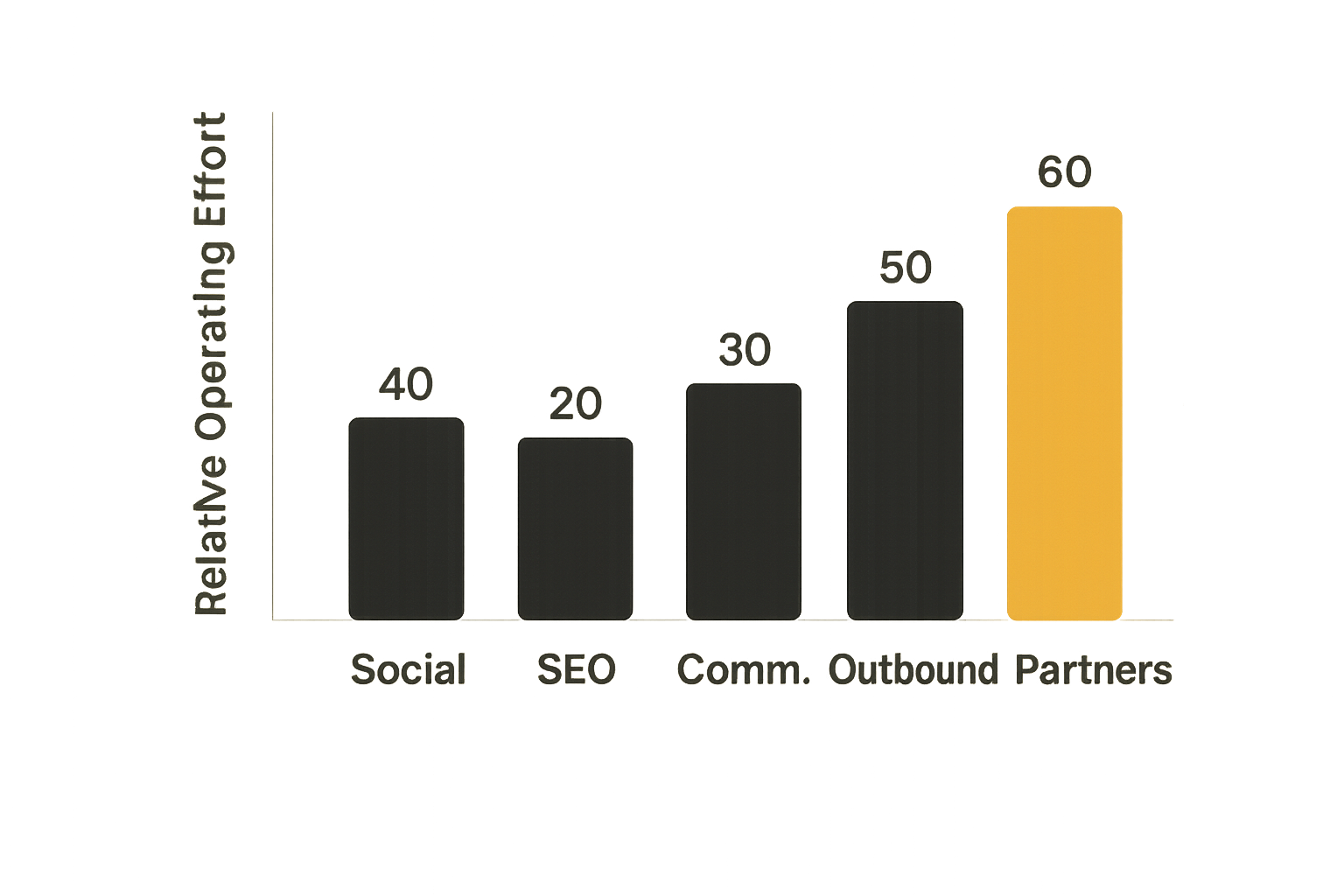
Go to market is not a department you add after the product is built. For small teams, it is the loop that connects audience, message, channel, product, and feedback.
The practical question is: where will your first useful users come from, and how will you learn from them?
Channel selection is a capacity decision
Channels are not just growth opportunities. They are operating commitments.
| Channel | Works when | Hidden cost |
|---|---|---|
| Founder-led social | You have a clear point of view and time to engage | Daily context switching |
| SEO content | The problem has search demand and durable intent | Slow feedback and editorial discipline |
| Communities | You can contribute before asking | Trust cost and moderation risk |
| Product Hunt-style launches | The product is easy to understand quickly | Spiky traffic and shallow feedback |
| Outbound | The buyer and pain are specific | List building, personalization, follow-up |
| Partnerships | Audiences overlap and incentives align | Coordination and attribution ambiguity |
Pick channels based on fit and capacity, not fashion. A solo founder who hates daily posting should be careful about building a launch around social momentum. A team with no editorial muscle should not pretend SEO will save next month’s pipeline.
Design the prelaunch feedback loop
A prelaunch list is useful only if it creates learning before launch day.
Instead of collecting emails passively, create a feedback loop:
- invite people around a specific problem
- ask one segmentation question
- show the current workflow or prototype
- ask what would block adoption
- tag responses by objection type
- use the tags to update product, page, pricing, and onboarding
This turns a waitlist into a research asset.
If you need a broader model, sh1pt’s guide to a go to market strategy frames GTM as an operating system across audience, channel, launch workflow, metrics, and founder decisions.
Launch day is a routing problem
Launch day creates inbound energy. Your job is to route it.
Traffic should route to the right page. Questions should route to the right owner. Bugs should route to triage. Qualified leads should route to sales or founder follow-up. New users should route into onboarding. Public replies should route back into the message.
If everything routes to the founder’s inbox, the founder becomes the bottleneck and the analytics layer becomes incomplete.
Practical rule: The point of launch day is not to look busy. The point is to route attention into activation, conversations, fixes, and decisions.
Measure learning, not vanity
Metrics are dangerous when they make weak launches look successful. Page views, likes, impressions, and signups can be useful, but only if they connect to the behavior you need.
The first launch should answer a small number of questions. Did the right people understand the promise? Did they try the app? Did they reach value? Did they return? Did they pay, invite, publish, export, or otherwise show commitment?
Metrics for the first 30 days
For many early apps, the first 30 days should focus on:
- qualified visitors
- visitor-to-signup conversion
- signup-to-activation conversion
- time to activation
- week-one retention
- support requests per activated user
- conversion to paid or committed usage
- top three objections
- top three requested improvements
The exact metrics depend on the product. A developer tool, consumer app, workflow SaaS, marketplace, and AI assistant all have different activation moments.
The shared principle is simple: measure the path to value, not just the top of the funnel.
Cohorts beat blended averages
Blended averages hide the truth. Cohorts reveal it.
Separate users by:
- source channel
- signup week
- segment or persona
- pricing plan
- use case
- activation path
A launch can look mediocre overall while one cohort shows strong pull. That is a strategic clue. It may tell you to narrow the audience, rewrite the page, change onboarding, or focus a channel.
Decide what changes at each threshold
Metrics should trigger decisions. Before launch, define thresholds.
Example:
If visitor-to-signup is low:
  revise headline, proof, offer, and CTA.

If signup-to-activation is low:
  fix onboarding, templates, empty states, and setup friction.

If activation is high but retention is low:
  inspect recurring value, reminders, collaboration, and habit loops.

If retention is high but paid conversion is low:
  revisit packaging, pricing, limits, and buyer urgency.
This prevents the common failure mode where every disappointing metric becomes “we need more traffic.” Often you do not. You need a clearer promise or a better first session.
What breaks in practice
Every team says they want to learn. In practice, the system often prevents learning.
The app ships, but the launch cannot isolate the problem. The founder has anecdotes, analytics has gaps, support has scattered notes, and the roadmap absorbs every loud request.
The app ships but onboarding does not
The most common launch failure is not a broken core feature. It is a broken first mile.
Users arrive and ask:
- What do I do first?
- Is this for me?
- Where is the example data?
- Why is the empty state empty?
- Do I need to invite my team?
- How long will setup take?
- What happens if I make a mistake?
If onboarding fails, you cannot judge the product. You are measuring confusion.
The launch gets traffic but no learning
Traffic without segmentation is noisy. If you do not know who came, why they came, what they expected, and where they dropped off, you cannot make a good decision.
A launch should capture at least enough context to distinguish:
- curious visitors from qualified users
- wrong-fit signups from target users
- usability failures from value failures
- pricing objections from trust objections
- missing features from unclear messaging
The mistake teams make is celebrating the spike and then arguing from anecdotes after it fades.
The team confuses motion with progress
Motion looks like:
- redesigning the homepage repeatedly
- adding more features before fixing activation
- posting in more channels without improving conversion
- collecting more feedback without making decisions
- building integrations no activated users asked for
Progress looks like:
- a sharper audience
- a shorter path to value
- fewer repeated objections
- higher activation in a defined cohort
- clearer pricing conversations
- faster release decisions
The difference is whether the work changes user behavior.
A practical implementation sequence for building and launching apps
This is the sequence I would use for a small team or solo founder building and launching apps without turning the process into corporate theater.
It is deliberately operational. You can run it in a week for a tiny product or over several months for a larger one.
The 10 step workflow
- Write the user, job, current alternative, and switching event in one paragraph.
- Collect 10 to 20 real signals: calls, DMs, support notes, community posts, competitor complaints, or workflow screenshots.
- Define the launchable wedge: narrow user, painful job, complete path to value.
- Write the landing page before finishing the product. If you cannot explain it, do not build more.
- Map the first user session from signup to activation. Remove or defer anything that blocks that path.
- Instrument the critical events and test them before launch traffic arrives.
- Create support paths: contact method, bug triage, known limitations, and response owner.
- Choose one primary launch channel and one secondary channel. Prepare channel-specific messages.
- Launch to a constrained audience first. Watch sessions, reply fast, and fix the first-mile issues.
- Review metrics and feedback within 48 hours. Decide whether to sharpen positioning, fix onboarding, adjust pricing, or expand distribution.
This sequence avoids the biggest trap: trying to scale attention before the product can convert attention into learning.
What works
What works is boring, clear, and repeatable:
- narrow positioning
- small release batches
- fast feedback triage
- instrumentation before traffic
- honest known-limitations copy
- founder involvement in early support
- a written decision log
- a weekly review of what changed because of user behavior
Small teams win by reducing coordination cost. The system should help you make better decisions faster, not create process debt.
What fails
What fails is usually predictable:
- building too much before testing the promise
- launching to everyone because the target user is unclear
- treating the landing page as design polish instead of product strategy
- instrumenting analytics after the launch
- ignoring support because it feels unscalable
- adding features when onboarding is the bottleneck
- chasing channels the team cannot operate consistently
A failed launch is not always bad. A launch that fails clearly can save months. The expensive failure is the one that produces attention but no diagnosis.
Where sh1pt.com fits
sh1pt.com is for people building and launching software products who want practical shipping strategies, product development processes, and growth tactics without pretending that a launch is just a public announcement.
The site is built around the idea that shipping is an operating system: product decisions, launch assets, channels, feedback, and iteration all have to connect.
Use sh1pt.com as a shipping reference layer
Use sh1pt.com when you need to think through questions like:
- How should we structure a product development workflow?
- What should happen before launch day?
- How do we connect content to shipping?
- What is a practical go to market plan for a small team?
- Which metrics should drive the next product decision?
- What breaks when the launch system is underdesigned?
The goal is not to give you a perfect template. Templates break when context changes. The goal is to give you operating models you can adapt.
When this approach is a fit
This approach is a fit if you are:
- an indie hacker trying to avoid building in isolation
- a founder turning a prototype into a real product
- a product manager coordinating launch readiness
- a solopreneur shipping with limited time and no large team
- a small startup trying to connect product and GTM work
It is less useful if you only want launch hacks, viral tricks, or a generic checklist. Those can create motion, but they rarely fix the underlying system.
Building and launching apps well means designing the workflow that turns attention into activation, support into learning, and learning into the next release.
Try sh1pt.com
sh1pt.com is for people building and launching software products who want to understand shipping strategies, product development processes, and growth tactics. Try sh1pt.com.