
A product catalog sounds harmless until launch week.
The landing page says one thing. The pricing page says another. The onboarding checklist mentions an old feature name. Support is answering questions from a spreadsheet. The founder is shipping changes directly from memory because the actual shape of the product only exists in Slack threads and half-finished docs.
Teams think the problem is content. The real problem is product state.
A product catalog is not just a nicer list of features. For a software team, it is the operating layer that connects what exists, what is available, who it is for, how it is priced, where it appears, and what has to happen before it can be launched. That changes the conversation. The practical question is not, do we have a product catalog. The practical question is, can your team ship, market, support, and update the product without contradicting itself?
Table of contents
- Why product catalog is a shipping system now
- What a product catalog means for software teams
- The product catalog model: entities, states, owners
- Build catalog before launch, not after
- Product catalog workflow from idea to market
- What works: a catalog that supports shipping
- What fails: common product catalog mistakes
- Product catalog metrics that matter
- Tooling and data architecture choices
- Product catalog governance for small teams
- Product catalog and go-to-market execution
- Product fit: how sh1pt.com thinks about product catalogs
Why product catalog is a shipping system now
Most small teams discover the need for a product catalog after the product has already escaped the building. The first launch worked because the founder could hold the whole offer in their head. The second launch added plans, add-ons, integrations, beta access, onboarding paths, and a growing pile of customer promises.
The symptom founders notice
The symptom is usually inconsistency. The homepage calls it team analytics. The app calls it workspace insights. The changelog calls it reporting. A customer asks whether it is included in Pro, and nobody is completely sure because a discount, beta flag, or annual plan changed the answer.
That looks like a naming problem. It is not. It is an operating problem.
Practical rule: If a feature can be sold, limited, launched, retired, bundled, or supported, it belongs in your product catalog.
The architecture underneath
A useful way to think about it is this: the product catalog is the shared state machine for your commercial product. It says what exists, where it lives, who can access it, and what conditions apply.
For software teams, that includes:
- features and modules
- plans and packages
- add-ons and usage limits
- integrations and platform support
- beta, private preview, and general availability status
- proof points, use cases, objections, and support notes
- launch dependencies and channel-specific copy
The catalog does not replace product strategy. It makes product strategy executable.
Why 2026 makes it harder
Shipping in 2026 is more fragmented. A solo founder can have a website, app store listing, changelog, docs, email sequence, affiliate page, in-app upsell, short-form clips, community posts, and AI-generated support answers before they have a real operations system.
The mistake teams make is treating every channel as a writing task. The better move is to treat channels as projections of the same catalog. The words can vary. The underlying product truth should not.
What a product catalog means for software teams
A product catalog for software is not the same thing as an ecommerce catalog. You are not only listing SKUs. You are describing product capability, availability, packaging, promise, and lifecycle.
Catalog versus roadmap
A roadmap describes intent. A catalog describes current and near-current product reality.
| System | Primary question | Typical owner | Failure mode |
|---|---|---|---|
| Roadmap | What might we build next? | Founder or product | Customers hear promises too early |
| Backlog | What work needs doing? | Engineering or product | Commercial context gets lost |
| Website | What do we want buyers to believe? | Marketing or founder | Claims drift from product reality |
| Product catalog | What is available, to whom, under what conditions? | Cross-functional owner | Becomes stale if nobody owns state |
The catalog should pull from the roadmap, but it should not become the roadmap. If everything speculative enters the catalog as if it exists, your launch system becomes fiction.
Catalog versus website
Your website is a surface. Your catalog is the source. This distinction matters because website copy is optimized for attention and conversion. Catalog data is optimized for accuracy, reuse, and decision-making.
A pricing page may say unlimited projects. The catalog should define what unlimited means, which plan includes it, whether old customers are grandfathered, and what support should say when someone hits a soft limit.
Catalog versus help center
The help center explains how to use the product. The product catalog explains what the product is, who gets it, and how it should be represented.
When teams confuse these, docs become bloated with positioning, and marketing pages become vague because the factual details are buried in tutorials. Keep the catalog closer to the operating model.
The product catalog model: entities, states, owners

The practical question is what to model. Too little structure and the catalog becomes a notes document. Too much structure and nobody updates it. The right model is boring enough to maintain and precise enough to prevent launch mistakes.
Core entities
For most early software teams, start with these entities:
- Product: the main thing customers buy or adopt.
- Plan: a packaged commercial tier.
- Feature: a capability available inside the product.
- Add-on: an optional paid or gated capability.
- Integration: a connection to another tool or platform.
- Persona: the buyer, user, or internal champion.
- Use case: the job the customer is trying to complete.
- Channel asset: page, email, demo script, docs article, ad, or changelog entry.
Do not begin with a giant schema. Begin with the questions people repeatedly ask before launch: Is this included? Who is it for? Is it live? Can sales mention it? Can support document it?
State model
State is the part most teams skip. They write descriptions but do not define lifecycle. That is where launches break.
A simple state model might be:
- Idea
- Validating
- Building
- Internal alpha
- Private beta
- Public beta
- Generally available
- Deprecated
- Retired
Each state should imply permissions. A feature in private beta may appear in founder-led sales calls but not on the pricing page. A generally available feature may appear in onboarding, docs, campaigns, and support macros. A deprecated feature should trigger cleanup work.
Practical rule: Every catalog item needs a state, and every state needs rules for what channels can mention it.
Ownership map
Ownership cannot mean everyone cares. It has to mean one person is accountable for freshness.
A lightweight ownership map looks like this:
- Founder owns packaging and promise.
- Product owns state and scope.
- Engineering owns technical constraints and release readiness.
- Marketing owns channel expression.
- Support owns customer-facing edge cases.
Related reading from our network: teams designing shared control in remote environments face similar ownership problems, and this piece on remote control workflows and permissions is a useful adjacent lens.
Build catalog before launch, not after
Most teams build the catalog as cleanup. That is backwards. The catalog is most valuable before launch because it forces decisions while there is still time to change the offer.
Pre-launch inventory
Before a launch, list every item that will be visible or implied:
- core features
- new feature names
- plan limits
- beta restrictions
- setup requirements
- integrations
- upgrade paths
- migration notes
- known limitations
- support promises
If the product is small, this can fit in a table. If the launch is complex, separate entities into tabs or linked records. The key is not tooling. The key is forcing ambiguity into the open.
Positioning fields
A catalog entry should not only say what the feature does. It should say why it matters and who should care.
Useful positioning fields:
- plain-language name
- internal name if different
- one-sentence customer promise
- target persona
- primary use case
- problem solved
- activation event
- top objection
- proof or example
- plan availability
- launch state
If you need a practical method for turning examples into decisions rather than mood boards, the sh1pt.com guide to using product examples as a practical system pairs well with catalog design.
Channel readiness
The product catalog should make channel readiness visible. For each item, note which surfaces are ready:
- landing page
- pricing page
- in-app copy
- onboarding
- docs
- sales deck
- demo script
- support macro
- analytics event
What breaks in practice is not that one page is missing. What breaks is that nobody knows which pages are safe to publish.
Product catalog workflow from idea to market
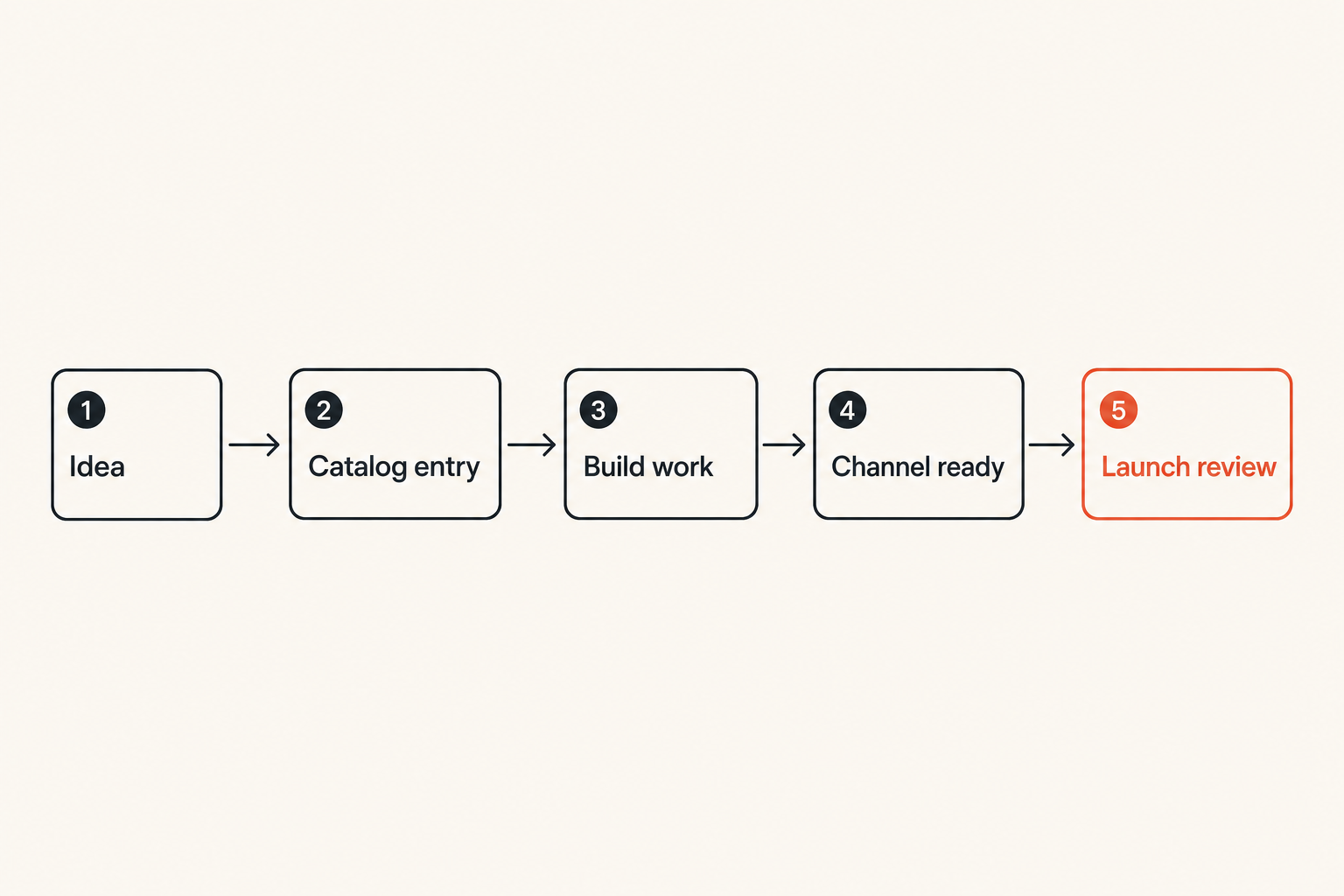
A catalog only works if it is part of the shipping workflow. If it lives outside the operating rhythm, it becomes another abandoned doc.
Step-by-step implementation
Use this sequence for a new feature, plan, add-on, or major launch:
- Create the catalog item when the idea becomes a candidate for customer-facing work.
- Assign an owner before writing launch copy.
- Define the current state and the next state.
- Fill the minimum fields: customer promise, target persona, availability, constraints, and dependencies.
- Link engineering work, design work, and launch assets to the item.
- Review the item at each release checkpoint.
- Approve channel readiness before public distribution.
- Update the catalog after launch based on customer questions and support tickets.
- Mark stale, deprecated, or retired items deliberately.
This is not process theater. It is how you keep the product, market, and support story from splitting into three versions.
Review cadence
For a small team, a weekly catalog review is usually enough. Keep it short:
- What changed state this week?
- What is blocked from launch?
- What is mentioned publicly but not ready?
- What is live but undocumented?
- What customer questions imply the catalog is unclear?
The review should produce updates, not discussion artifacts. If the catalog does not change after the meeting, the meeting probably did not need to happen.
Decision gates
Decision gates prevent premature promises. A feature should not move to public beta just because the code merged. It should move when the catalog says the promise, audience, limits, and support path are ready.
Practical rule: Code complete is not launch complete. Launch complete means the catalog item is accurate across product, pricing, marketing, docs, and support.
What works: a catalog that supports shipping
A good product catalog reduces memory load. The founder should not have to answer the same packaging question ten times. The PM should not have to inspect old launch notes. The marketer should not have to guess whether a feature is safe to promote.
Single source of truth
Single source of truth does not mean one tool for everything. It means one authoritative record for each product truth.
You can still have:
- Linear or GitHub for engineering work
- Notion or Airtable for catalog records
- Webflow, Framer, or a CMS for marketing pages
- Intercom or Help Scout for support content
- Stripe or Paddle for billing configuration
But the catalog should answer the canonical question: what is the official state of this product item?
API-minded content blocks
Even if you never expose an API, think in reusable blocks. A feature description might have:
- short label
- buyer-facing sentence
- user-facing sentence
- technical constraint
- eligibility rule
- upgrade prompt
- support note
This makes the catalog easier to project into multiple surfaces. The landing page needs the buyer sentence. The app needs the user sentence. Support needs the constraint. Billing needs the eligibility rule.
Launch reusable packages
A mature catalog gives you launch packages. For example, a new integration might always require:
- catalog entry
- beta state rule
- docs outline
- onboarding checklist
- pricing decision
- changelog note
- support macro
- analytics events
- customer announcement
The advantage is not bureaucracy. The advantage is not forgetting obvious work when the team is moving fast.
What fails: common product catalog mistakes
The mistake teams make is building a product catalog that looks complete but cannot drive decisions. It becomes a museum of product claims instead of a control system for shipping.
Feature dump
The most common failure mode is the feature dump. A team lists every feature, writes a sentence for each, and calls it done. There is no state, no owner, no channel readiness, no packaging logic, and no link to customer outcomes.
A feature dump is better than nothing, but only barely. It helps with memory. It does not help with launch control.
No state discipline
Without state discipline, teams mention unfinished work too early or hide finished work too long. Both are expensive.
Mentioning unfinished work too early creates trust debt. Hiding finished work wastes product investment. A catalog should make both visible.
Channel drift
Channel drift happens when each surface evolves independently. The app changes. The website does not. The docs mention an old plan. The sales deck has custom wording. The onboarding email still points to a retired workflow.
This is why the catalog needs channel readiness fields. You are not trying to make every sentence identical. You are trying to keep the underlying promise consistent.
Unowned exceptions
Every software product has exceptions: grandfathered customers, enterprise-only limits, private integrations, founder-approved discounts, one-off onboarding paths. The issue is not that exceptions exist. The issue is that they live in private memory.
Put exceptions in the catalog or link them from the catalog. If support, billing, and product cannot see the exception, it will eventually become a customer-facing contradiction.
Product catalog metrics that matter
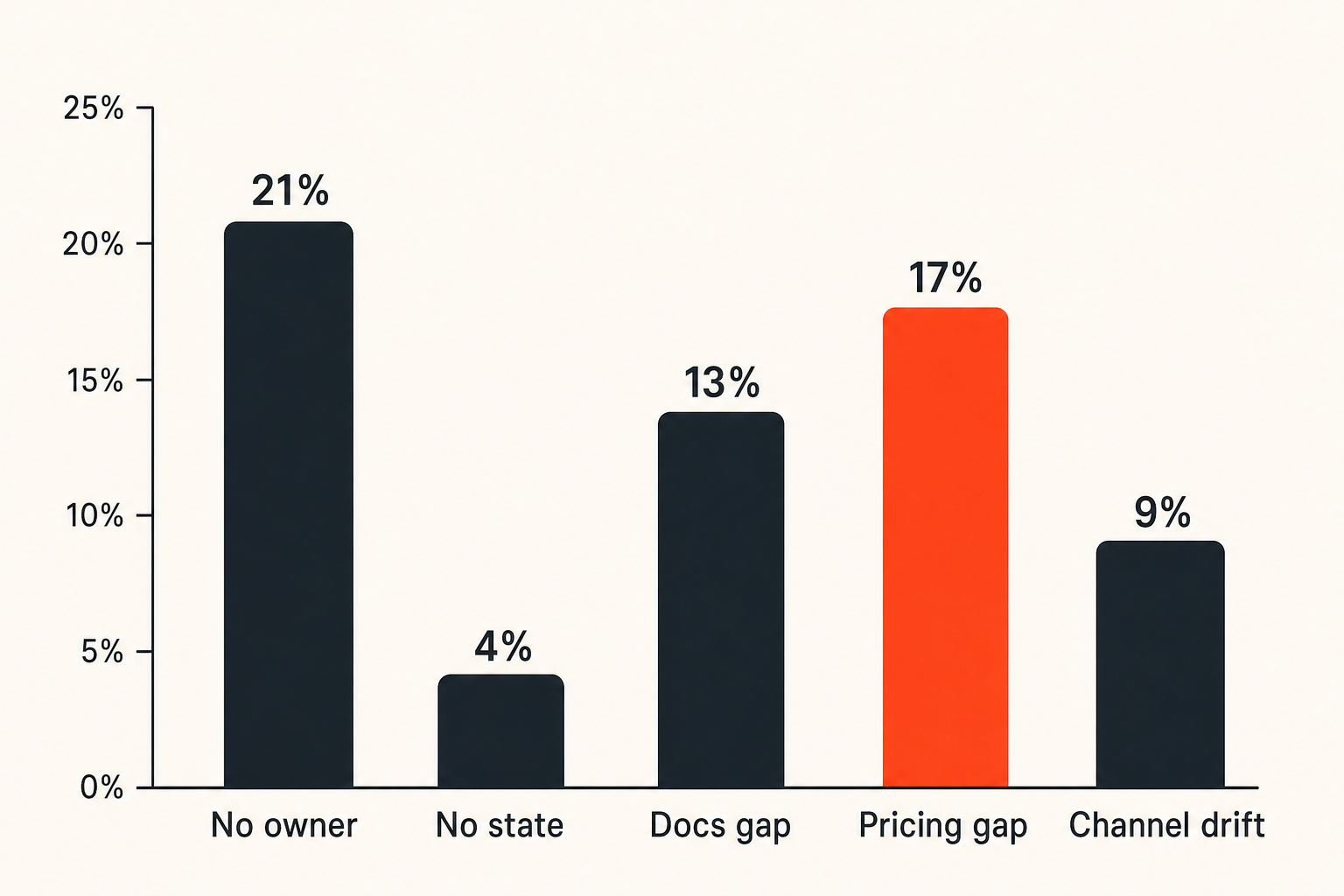
Do not turn catalog work into fake productivity tracking. The goal is not to maximize the number of entries. The goal is to reduce confusion, shorten launch cycles, and improve the accuracy of your product promise.
Operational metrics
Track metrics that show whether the catalog is helping shipping:
| Metric | Why it matters | Healthy signal |
|---|---|---|
| Items without owner | Shows accountability gaps | Trending down |
| Items without state | Shows launch ambiguity | Near zero |
| Public items missing docs | Shows support risk | Reviewed weekly |
| GA items missing pricing logic | Shows revenue risk | Escalated before launch |
| Deprecated items still in channels | Shows drift | Cleanup assigned |
These are not vanity metrics. They are friction indicators.
Customer-facing metrics
The catalog should also improve customer experience. Watch for:
- fewer support questions about plan availability
- fewer refund or downgrade requests caused by misunderstanding
- better activation from clearer onboarding promises
- higher conversion on pages where packaging was clarified
- fewer sales calls spent explaining basic eligibility
You do not need perfect attribution. You need enough signal to know whether confusion is going down.
Metrics you should ignore
Ignore catalog completeness as an isolated metric. A catalog can be 100 percent complete and still useless if it is stale, too detailed, or disconnected from launch workflow.
Also be careful with page-level conversion as the only measure. A vague promise can convert well in the short term and create support debt later. The catalog should optimize for accurate demand, not just more demand.
Tooling and data architecture choices
Tooling matters less than teams think, but more than purists admit. A product catalog stored in a place nobody checks will fail. A product catalog with too many required fields will also fail.
Spreadsheet first
For indie hackers and small startup teams, a spreadsheet or Airtable-style base is usually the right starting point. It is visible, editable, and easy to reshape.
Start with columns like:
- item name
- type
- state
- owner
- plan availability
- primary persona
- customer promise
- constraints
- public channels
- docs status
- support status
- last reviewed
The spreadsheet phase is not amateur. It is how you learn the schema before hardening it.
Database later
Move to a database or CMS-backed catalog when the catalog needs to power surfaces directly. That might happen when:
- you have many plans or add-ons
- pricing rules are complex
- feature availability differs by segment
- multiple teams edit related assets
- the website or app should render catalog data
- audit history matters
Related reading from our network: the same source-of-truth problem appears in media infrastructure, where a streaming SaaS architecture has to coordinate content, rights, delivery, and customer experience behind a simple interface.
Integrations and permissions
Integrations should follow maturity. Do not wire everything together on day one. First prove that the catalog fields are useful.
When you do integrate, connect the catalog to:
- project management for build status
- CMS for public pages
- billing for plan and add-on availability
- analytics for activation events
- support tools for macros and known issues
Permissions matter because bad edits can become public promises. Give broad read access and narrow write access. Make state changes deliberate.
Product catalog governance for small teams
Governance sounds heavy until you realize the alternative is founder memory as infrastructure. Small teams do not need committees. They need clear rhythms and decision rights.
Founder operating rhythm
For a founder-led product, the founder should review catalog changes before major launches. Not every typo. Not every support note. The big decisions:
- what is sold
- who it is for
- what is included
- what is excluded
- what is promised publicly
- what is intentionally not promised
This keeps the product catalog tied to business strategy instead of becoming an admin layer.
PM and marketing handoff
As the team grows, product and marketing need a handoff that is more specific than announcing a feature in Slack.
A useful handoff includes:
- catalog item link
- state and launch date
- target persona
- primary use case
- demo environment
- screenshots or product proof
- constraints and known gaps
- pricing and packaging notes
- approval owner
If your team has or is adding a product marketing function, this connects directly to the operator role described in sh1pt.coms guide to the product marketing manager role in shipping demand.
When to add process
Add process when coordination cost exceeds process cost. Before that, keep it simple.
Signals you need more governance:
- multiple people publish customer-facing copy
- sales or support gives different answers than the website
- pricing changes create confusion
- launches require repeated manual checklists
- old features remain visible after retirement
- customers ask questions that your team has already answered internally
Related reading from our network: process only works when it changes behavior, which is also the argument behind security awareness training for CI/CD teams rather than treating training as a checkbox.
Product catalog and go-to-market execution
A product catalog becomes strategically useful when it feeds go-to-market work. Otherwise, it is only internal tidiness.
Pricing and packaging
Pricing is where vague catalogs get exposed. You cannot package confidently if you do not know which features belong to which plan, which limits are real, and which add-ons create upgrade moments.
For each commercial item, define:
- included plans
- excluded plans
- trial availability
- usage limits
- upgrade trigger
- grandfathering rules
- enterprise exceptions
- billing dependency
This does not need to be complex. It needs to be explicit.
Sales and support enablement
Even if you do not have a sales team, you have sales moments. A pricing page, demo video, onboarding email, and founder reply are all sales surfaces.
Support also needs catalog context. When a customer asks why they cannot access something, the answer should come from the catalog, not from someone searching old Slack threads.
Launch narrative
The launch narrative should be built from catalog truth. What changed? Who benefits? What problem is now easier? What is not included yet? Where should users start?
This is where catalog work connects to go-to-market strategy. If you are building a broader launch system, the sh1pt.com piece on go to market strategy as an operating system is the natural companion.
A strong product catalog does not make the launch exciting by itself. It makes the launch coherent. Coherence is underrated because it is invisible when it works and painful when it does not.
Product fit: how sh1pt.com thinks about product catalogs
A product catalog is not a trendy artifact. It is a practical way to make shipping less dependent on memory, heroics, and scattered documents.
Use the catalog to ship more clearly
For indie hackers, solopreneurs, founders, and product managers, the catalog is a forcing function. It forces you to name the product clearly, define availability, choose the audience, expose support gaps, and connect launch assets to product reality.
What works is simple:
- model the product items that affect customers
- assign owners
- define state
- connect channels
- review before launch
- update after customer feedback
What fails is also simple:
- treating the catalog as a static feature list
- letting every channel invent its own truth
- skipping state and ownership
- avoiding pricing and packaging decisions
- adding tooling before the workflow is understood
The closing point is this: a product catalog is not paperwork. It is the operating system behind a product promise. If you want to ship faster without confusing customers, build the catalog before the launch makes you need it.
Try sh1pt.com
sh1pt.com is for people building and launching software products who want practical shipping strategies, product development processes, and growth tactics. If you are turning a product catalog into a launch system, Try sh1pt.com.