
Most teams collect product examples the wrong way. They save screenshots, bookmark landing pages, swipe onboarding flows, and call it research.
Then they ship a weaker copy of someone else's surface area.
Teams think the problem is finding better product examples. The real problem is turning examples into a decision system: what to build, what not to build, what to test, what to ignore, and what your product can actually support operationally.
That changes the conversation. A product example is not a mood board. It is evidence of a business model, a workflow, a distribution bet, a support burden, and a set of tradeoffs that may or may not apply to you in 2026.
The practical question is not, "Which products should we copy?" It is, "What can this example teach us about shipping our own product without inheriting someone else's constraints?"
Table of contents
- Product examples are architecture, not inspiration
- A practical taxonomy of product examples
- How to reverse engineer product examples
- Good product examples versus bad product examples
- The product example teardown workflow
- Using product examples for your own roadmap
- Product examples by launch stage
- Metrics that make product examples useful
- Common failure modes when teams use product examples badly
- Build your product examples library
Product examples are architecture, not inspiration
Product examples are useful because they show what a team chose to make visible. They are dangerous because they hide everything that made the visible thing possible.
A clean pricing page hides a billing model. A simple onboarding step hides a permissions system. A neat AI feature hides prompt evaluation, fallback behavior, latency tradeoffs, and customer support scripts. A viral launch hides positioning, timing, founder audience, channel selection, and years of trust.
The mistake teams make is treating the artifact as the strategy.
Why screenshots are not enough
Screenshots are easy to collect because they remove context. That is the problem.
A screenshot of a dashboard does not tell you:
- who uses it every day;
- what data must exist before it becomes useful;
- how often the data is wrong;
- whether users understand it without a sales call;
- what happens when the user has no history yet;
- how expensive it is to maintain.
In production, these are usually the real issues. The interface is the end of the chain, not the beginning.
A useful way to think about it is this: every product screen is a receipt. It proves that some set of decisions already happened underneath.
The decision stack behind every example
When you inspect a product example, look for the stack behind it:
- Audience decision: who is this really for?
- Workflow decision: what job does it enter or replace?
- Data decision: what information must be captured, imported, generated, or trusted?
- Trust decision: what proof does the user need before acting?
- Business decision: where does pricing, retention, expansion, or referral happen?
- Operational decision: what must support, success, or engineering handle later?
That stack matters more than the pixels.
Practical rule: Do not add a product example to your roadmap until you can explain the workflow, data dependency, and support burden behind it.
The operator question
The operator question is not, "Is this example good?" Plenty of examples are good for someone else.
The better question is: "Would this example make our product easier to adopt, easier to sell, easier to support, or easier to expand?"
If the answer is no, the example may still be interesting. It just is not a roadmap input.
This is why product examples belong inside your product development process, not in a random swipe file. If your team needs a more complete operating model, the same logic applies to a broader product development workflow where signals become decisions, releases, and feedback loops instead of disconnected notes.
A practical taxonomy of product examples
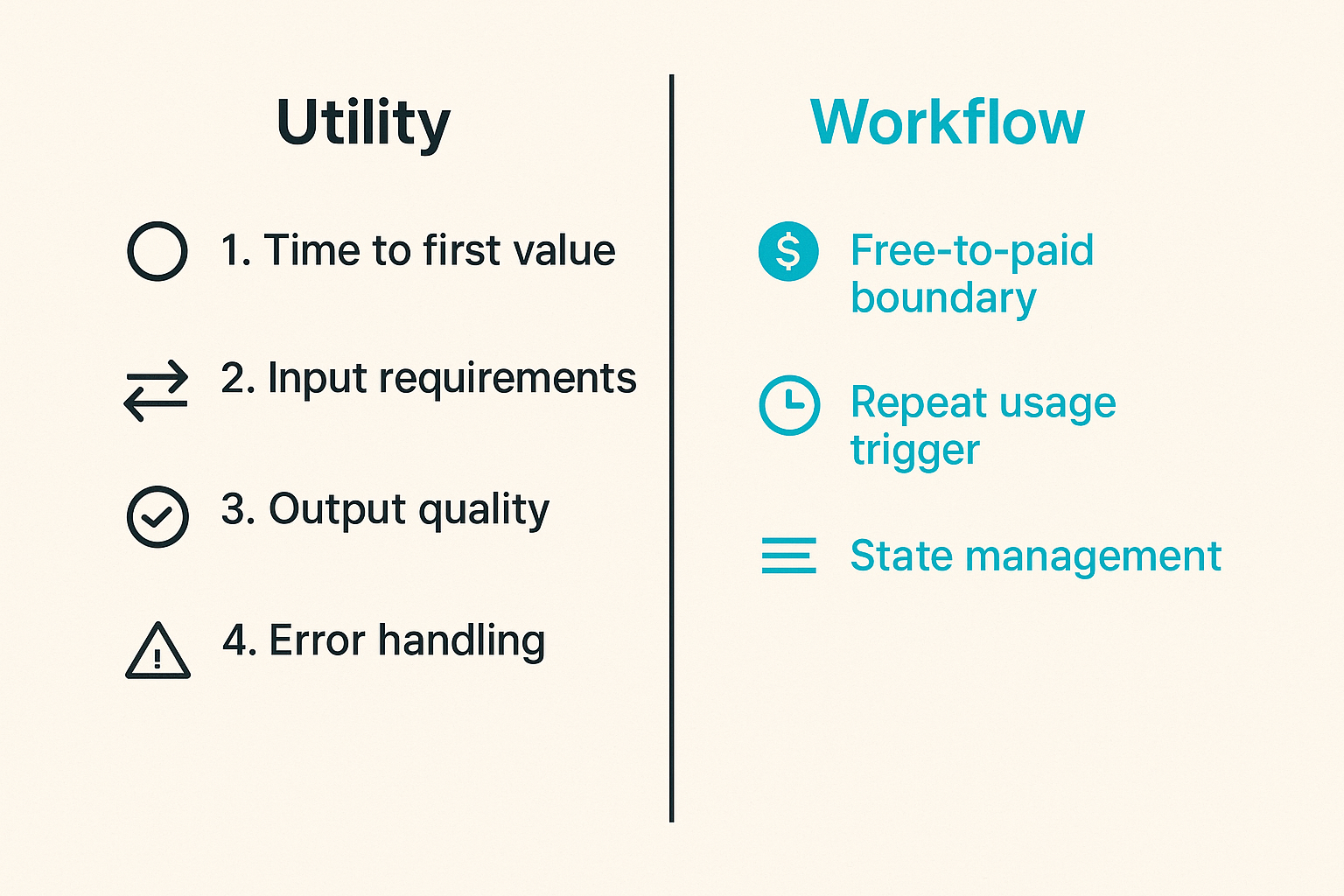
Not all product examples teach the same thing. A pricing example, onboarding example, marketplace example, and AI assistant example should not be evaluated with the same checklist.
A practical taxonomy keeps you from comparing the wrong systems.
Utility product examples
Utility products solve a narrow job with a clear before-and-after. Think converters, scheduling tools, file processors, small automation tools, developer utilities, calculators, and focused AI wrappers.
These examples are useful for indie hackers and solopreneurs because the scope is visible. The product either saves time, reduces friction, or gives the user a result they can verify quickly.
When studying utility product examples, inspect:
- time to first value;
- input requirements;
- output quality;
- error handling;
- free-to-paid boundary;
- repeat usage trigger.
What breaks in practice is overbuilding. Utility products get bloated when founders confuse repeated usage with feature depth. Sometimes the best utility product has fewer screens and better defaults.
Workflow product examples
Workflow products sit inside recurring business processes: project management, customer support, sales operations, analytics, finance, hiring, content production, and internal tools.
These examples are harder to copy because the value is not just the screen. The value is state management.
A workflow product needs to know:
- what stage an item is in;
- who owns the next action;
- what blocks progress;
- what history matters;
- what integrations must stay in sync;
- what exceptions require human judgment.
This is where many startup teams underestimate complexity. They copy a board view or activity feed, but they do not copy the state model that makes the workflow reliable.
Related reading from our network: teams dealing with remote execution face similar workflow-versus-tool problems in Zoom video chat for remote teams, where the call itself is not the collaboration system.
Market and network product examples
Marketplaces, communities, creator platforms, collaboration products, and networked tools are their own category. Their product examples are often misleading because the visible interface depends on liquidity.
A marketplace with supply and demand looks obvious after it works. Before it works, the same screens feel empty.
When studying market and network examples, ask:
- who creates value before the network is mature?
- what makes the first side show up?
- what protects trust?
- what prevents spam or low-quality participation?
- what is manually operated behind the scenes?
Practical rule: If a product example depends on network effects, study the cold-start mechanism before studying the interface.
How to reverse engineer product examples
Product examples become useful when you reverse engineer them into assumptions. The goal is not to admire the product. The goal is to understand what must be true for that product decision to work.
Start with the user job
Begin with the job the user is hiring the product to do. Not the category. Not the feature. The job.
Bad teardown: "This product has a nice dashboard."
Useful teardown: "This product helps a founder know which launch channel is producing qualified signups before spending more time on content."
That framing changes everything. Now you can judge the product based on whether the dashboard actually helps the user make a decision.
Use this prompt:
When the user arrives, what are they trying to stop doing, start doing, decide, prove, automate, or delegate?
If you cannot answer that, you are still at the surface.
Map the promise to the mechanism
Every good product makes a promise. The mechanism is how the product keeps it.
Example:
- Promise: "Launch your landing page in minutes."
- Mechanism: templates, opinionated sections, hosted forms, domain setup, analytics, copy prompts, deployment pipeline.
- Hidden burden: template quality, spam prevention, uptime, support for DNS issues, analytics accuracy.
The promise is marketing. The mechanism is product.
The mistake teams make is copying the promise without building the mechanism. Users notice quickly. A vague AI copilot that cannot recover from bad input becomes a support queue, not a moat.
Separate packaging from capability
Packaging is how a product presents value. Capability is what the system can actually do.
A product may package itself as "simple analytics" while the underlying capability is event ingestion, identity resolution, dashboards, alerts, and team permissions. Another product may package itself as "AI notes" while the capability is transcription, summarization, entity extraction, storage, sharing, privacy controls, and search.
When you study product examples, write two columns:
- Packaging: the words, screens, pricing, positioning, and onboarding.
- Capability: the technical and operational machinery required to deliver the promise.
Both matter. But they should not be confused.
Related reading from our network: this same packaging-versus-system issue shows up in secure communication products; end-to-end encrypted messaging is not just a private chat UI, it is identity, devices, metadata, recovery, and team workflow.
Good product examples versus bad product examples
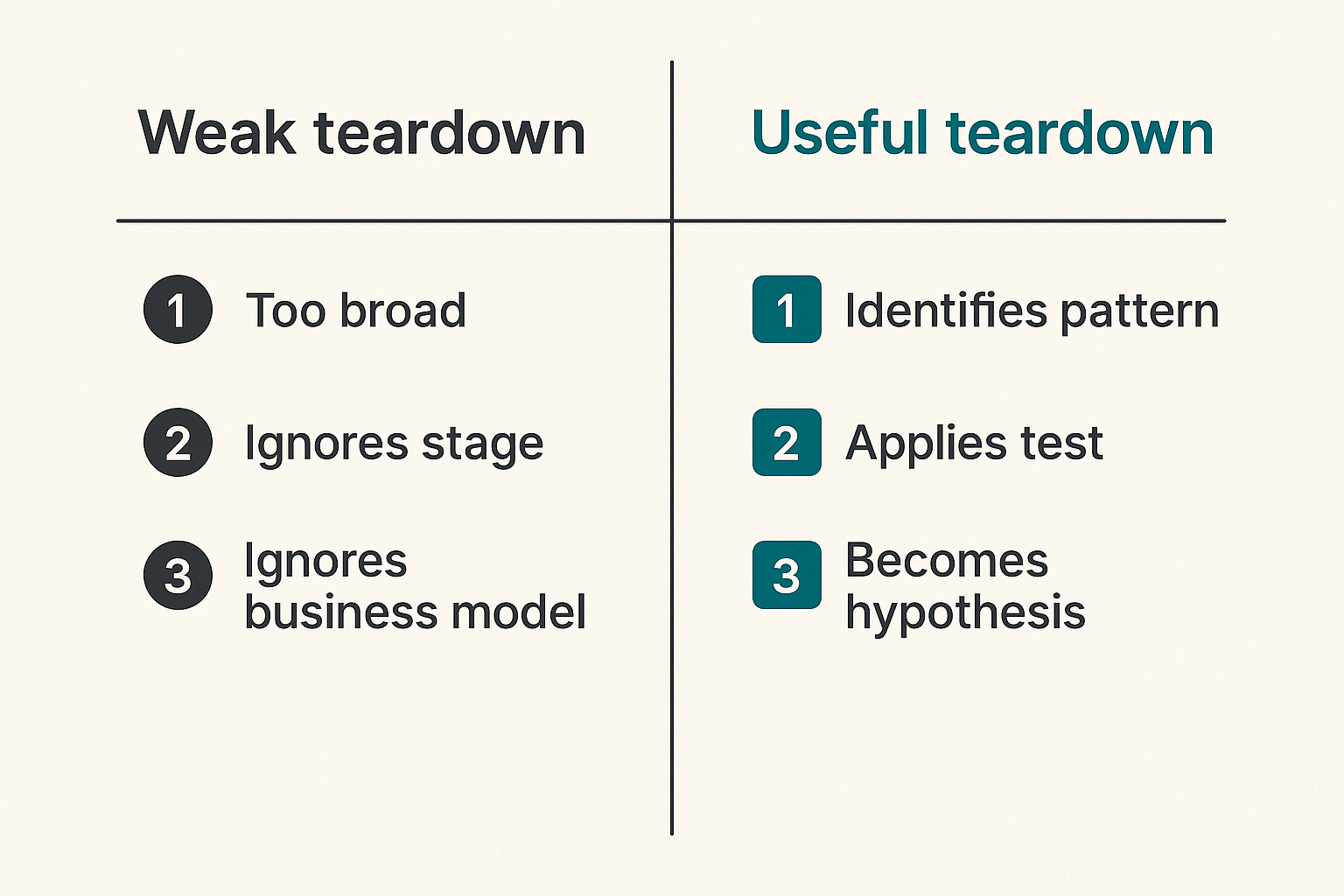
A good product example produces a decision. A bad product example produces vague admiration.
That sounds simple, but it is the difference between useful research and founder procrastination.
What works
Good examples are specific. They show a pattern you can test.
For example:
- "This onboarding flow asks for one integration before showing value. We should test whether importing one data source before signup improves activation."
- "This pricing page sells by workflow size, not seat count. We should examine whether our buyers think in projects instead of users."
- "This AI feature shows confidence and source material. We should test whether transparency reduces support tickets."
Each one becomes a hypothesis.
Practical rule: A product example is not useful until it can be translated into a testable product, positioning, pricing, or operational hypothesis.
What fails
Bad examples usually fail in one of three ways.
First, they are too broad. "Linear has great UX" is not a useful input. Which part? Command menu? Issue model? Keyboard flow? Empty states? Team permissions? Release notes?
Second, they ignore stage. A company with a mature brand, deep engineering team, and thousands of customers can ship patterns that would be irresponsible for a two-person product.
Third, they ignore business model. A feature that makes sense for enterprise expansion may be dead weight in a self-serve indie tool.
The practical question is: what would this example cost us to build, explain, sell, and support?
A comparison table for teardown quality
| Teardown type | Looks like | Produces | Risk |
|---|---|---|---|
| Screenshot swipe | Saved UI images | Visual taste | Copying without context |
| Feature checklist | Competitor matrix | Parity pressure | Building too much |
| Workflow teardown | Job, state, owner, trigger | Product hypothesis | Requires more thinking |
| Business teardown | Pricing, channel, retention loop | Strategy input | Harder to validate quickly |
| Operational teardown | Support, edge cases, integrations | Shipping plan | May reveal uncomfortable scope |
The point is not to stop collecting examples. The point is to collect them at the right level of abstraction.
The product example teardown workflow
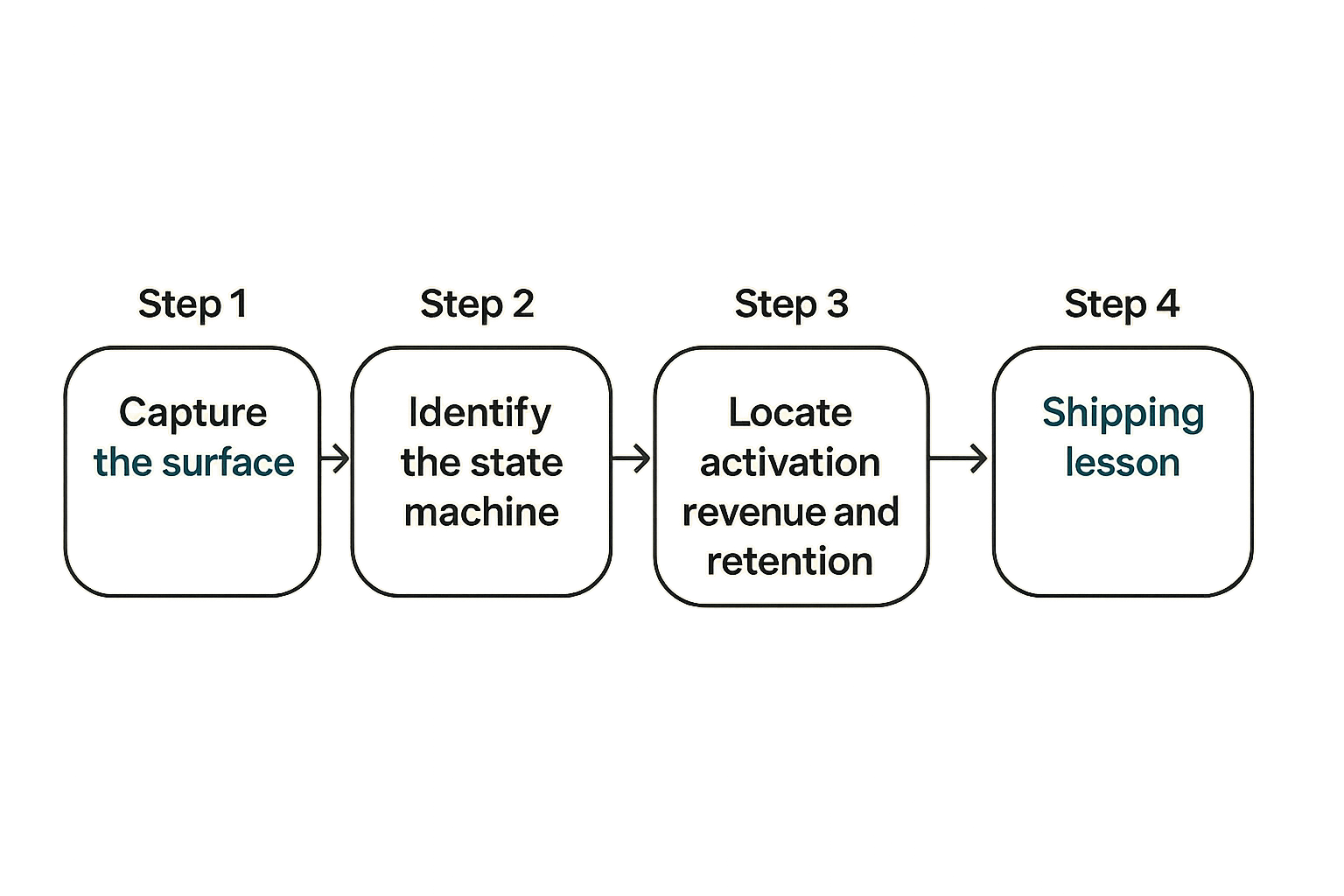
If product examples matter to your roadmap, they need a repeatable workflow. Otherwise, your team will keep rediscovering the same ideas in different meetings.
Here is a practical teardown sequence.
Step 1 capture the surface
Start with the obvious artifact:
- screenshot;
- landing page copy;
- onboarding steps;
- pricing structure;
- feature interaction;
- email sequence;
- help docs;
- public changelog or launch post.
Do not overthink this step. Capture the thing that made you notice the product.
But label it accurately. "Dashboard inspiration" is weak. "Activation dashboard that shows three default KPIs before the user configures anything" is much better.
Step 2 identify the state machine
Most useful software is a state machine wearing a friendly interface.
Ask:
- What states can an object be in?
- What moves it from one state to another?
- Who is allowed to move it?
- What happens if the transition fails?
- What notifications or automations depend on the state?
For a launch tool, a project might move from idea to draft to scheduled to live to measured to archived. For a CRM, a lead moves through qualification, demo, proposal, negotiation, closed won, closed lost, and expansion.
If you cannot identify state, you probably do not understand the product example yet.
Step 3 locate activation revenue and retention
Now find the business mechanics.
Activation is where the user first experiences value. Revenue is where the user pays or expands. Retention is why the user returns.
A simple teardown template:
example_name: ""
category: ""
user_job: ""
visible_pattern: ""
activation_moment: ""
revenue_boundary: ""
retention_loop: ""
hidden_dependencies:
  - ""
risks_if_copied:
  - ""
possible_test_for_us: ""
This forces clarity. It also keeps your product examples from becoming a pile of attractive fragments.
Step 4 write the shipping lesson
End every teardown with one sentence:
The shipping lesson for us is ______ because ______.
Examples:
- "The shipping lesson for us is to delay team invites until the first project has value because inviting teammates into an empty workspace creates confusion."
- "The shipping lesson for us is to expose source data in AI outputs because our users need confidence before acting."
- "The shipping lesson for us is to package by workflow volume because our customers do not think in seats."
This is where research becomes product direction.
Using product examples for your own roadmap
A roadmap is not a museum of admired products. It is a commitment device. Every item on it consumes engineering time, design attention, launch bandwidth, and support capacity.
Product examples should help you make better commitments, not create more noise.
Convert examples into hypotheses
Use examples to form hypotheses, not requirements.
Weak roadmap item:
Add AI summaries like Product X.
Useful hypothesis:
If we summarize customer feedback into three recurring themes with source links, product managers will review feedback weekly instead of monthly.
Now you can test it. You can prototype it manually. You can measure usage. You can ask whether users trust it. You can decide not to build it.
This is the difference between copying and learning.
Prioritize by operational fit
Operational fit means your team can build, explain, sell, support, and maintain the pattern.
A feature can be strategically attractive and still be a bad fit right now.
Ask:
- Do we have the data needed?
- Can users understand it without training?
- Will it create new support categories?
- Does it require integrations we cannot maintain?
- Does it change our pricing model?
- Does it slow down onboarding?
- Does it help the buyer, the user, or neither?
What breaks in practice is support debt. Teams copy the happy path and forget the exception path.
Related reading from our network: buyers evaluating broad software platforms face the same fit problem; a tool can look good in a demo and still fail when ownership, rollout, and integrations are unclear, as discussed in this practical guide to Pivotal software workflow.
Avoid copy paste strategy
Copying can be useful at the component level. It is dangerous at the strategy level.
You can copy a pattern like progressive disclosure, checklist onboarding, inline empty states, or usage-based upgrade prompts. You cannot safely copy another company's audience, channel, brand trust, funding level, margin structure, or customer base.
The mistake teams make is importing conclusions without importing context.
If you are planning a launch, product examples should connect to your market motion. A feature that looks compelling may not matter if the launch channel cannot explain it. For a fuller operating model, see the guide to building a go to market strategy that connects product, audience, channels, metrics, and founder decisions.
Product examples by launch stage
The right product examples depend on your stage. A prelaunch founder, a team with ten paying customers, and a scaling product should not study the same things with the same priority.
Stage changes what you can afford to learn.
Prelaunch examples
Before launch, study examples that help you reduce uncertainty quickly.
Useful prelaunch examples include:
- landing pages with sharp positioning;
- waitlist flows;
- demo videos;
- concierge MVPs;
- pricing tests;
- onboarding promises;
- founder-led launch posts;
- manual workflows disguised as software.
At this stage, avoid studying mature admin panels, complex permission systems, enterprise dashboards, and deep automation unless they are core to the initial promise.
The practical question is: what does the user need to believe before trying this?
First customer examples
Once you have early users, study examples that improve activation and learning.
You need to understand where users stall. Product examples can help you design:
- better empty states;
- sample data;
- guided setup;
- onboarding checklists;
- lifecycle emails;
- support prompts;
- feedback capture;
- simple usage analytics.
The best examples at this stage reduce time to value. They do not necessarily add more capability.
If you are using content to support launch learning, examples can also shape the publishing system around the product. The workflow in AI publishing shipping software is adjacent because content becomes useful only when it supports a controlled launch system, not when it creates a pile of drafts.
Scaling examples
At scaling stage, product examples become more about leverage and control.
Study examples around:
- team permissions;
- audit logs;
- usage-based billing;
- customer segmentation;
- integration health;
- self-serve expansion;
- admin reporting;
- customer success workflows;
- documentation and education.
These examples are less glamorous but often more valuable. They reduce operational drag.
The risk is adding enterprise weight too early. Scaling examples are useful when they remove constraints you already feel, not when they make your product look more mature than it is.
Metrics that make product examples useful
Product examples become more valuable when you attach metrics. You do not need fake precision. You need to know which behavior the example is supposed to change.
Without a metric, the example becomes taste.
Activation metrics
Activation metrics answer: did the user reach first value?
Examples:
- time from signup to first completed project;
- percentage of users who connect an integration;
- percentage who invite a teammate after creating value;
- first successful export, publish, deployment, or payment;
- number of required steps before value is visible.
When studying onboarding examples, always ask what activation event the flow is designed to produce.
A checklist is not good because it looks clean. It is good if it moves users toward a meaningful activation event.
Distribution metrics
Distribution metrics answer: does the product example help acquisition or referral?
Some product patterns are distribution mechanisms:
- public profile pages;
- shared reports;
- watermarked outputs;
- team invites;
- collaborative comments;
- exported documents;
- embeddable widgets;
- templates that users share.
The product may be doing marketing work from inside the workflow.
That changes the conversation. You are not just evaluating UX. You are evaluating whether the product creates a reason for more people to see it.
Support metrics
Support metrics answer: does the example reduce confusion or create it?
Track:
- tickets per active account;
- repeated question categories;
- setup failure points;
- refund reasons;
- docs views before support contact;
- time to resolution;
- number of edge cases created by a feature.
This is where many examples fail after launch. A clever feature can increase support volume if users do not understand its boundaries.
Practical rule: If a product example adds capability but also adds unanswered questions, budget for support design before you budget for polish.
Common failure modes when teams use product examples badly
Product examples go wrong when teams use them to avoid hard thinking. The failure mode is rarely lack of inspiration. It is too much unprocessed inspiration.
Cargo culting the interface
Cargo culting means copying the visible ritual without understanding the underlying mechanism.
Examples:
- adding a command palette when users have no repeated expert workflow;
- adding team invites before single-player value exists;
- adding AI chat when structured automation would be clearer;
- adding dashboards before users know what decisions they need to make;
- adding usage-based pricing before usage maps to customer value.
These patterns can be excellent in the right system. They can also be noise.
The practical question is: what user behavior already exists that this pattern makes easier?
Ignoring constraints
Every product example comes from constraints:
- team size;
- technical stack;
- customer type;
- compliance needs;
- data access;
- funding;
- sales motion;
- market maturity;
- brand trust.
A bootstrapped founder copying an enterprise SaaS onboarding model may inherit too much process. A venture-backed team copying a tiny indie landing page may under-explain the buying case.
Constraints are not excuses. They are design inputs.
Before copying an example, write down why the original team may have chosen it. If your constraints differ, your implementation probably should too.
Treating competitors as requirements
Competitor examples are useful, but they are also dangerous. They create parity pressure.
A competitor shipping a feature does not prove users need it. It proves the competitor shipped it.
You still need to ask:
- Is this feature used?
- Is it bought?
- Is it retained?
- Is it a sales checkbox?
- Is it compensating for another weakness?
- Is it expensive to support?
- Is it strategically central or just visible?
What works is competitive awareness. What fails is competitor obedience.
Your roadmap should be shaped by customer problems and strategic bets, with competitor examples used as supporting evidence.
Build your product examples library
A product examples library is not a folder of screenshots. It is a lightweight internal knowledge base that helps you make better shipping decisions.
Keep it small enough to use. A bloated database becomes another place where insight goes to die.
The minimum database
Start with a simple structure:
| Field | Purpose |
|---|---|
| Product name | Identifies the source |
| Category | Utility, workflow, network, marketplace, AI, developer tool, etc. |
| User job | Explains what the user is trying to accomplish |
| Pattern observed | Names the visible product pattern |
| Mechanism | Describes how the product delivers the promise |
| Activation event | Identifies first value |
| Revenue boundary | Shows where pricing or expansion appears |
| Retention loop | Explains why the user returns |
| Hidden burden | Captures support, data, integration, or trust costs |
| Lesson for us | Converts the example into a decision input |
| Status | Ignore, watch, test, build, revisit |
This can live in Notion, Airtable, Linear, a spreadsheet, markdown files, or your issue tracker. The tool matters less than the discipline.
A useful entry should take ten to twenty minutes, not two hours. If the process is too heavy, the team will stop using it.
The review cadence
Review examples at decision points, not randomly.
Good moments:
- before shaping a new feature;
- before changing onboarding;
- before pricing work;
- before a launch;
- after support patterns repeat;
- after churn interviews;
- after a competitor changes positioning.
Do not let the library become a passive archive. Each review should end with one of four outcomes:
- no action;
- run a test;
- change a spec;
- update positioning.
This keeps product examples tied to shipping.
Where sh1pt.com fits
sh1pt.com is for people building and launching software products who want to understand shipping strategies, product development processes, and growth tactics.
That means product examples are useful here only when they help operators move from idea to market. The goal is not to celebrate polished products from a distance. The goal is to understand how real launch decisions get made: what gets scoped, what gets cut, what gets tested, what gets measured, and what breaks after users arrive.
If you are an indie hacker, founder, product manager, or solopreneur, the advantage is not having the biggest swipe file. The advantage is having a repeatable way to turn product examples into shipping decisions.
In 2026, that matters more because software is easier to generate and harder to differentiate. More teams can produce interfaces. Fewer teams can build coherent workflows, distribution loops, trust systems, and operationally sane products.
Product examples should make you sharper, not busier.
Try sh1pt.com
sh1pt.com helps people building and launching software products understand shipping strategies, product development processes, and growth tactics. For more practical product examples and launch workflows, Try sh1pt.com.