
Most teams do not fail at iteration because they lack ideas. They fail because every idea enters the same backlog, every customer complaint feels urgent, and every release becomes a debate about taste.
Product iteration best practices are not about moving cards faster. They are about designing a system that turns signals into decisions, decisions into small releases, and releases into evidence you can trust.
Teams think the problem is prioritization. The real problem is that their iteration workflow has no memory, no ownership, and no clear definition of what a shipped change is supposed to prove.
That changes the conversation. The practical question is not how do we iterate more. It is how do we build an operating loop that keeps learning connected to shipping without turning the product into a pile of experiments.
Table of contents
- Product iteration best practices are an operating system
- Start with the decision not the backlog
- Build a signal intake that does not drown the team
- Turn feedback into a ranked iteration queue
- Ship in slices that can teach you something
- Instrument the product before you debate it
- Run iteration reviews like operating reviews
- Manage customer communication as part of iteration
- Common product iteration failure modes
- Product iteration best practices inside your shipping system
Product iteration best practices are an operating system
A useful way to think about product iteration is as a control loop. Inputs come from users, analytics, sales calls, support tickets, founder intuition, and competitive pressure. The team interprets those inputs, chooses a change, ships it, observes the result, and decides what to do next.
The mistake teams make is treating only the middle part as product work. They obsess over the ticket, sprint, or spec, while the input and output sides stay informal. That creates a product that is busy but not necessarily learning.
If you already have a broader product development workflow, iteration should not sit beside it as a separate ritual. It should be the recurring loop inside that workflow.
Iteration is not a meeting cadence
A weekly product meeting does not mean you are iterating. A two-week sprint does not mean you are learning. A public changelog does not mean the product is improving.
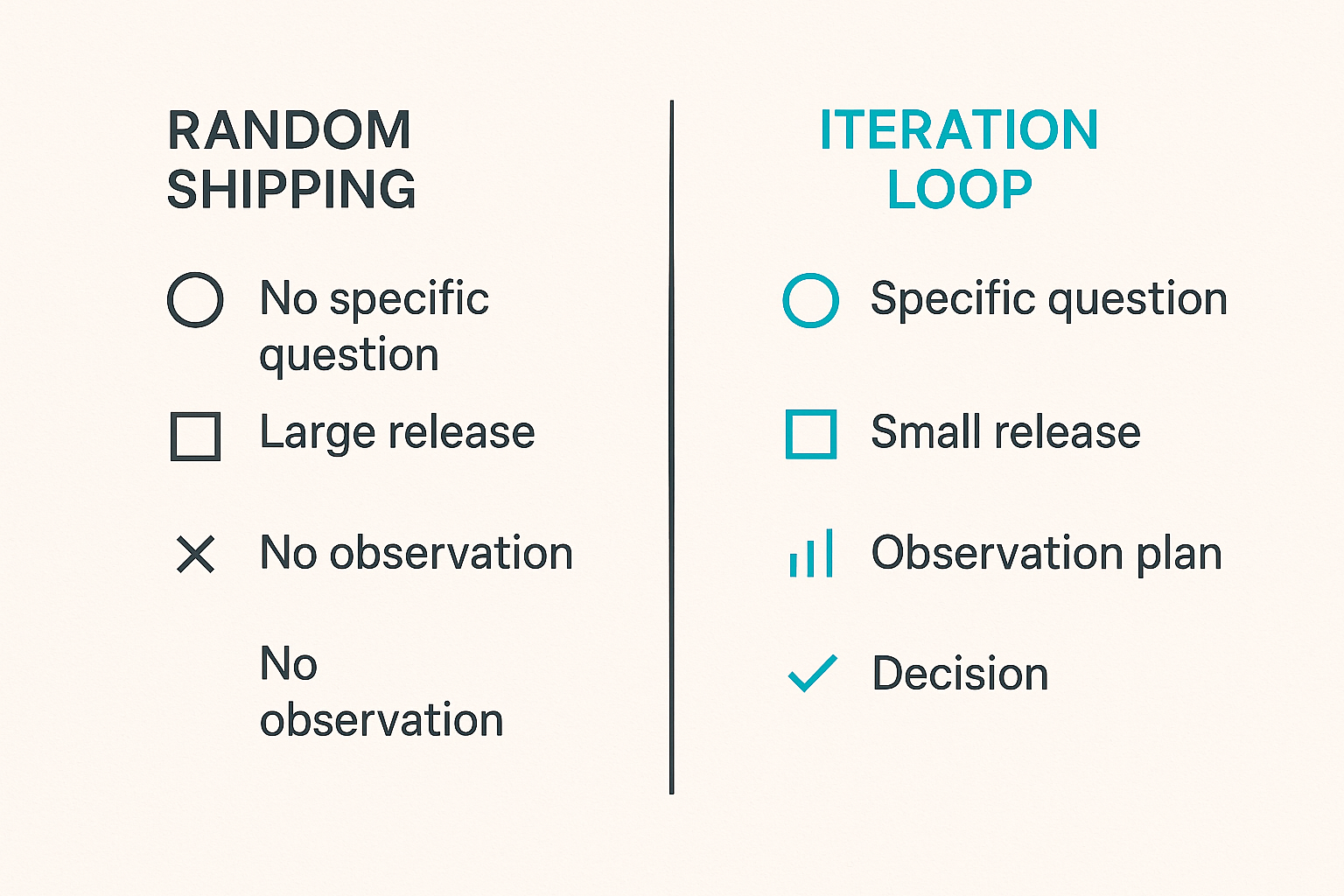
Iteration requires four things:
- A specific question or risk the change is meant to address.
- A small enough release to isolate the effect.
- A measurement or observation plan.
- A decision after the release.
Without those, you are just shipping a sequence of changes.
Practical rule: If a release cannot change a future product decision, it is delivery work, not iteration.
Why this matters more in 2026
In 2026, small teams can build faster than ever. AI-assisted coding, design systems, low-friction deployment, and integrated analytics make it easier to produce software. That is useful, but it also hides bad process.
When implementation gets cheaper, decision quality becomes the bottleneck. A founder can now ship five half-formed ideas in the time it used to take to ship one. The risk is not slowness. The risk is accumulating product complexity faster than the market can validate it.
That changes the conversation from velocity to judgment. The best iteration systems slow down at the decision boundary and speed up at the implementation boundary.
The ownership question
Every iteration loop needs an owner. Not necessarily a product manager. For an indie hacker, it may be the founder. For a small SaaS team, it may rotate between product, engineering, and customer success. But someone has to own the decision record.
Ownership includes:
- Deciding what enters the iteration queue.
- Defining what a change should prove.
- Confirming the release is instrumented.
- Calling the result after enough signal.
- Closing the loop with customers and the team.
If ownership is unclear, the backlog becomes a political object. Whoever complains most recently gets attention.
Start with the decision not the backlog
Most teams open the backlog and ask what should we build next. That is already too late. Backlogs are biased toward what has already been written down, not what matters now.
A better starting point is the decision. What do we need to learn or improve in the next cycle? Activation? Retention? Conversion? Expansion? Support load? User trust? Onboarding clarity?
Define the decision each iteration must answer
A clean iteration starts with a decision statement:
We need to decide whether improving team invite flow will increase first-week activation for new workspaces.
That statement does more work than a feature ticket called improve invites. It narrows the target user, defines the expected movement, and hints at the metric.
Good decision statements usually include:
- The user segment.
- The current friction.
- The expected behavior change.
- The decision you will make after release.
Example:
If guided import reduces setup time for trial users, we will make it the default onboarding path. If not, we will keep manual setup and improve templates instead.
Separate discovery bets from delivery work
Not every product change is an experiment. Some work is required to maintain the product: bug fixes, security updates, infrastructure cleanup, compliance, performance, billing accuracy. Calling all of that iteration creates noise.
Separate your work into at least three lanes:
| Lane | Purpose | Example | Review question |
|---|---|---|---|
| Discovery bet | Learn whether a product direction is worth more investment | New onboarding step | Did behavior change enough to continue |
| Delivery improvement | Make known product value easier to access | Faster export flow | Did quality or usability improve |
| Operational maintenance | Keep the system reliable | Fix webhook retry bug | Did risk decrease |
This distinction matters because each lane needs a different success measure. Discovery needs evidence. Delivery needs quality. Maintenance needs reliability.
Use evidence levels instead of opinions
Opinions are allowed. They just need labels. A founder hunch is useful when treated as a hunch. A customer request is useful when treated as one request. Analytics are useful when interpreted in context.
A simple evidence scale helps:
- Level 1: Founder or team intuition.
- Level 2: One or two customer conversations.
- Level 3: Repeated support or sales pattern.
- Level 4: Analytics showing measurable friction.
- Level 5: Released change with observed behavior.
The goal is not to worship data. The goal is to stop pretending every input has the same weight.
Build a signal intake that does not drown the team
Iteration quality depends on input quality. If feedback arrives through DMs, calls, emails, analytics dashboards, support tools, social comments, and founder memory, the product team will eventually optimize for whichever channel is loudest.
The practical question is how to collect signals without turning the company into a research bureaucracy.
Normalize feedback into one format
Use one lightweight format for feedback records. It can live in Notion, Linear, Airtable, a spreadsheet, or your own database. The tool matters less than the structure.
A useful feedback record includes:
source: customer_call
segment: paid_team_account
user_role: admin
problem: teammates do not accept invites before trial ends
frequency: repeated
impact: blocks activation
quote: invite emails get lost and I do not know who joined
linked_metric: workspace_activation_rate
candidate_iteration: improve invite visibility
status: triaged
The point is not documentation for its own sake. It is to make different signals comparable.
Keep noisy channels useful
Some channels are inherently noisy. Social media comments, founder communities, launch platforms, and public roadmaps can generate useful edge cases and terrible priorities in the same hour.
Do not ignore them. Do not obey them either.
A good intake rule is to capture the problem, not the proposed solution. If someone says add Slack integration, the record should say teams want alerts where they already work. The solution can come later.
Related reading from our network: teams choosing workflow tools face a similar trap when they buy by feature checklist instead of operating fit, which is covered in this guide to project management software in 2026.
What breaks when intake is unmanaged
What breaks in practice is not just prioritization. The team loses trust in the process.
Common symptoms:
- Sales promises features because product decisions feel opaque.
- Support escalates every complaint because there is no feedback path.
- Engineering sees product changes as random.
- Founders override the plan because the plan does not reflect reality.
- Customers repeat feedback and never hear back.
Practical rule: A feedback system is not complete until the person receiving feedback knows where to put it and what will happen next.
Turn feedback into a ranked iteration queue
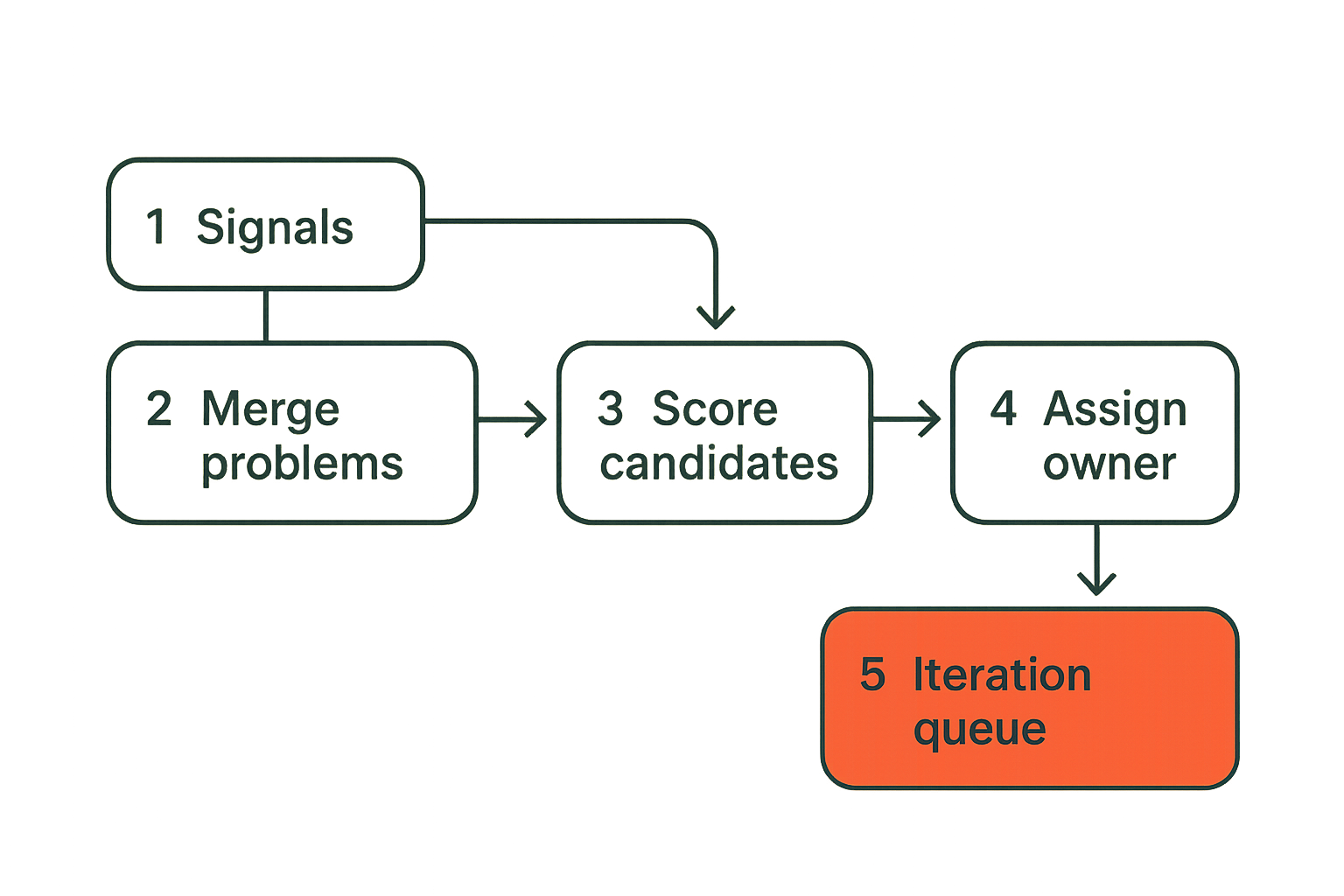
A backlog stores possibilities. An iteration queue stores decisions ready for action. The distinction matters.
A backlog can be messy and broad. The iteration queue should be small, ranked, and owned. If everything in the backlog can be pulled into the next cycle, nothing has been triaged.
Score by risk reach and reversibility
Complicated scoring frameworks often fail because nobody maintains them. Use a small model that your team can apply quickly.
Score each candidate on:
- Risk: What product or business risk does this address?
- Reach: How many relevant users or accounts does it affect?
- Confidence: How strong is the evidence?
- Reversibility: How easy is it to undo if wrong?
- Effort: How much team capacity does it consume?
Reversibility is underrated. A reversible change with medium evidence may be worth shipping sooner than a high-effort change with slightly better evidence.
Promote only ready work
A candidate should not enter the iteration queue until it has enough context to be acted on. Ready does not mean fully specified. It means the team can start without inventing the purpose.
Ready work has:
- A decision statement.
- A target user or segment.
- A success signal.
- A release slice.
- An owner.
- A review date or trigger.
If one of these is missing, the item can stay in discovery.
A practical triage workflow
Use a weekly or twice-weekly triage loop for small teams. Keep it short and strict.
- Collect new signals from support, analytics, sales, calls, and founder notes.
- Merge duplicates into existing problem records.
- Raise evidence levels when patterns repeat.
- Identify candidate iterations tied to current business goals.
- Score candidates by risk, reach, confidence, reversibility, and effort.
- Promote only the top few ready candidates into the iteration queue.
- Assign owners and review triggers before implementation starts.
This sequence prevents the common pattern where the team debates solutions before agreeing on the problem.
Ship in slices that can teach you something
The smallest release is not always the fastest implementation. It is the smallest product change that can produce useful evidence.
Teams often slice by engineering convenience: backend first, UI later, settings page now, reports next week. That may help delivery, but it often delays learning. Users do not experience your architecture layers. They experience workflows.
The smallest useful release
A useful slice should be complete enough for a real user to encounter the intended value. It can be limited by segment, plan, workspace, manual backend support, or feature flag. But it should not be a disconnected fragment.
For example, if you are improving onboarding, a useful slice might be:
- Only for new trial workspaces.
- Only for one acquisition channel.
- Only for one import source.
- Supported manually by the founder for the first ten accounts.
That can be much better than building a fully automated onboarding system nobody uses.
Feature flags and rollback plans
Iteration without rollback is just risk accumulation. You do not need enterprise-grade release infrastructure, but you do need a way to reduce blast radius.
For each meaningful iteration, define:
- Who receives it first.
- How it can be disabled.
- What data or state it changes.
- Whether users need migration or communication.
- What support should do if it fails.
Practical rule: A product change is not small if it is hard to reverse.
What fails when slices are fake
Fake slices look small in the project tool but big in the product.
What fails:
- The team ships internal plumbing and calls it progress.
- Users cannot complete the workflow, so evidence is weak.
- Partial states create support tickets.
- Metrics move for reasons unrelated to the change.
- The next slice becomes hostage to the previous one.
What works:
- Slice by user workflow, not code layer.
- Limit audience instead of limiting usefulness.
- Keep manual operations acceptable during early learning.
- Pair the release with a clear review trigger.
Instrument the product before you debate it
Many iteration arguments are really instrumentation problems. The team cannot tell whether a change worked, so everyone interprets anecdotes in their own favor.
Instrumentation does not need to be complex. It needs to exist before the release.
Define success before release
Every iteration should have a success statement:
Success means invited teammates join within 48 hours at a higher rate for new workspaces exposed to the updated invite flow.
This does not require a perfect experiment. It does require a defined behavior, audience, and time window.
A minimal release measurement plan can include:
- Primary behavior metric.
- Guardrail metric.
- Support or complaint signal.
- Qualitative follow-up method.
- Decision date.
The guardrail matters. An onboarding change that increases setup completion but also increases refunds may not be a win.
Track activation retention and support signals
For many software products, iteration should connect to a few durable operating metrics:
- Activation: Did users reach the first meaningful outcome?
- Retention: Did they come back or continue using the workflow?
- Conversion: Did the change affect trial, upgrade, or purchase behavior?
- Expansion: Did existing accounts adopt more value?
- Support load: Did confusion, bugs, or manual work increase?
Do not track everything with equal attention. Pick the metric that matches the decision.
Use qualitative notes with quantitative metrics
Quantitative data tells you what changed. Qualitative feedback often tells you why.
A small team can pair analytics with lightweight customer notes:
iteration_id: invite_visibility_v2
metric_result: activation improved for founder-led teams but not agencies
support_signal: fewer where is my teammate tickets
customer_notes:
  - admins liked seeing pending invites in setup checklist
  - agencies still need bulk invite import
decision: keep change and create separate agency workflow candidate
This kind of record prevents the team from flattening a mixed result into worked or failed.
Run iteration reviews like operating reviews
The review is where iteration becomes compounding knowledge. Without a review, each release is just another artifact left in the product.
The mistake teams make is reviewing effort instead of results. They ask whether the feature shipped, whether it was hard, and what is next. Those are useful delivery questions, but they do not close the learning loop.
Review shipped changes not intentions
A good iteration review starts with what actually shipped. Not what was planned. Not what the spec promised. Not what the team hoped users would do.
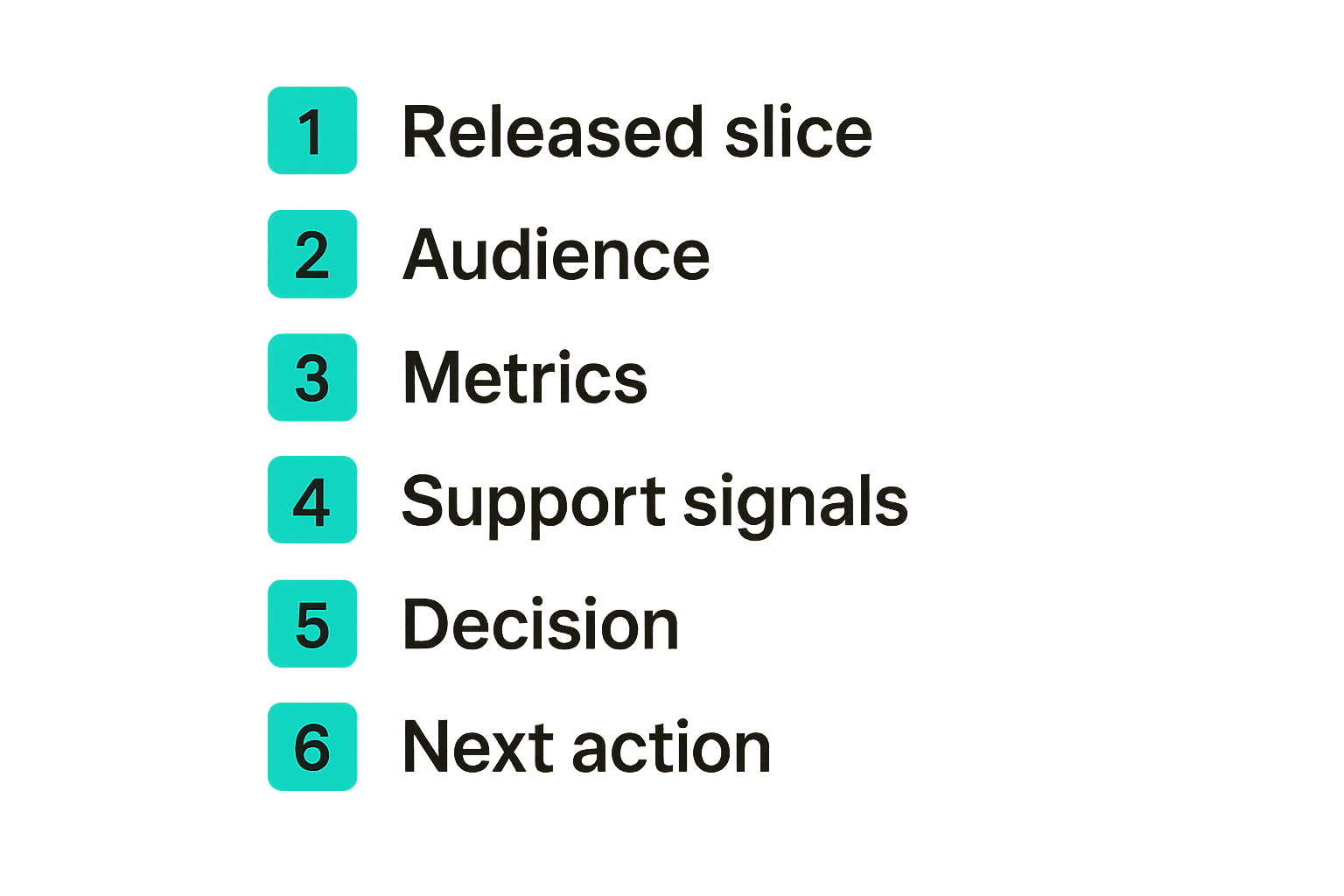
Review this:
- The released slice.
- The exposed audience.
- The measurement window.
- The actual user behavior.
- The support and qualitative signals.
- The decision now required.
If the shipped version differs from the planned version, record that. Many bad decisions happen because teams evaluate a release as if it matched the original idea.
Decide keep change revert or expand
Every iteration review should end with one of a few decisions:
| Decision | Meaning | Next action |
|---|---|---|
| Keep | The change is useful enough to remain | Document and monitor guardrails |
| Expand | The result justifies broader rollout or deeper investment | Define the next slice |
| Revise | Signal is mixed but direction still looks valid | Adjust and retest |
| Revert | The change created harm or no useful value | Roll back and capture learning |
| Park | Evidence is insufficient and priority is low | Remove from active queue |
This avoids the worst default: leaving every shipped change in place because reverting feels embarrassing.
Make decisions visible
Iteration decisions should be visible to the team. Not in a 40-page document. In a simple decision log.
Useful fields:
date: 2026-06-02
iteration: invite_visibility_v2
owner: founder
result: expand
reason: improved activation for founder-led teams with no support increase
next_step: test agency-specific bulk invites
links: metrics_dashboard support_notes release_pr
Visibility reduces repeated debates. It also helps new team members understand why the product is shaped the way it is.
Manage customer communication as part of iteration
Product iteration is not only internal. Customers experience the change, ask questions, misunderstand intent, and sometimes feel whiplash if the product moves too quickly.
Communication is part of the architecture. If users do not understand what changed or why it matters, your measurement can be polluted by confusion.
Close the feedback loop
When a customer gives useful feedback, close the loop when the product changes. This does not mean promising every request. It means showing that feedback enters a real system.
A simple reply works:
You mentioned that pending invites were hard to track during setup. We shipped a small update that shows pending teammates in the onboarding checklist. If you try it this week, I would like to know whether it fixes the issue for your team.
That message does three things. It acknowledges the original problem, points to the shipped change, and asks for specific follow-up.
Related reading from our network: community operators deal with a similar loop of asks, offers, trust, and follow-up in this guide to the best platform for local community building.
Use changelogs and release notes carefully
Changelogs are useful when they explain user impact. They are less useful when they become a dump of internal work.
For iteration, release notes should answer:
- Who is affected?
- What changed in the workflow?
- Why should the user care?
- Is any action required?
- Where can feedback go?
If you use content as part of launch and iteration, the workflow matters. The same control problem appears in publishing: this sh1pt.com guide to AI publishing shipping software frames content as a launch system instead of a pile of drafts.
Related reading from our network: editorial teams face the same approval and quality-gate problem in this guide to AI blog publishing software.
Avoid support driven roadmaps
Support is one of the best product signal sources. It is also biased toward pain. If you only build from support tickets, you may optimize for the loudest friction while ignoring strategic growth.
Use support signals to identify problems, not automatically set the roadmap.
Good support-to-product handoff:
- Support records the problem and affected segment.
- Product groups it with related signals.
- The team checks metric impact.
- The iteration owner decides whether to promote it.
- Support receives the decision and customer-facing explanation.
This keeps support close to product without making the roadmap reactive.
Common product iteration failure modes
Bad iteration usually looks productive from the outside. The team ships. Customers see changes. Metrics dashboards fill up. The roadmap moves.
Inside the product, though, complexity increases and confidence does not. That is the warning sign.
The backlog landfill
The backlog landfill happens when every idea is saved but few are triaged. It feels responsible because nothing is lost. In practice, everything is lost because the team cannot distinguish live opportunities from stale notes.
Symptoms:
- Hundreds of tickets with unclear status.
- Old requests resurfacing as if they are new.
- No connection between backlog items and current goals.
- Engineers pulling work based on ticket clarity rather than importance.
Fix it by separating archive from queue. The archive can be large. The queue must be small.
The pivot disguised as iteration
Some teams call every direction change an iteration. That can hide strategic confusion.
Iteration adjusts a product direction based on evidence. A pivot changes the direction because the current one no longer looks viable. Both can be valid, but they need different conversations.
A pivot disguised as iteration creates problems:
- Existing users become confused.
- Messaging changes faster than the product.
- The team never finishes learning from prior bets.
- Metrics reset before they become useful.
If the target customer, core problem, or business model changes, call it what it is. Do not bury it inside a sprint plan.
The metric theater problem
Metric theater happens when teams attach dashboards to decisions they have already made. The data exists, but it does not govern anything.
Watch for these patterns:
- Metrics are reviewed only after launch celebrations.
- Bad results lead to explanation but no action.
- Success definitions change after results arrive.
- Vanity metrics replace behavior metrics.
- Nobody owns the decision after measurement.
Practical rule: If a metric cannot trigger keep, expand, revise, revert, or park, it is probably reporting, not iteration control.
Product iteration best practices inside your shipping system
Product iteration best practices work only when they are connected to the rest of shipping. Iteration is not a separate product management hobby. It is how a software business turns market contact into product change without losing the plot.
For indie hackers and small teams, the advantage is focus. You do not need a large process. You need a repeatable loop that keeps decisions honest.
Connect launch iteration and growth
Launch is not the end of product work. It is the start of higher-quality feedback. If you treat launch as a one-time event, you waste the best signals you will get.
A practical launch-to-iteration loop looks like this:
- Launch to a defined audience with clear positioning.
- Capture objections, usage, support questions, and conversion behavior.
- Group signals by user segment and workflow stage.
- Promote the highest-leverage iteration candidate.
- Ship a small slice.
- Measure behavior and customer response.
- Decide whether to keep, expand, revise, revert, or park.
If you are still shaping the full release motion, this guide on how to launch a software product is the adjacent piece: launch creates the signal, iteration turns it into a better product.
Where sh1pt com fits
sh1pt.com is built for people who care about getting software from idea to market without turning shipping into chaos. The useful product iteration stack is not just roadmapping. It includes launch strategy, feedback capture, decision records, release discipline, customer communication, and growth loops.
That is the lens here: shipping is an operating system. Product iteration best practices are one loop inside it.
You can run this with simple tools. A spreadsheet, issue tracker, analytics product, customer notes, and release checklist are enough at the beginning. The important part is the workflow:
- Capture signals consistently.
- Promote only ready iteration candidates.
- Ship reversible slices.
- Measure before arguing.
- Review outcomes, not effort.
- Communicate changes to the people affected.
The teams that win are usually not the ones with the most elaborate process. They are the ones that make fewer untracked decisions.
Try sh1pt com
sh1pt.com is for people building and launching software products who want to understand shipping strategies, product development processes, and growth tactics. If you want more practical product iteration best practices and shipping workflows, Try sh1pt.com.