
Scaling a software product usually starts with a good problem: users are arriving, feedback is getting louder, and the product is no longer a private experiment. Then the cracks show up. Support takes longer. Releases feel risky. The backlog gets political. Every new customer request sounds urgent.
Teams think the problem is traffic, engineering capacity, or hiring. The real problem is operating design. Scaling a software product is not just making the app faster. It is making the company around the app capable of making better decisions under pressure.
That changes the conversation. The practical question is not, can the product handle 10x more users? The better question is, can your release process, feedback loop, support model, pricing logic, and product architecture handle 10x more ambiguity without turning into noise?
This guide is written for indie hackers, founders, product managers, and solopreneurs who are past the first launch and trying to grow without replacing useful speed with process theater.
Table of contents
- Why scaling a software product is an operating system problem
- The scaling map: product, users, operations, and revenue
- Build the product architecture for change
- Create a release workflow that can survive growth
- Use feedback loops without becoming reactive
- Scaling a software product with support and success
- Pricing, packaging, and usage limits
- Metrics that matter when scaling a software product
- Common failure modes when growth arrives
- Product-fit: how sh1pt.com thinks about scaling
Why scaling a software product is an operating system problem
Scaling is often discussed like a technical milestone. Add queues. Add caching. Move to a bigger database. Split services. Hire senior engineers. Those things can matter, but they are rarely the first constraint for a small product team.
The mistake teams make is treating scale as a future infrastructure project instead of a current workflow problem. By the time the database is the only bottleneck, many product and operational bottlenecks have already been ignored.
The real bottleneck is decision throughput
A small team can move fast because decisions are cheap. The founder knows the customer, the backlog is short, and most product changes are reversible. As the product grows, each decision starts touching more surfaces: billing, onboarding, support, permissions, integrations, documentation, analytics, and customer expectations.
Decision throughput is the number of meaningful product decisions your team can make, ship, validate, and learn from without creating confusion. It is not the same as velocity. A team can merge many pull requests and still make few useful decisions.
When decision throughput drops, scaling gets ugly. Roadmap debates get longer. Releases get bigger. Support becomes a second product management system. Product managers start translating between engineers, customers, and sales instead of clarifying tradeoffs.
Practical rule: If every meaningful change requires a custom meeting, you do not have a scaling problem yet. You have a decision system problem.
Scale starts before infrastructure
Infrastructure work is easier when the product has clean boundaries. It is painful when every feature shares hidden state, every plan has custom behavior, and every important customer has a one-off exception.
A useful way to think about it is this: infrastructure scales execution, but operating systems scale judgment. If your product team cannot answer what changed, who it affects, how it will be rolled back, and what metric proves it worked, more infrastructure will only let you create mess faster.
This is why a practical product development workflow matters before the team gets large. It turns signals into decisions, decisions into releases, and releases into evidence. Without that loop, scaling a software product becomes a pile of unrelated fixes.
The scaling map: product, users, operations, and revenue
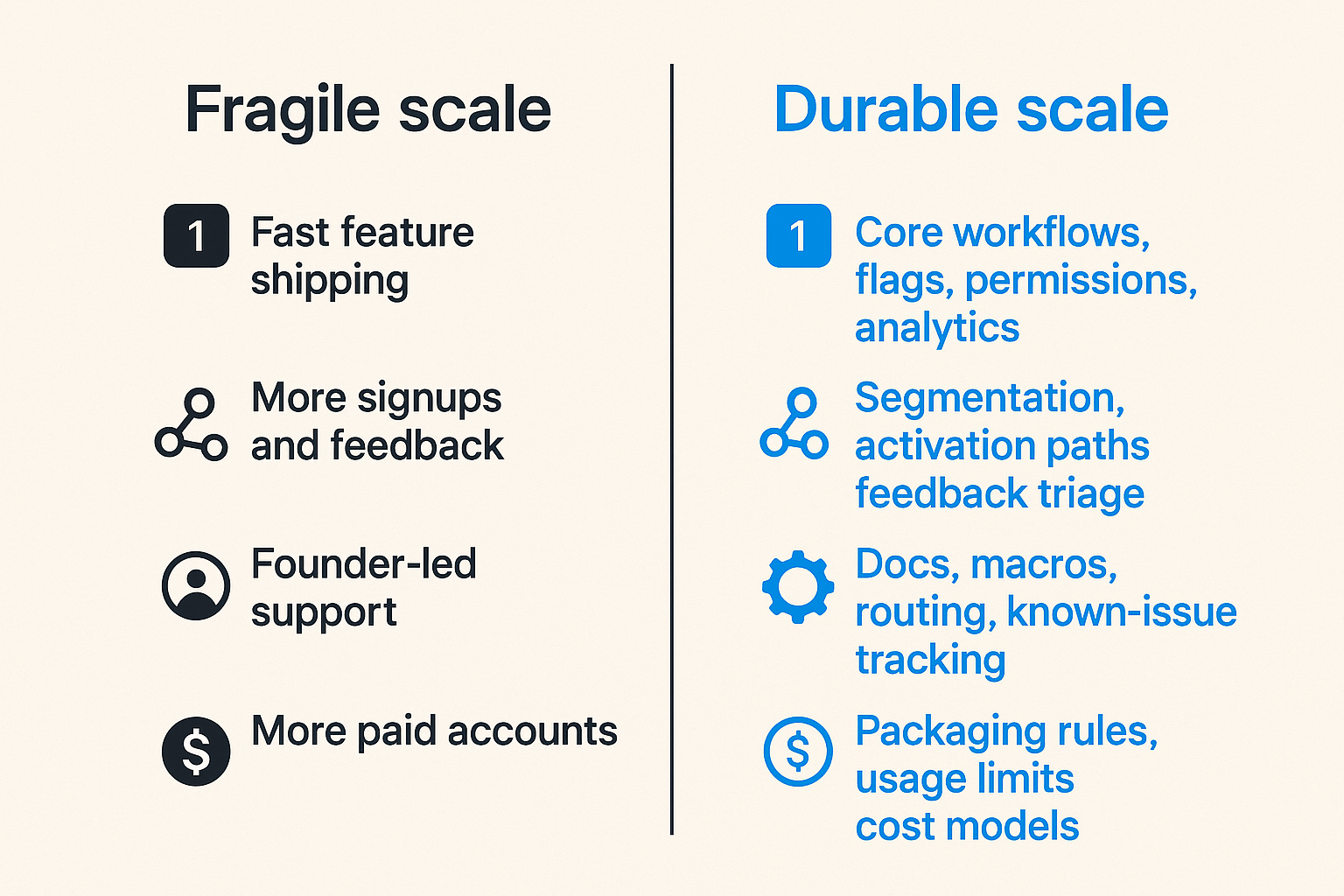
Scaling pressure does not arrive in one clean channel. It arrives as a bundle. More users create more support. More support creates more product requests. More product requests create more releases. More releases create more billing, permissions, and migration risk. Revenue adds expectations that did not exist when the product was free or cheap.
Four surfaces that break together
The practical scaling map has four surfaces:
| Surface | What looks good early | What breaks during scale | Durable response |
|---|---|---|---|
| Product | Fast feature shipping | Feature sprawl and unclear ownership | Core workflows, flags, permissions, analytics |
| Users | More signups and feedback | Noisy requests and uneven onboarding | Segmentation, activation paths, feedback triage |
| Operations | Founder-led support | Slow replies and repeated explanations | Docs, macros, routing, known-issue tracking |
| Revenue | More paid accounts | Custom deals and margin surprises | Packaging rules, usage limits, cost models |
The table matters because teams often optimize one surface while ignoring the others. Engineering improves performance, but support still cannot explain the product. Marketing drives signups, but activation is weak. Pricing changes, but billing operations cannot handle edge cases.
That is not scaling. That is shifting load from one part of the system to another.
Related reading from our network: teams choosing operational tooling face similar workflow tradeoffs, and this guide to project management software in 2026 is useful if your scaling problem is really ownership, routing, and visibility.
What changes at each stage
You do not need enterprise process at 500 users. You do need more structure than you had at 5 users.
At the first stage, the product needs learning speed. Your goal is to discover a repeatable job-to-be-done, not to formalize every request. At the second stage, the product needs reliability. Your goal is to make the main path boring, understandable, and measurable. At the third stage, the product needs leverage. Your goal is to make the team effective without every decision running through the founder.
The mistake is copying a later-stage company too early. The opposite mistake is pretending your early-stage habits will survive later-stage pressure.
Practical rule: Add structure at the moment it reduces rework, not at the moment it makes the team look mature.
Build the product architecture for change
Scaling a software product means accepting that you will be wrong. You will ship features that need to be reversed, rename concepts, adjust plans, change onboarding, and discover customers using the product in ways you did not predict.
So the architecture should not only optimize for the current feature set. It should optimize for controlled change.
Separate core workflows from experiments
Every product has a few workflows that must be stable. For a project management app, that might be creating projects, assigning tasks, notifications, and billing. For a developer tool, it might be installation, API keys, usage tracking, and error reporting. For a marketplace, it might be listing, checkout, messaging, dispute handling, and payouts.
Experiments should not be woven into those workflows without boundaries. If a new onboarding idea modifies core account creation, permission logic, and billing in one release, it is no longer a small experiment. It is a system change.
A better pattern:
- Keep core domain objects boring and explicit.
- Put experimental behavior behind feature flags.
- Avoid changing billing, permissions, and user-generated data in the same release unless there is a clear migration plan.
- Track which experiments touched which user segments.
What breaks in practice is not usually the experiment itself. It is the cleanup. Teams forget to remove dead flags, old onboarding branches, unused plan checks, and temporary database columns. The product becomes a museum of past guesses.
Design flags, permissions, and plans early
Small products often hardcode access because it is faster. That is fine for a prototype. It becomes expensive when customers start paying for different plans, internal users need admin controls, and support needs to reproduce customer states.
You do not need a complex entitlement system on day one. You do need a place where the product can answer simple questions consistently:
- Can this user access this feature?
- Which plan or role grants that access?
- Is access temporary, grandfathered, beta-only, or usage-limited?
- What should the user see if access is denied?
If those answers are scattered across controllers, frontend checks, billing webhooks, and customer-specific exceptions, scaling will be painful.
Practical rule: Permissions and packaging are product architecture, not just billing configuration.
Keep observability close to user intent
Technical observability tells you whether the system is healthy. Product observability tells you whether users are succeeding. You need both, but they should not live in separate universes.
A request trace that says an endpoint returned 200 is useful. An event trail that says the user created a workspace, invited a teammate, hit a permission wall, retried twice, then abandoned setup is more useful for product decisions.
Good scaling instrumentation connects these layers:
- System events: errors, latency, job failures, webhook failures.
- Product events: activation steps, core actions, upgrades, cancellations.
- Operational events: support tickets, refunds, manual fixes, account reviews.
When these are disconnected, teams argue from anecdotes. Engineering sees stable uptime. Support sees angry users. Product sees flat activation. Everyone is right, but no one has the joined-up picture.
Create a release workflow that can survive growth
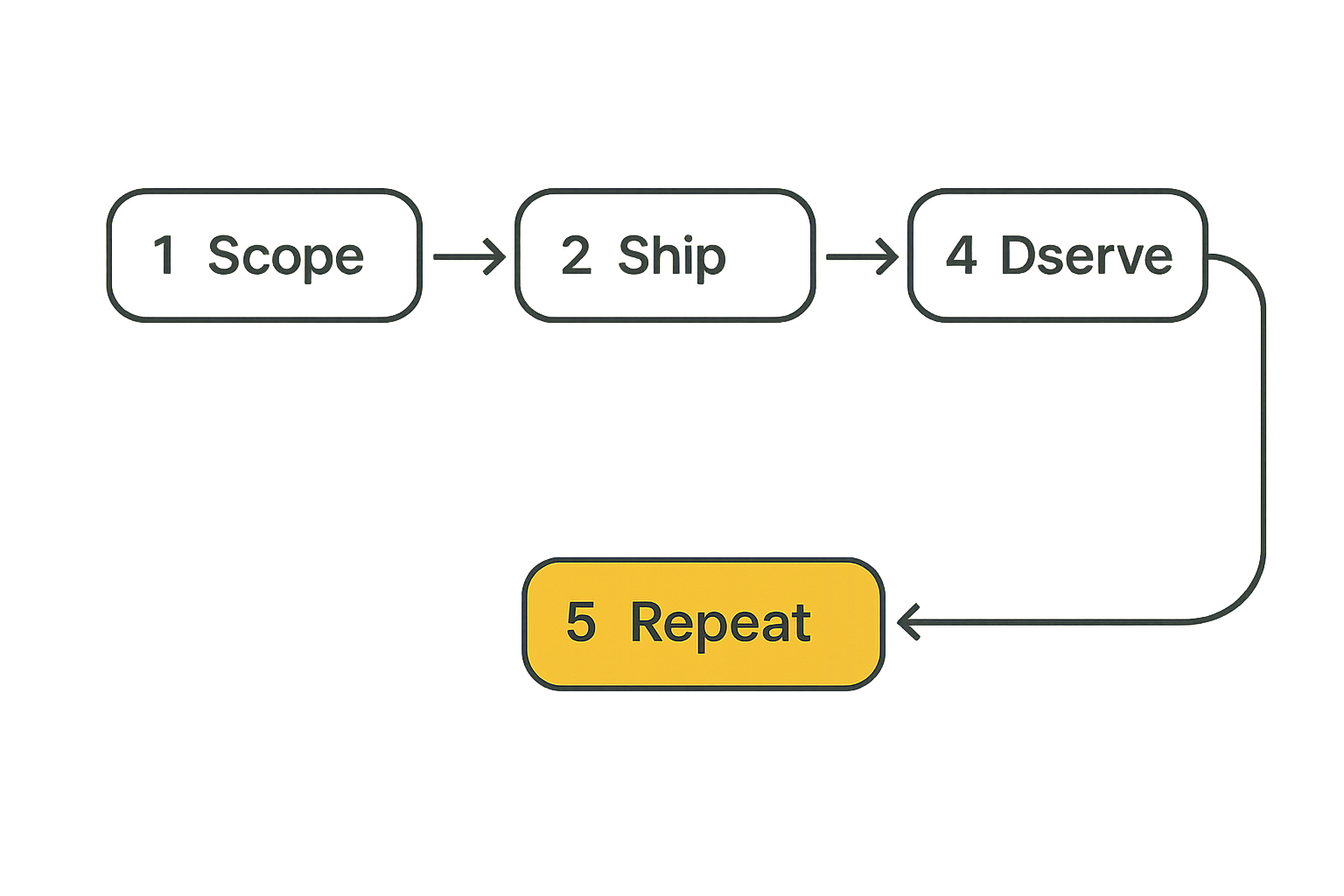
Release workflow is where scaling becomes visible. A tiny product can deploy whenever the founder feels ready. A growing product needs to ship without turning every release into a negotiation.
The point is not bureaucracy. The point is to make releases smaller, safer, and easier to learn from.
Small releases beat big migrations
Big releases are attractive because they feel efficient. Bundle the redesign, onboarding change, pricing update, and analytics rewrite into one big push. Announce it. Move on.
In production, big releases make causality hard. If activation drops, which change caused it? If support volume rises, which new behavior confused users? If revenue improves, was it pricing, messaging, or a temporary launch bump?
Small releases create cleaner evidence. They also reduce emotional attachment. It is easier to roll back one narrow change than a quarter of work.
A practical release unit should answer:
- What user behavior are we trying to change?
- Which users are affected first?
- What could break?
- How do we disable or reverse it?
- What will we watch in the first 24 to 72 hours?
This is adjacent to the operating discipline behind shipping software faster: faster does not mean more frantic. It means smaller scope, clearer ownership, and tighter feedback.
Rollbacks are product features
Rollbacks are usually treated as engineering safety. They are also product safety. If a feature changes a workflow customers depend on, rollback is part of the customer experience.
A rollback plan should include more than revert the code. Ask:
- Was data created in a new format?
- Did users see new settings, emails, invoices, or exports?
- Did support receive macros and known-issue notes?
- Did analytics mark which accounts touched the change?
- Do affected customers need communication?
The mistake teams make is calling something reversible when only the code is reversible. Data, expectations, and customer communication may not be.
The release sequence
A simple release sequence is enough for most small teams:
- Define the decision. State what the release should prove, change, or unblock.
- Scope the smallest shippable slice. Remove unrelated cleanup unless it reduces risk.
- Decide the rollout path. Internal, beta segment, small percentage, plan-based, or everyone.
- Prepare observability. Events, logs, support tags, and dashboards should exist before launch.
- Ship with an owner. One person watches the release and makes the go, hold, or rollback call.
- Review evidence. Capture what changed, what broke, what confused users, and what to do next.
This does not require a large team. A solopreneur can run the same sequence in a lightweight way. The value is not the ceremony. The value is having a repeatable loop.
Use feedback loops without becoming reactive
Feedback is not automatically useful. As a product grows, feedback becomes louder and less representative. Paying customers, free users, churned accounts, prospects, internal stakeholders, and power users all pull in different directions.
Scaling a software product requires a feedback loop that filters for decision value instead of volume.
Sort signals by decision value
Not all feedback deserves the same treatment. A long email from a power user may be valuable, but it may also describe a niche workflow. A short cancellation reason may be vague, but if repeated across a segment, it may expose a real activation gap.
A useful triage model separates feedback into four buckets:
- Bug: something promised does not work.
- Friction: something works but is confusing, slow, or hard to discover.
- Request: a user wants new capability.
- Strategy signal: feedback that changes how you understand the market, persona, or job.
The final bucket is the most important and the easiest to miss. Strategy signals do not always arrive as feature requests. They show up when users describe why they chose you, what they compare you against, what they refuse to pay for, and what they manually do before or after using your product.
Related reading from our network: content teams face the same problem when volume overwhelms judgment, and this piece on human in the loop AI publishing is a useful parallel for designing review gates without killing throughput.
Close the loop with users
Closing the loop does not mean promising every request. It means making users feel that the product team is listening, deciding, and learning.
For small teams, this can be simple:
- Tag feedback by account type, plan, use case, and lifecycle stage.
- Connect shipped changes back to the original request cluster.
- Tell users when a fix, improvement, or deliberate non-decision happens.
- Keep a short public or semi-public changelog for important changes.
The hidden benefit is internal clarity. When the team sees which releases came from which signal clusters, roadmap decisions become less personal. You are no longer debating whose anecdote is stronger. You are looking at accumulated evidence.
Scaling a software product with support and success
Support is where product truth leaks out. If users repeatedly misunderstand a feature, the product is communicating badly. If support keeps applying manual fixes, the product lacks operational paths. If one customer segment creates most of the load, pricing or onboarding may be wrong.
The mistake teams make is treating support as a cost center after the product ships. In a growing software product, support is part of the product surface.
Support is a product surface
Users do not experience your product as code. They experience onboarding, emails, docs, settings, invoices, errors, delays, and human responses as one system.
That means support needs product context:
- Which release changed the workflow?
- Which accounts are in the beta?
- Which plans have the feature?
- Which bugs are known and actively being fixed?
- Which workarounds are safe?
If support cannot answer these questions, the team creates avoidable churn. Users hear different explanations from different people. Founders get pulled into repeated escalations. Engineers receive vague bug reports without reproduction paths.
Turn tickets into backlog evidence
A support ticket is not automatically a product task. It is evidence. The product team still needs to decide whether the issue is a bug, missing documentation, poor onboarding, bad packaging, or a true feature gap.
A lightweight ticket-to-backlog flow works well:
- Tag the ticket by product area and user segment.
- Mark the underlying type: bug, friction, request, billing, confusion, or account-specific issue.
- Link repeated tickets into a cluster.
- Create a product note only when the cluster changes a decision.
- Close the loop when the fix ships or the team chooses not to act.
This prevents the backlog from becoming a graveyard of copied customer quotes. It also protects engineering from whiplash.
Write docs as operational leverage
Docs are not just user education. They are load-bearing infrastructure for support, sales, onboarding, and product quality.
Good docs reduce repeated tickets, clarify product boundaries, and force the team to explain the system plainly. If a feature is hard to document, that is often a product design smell. If a support article needs five caveats, the underlying workflow may be too fragile.
Related reading from our network: communities hit similar coordination problems when communication volume increases, and this article on AI publishing for community building is a useful adjacent example of turning content into operational infrastructure.
Pricing, packaging, and usage limits
Pricing becomes harder as the product scales because the customer base becomes less uniform. Early users may tolerate rough edges for a low price. Later customers expect clear packaging, predictable limits, support expectations, and upgrade paths.
This is where many teams accidentally create operational debt.
Choose boundaries customers understand
A good package boundary is easy to explain and enforce. A bad boundary requires support to interpret intent.
Useful packaging boundaries often map to:
- Seats or collaborators.
- Usage volume.
- Workspaces, projects, or accounts.
- Advanced permissions.
- Automation or integrations.
- Support level or service expectations.
Bad boundaries are vague. They depend on hidden internal concepts, manual approvals, or exceptions that only the founder remembers.
If a customer cannot predict when they will need to upgrade, pricing becomes a trust problem. If your team cannot enforce the boundary consistently, pricing becomes an operations problem.
Model costs before edge cases
Scaling exposes unit economics. A feature that is cheap for 20 users may become expensive for 2,000. AI calls, file storage, email volume, background jobs, webhooks, analytics retention, support time, and third-party APIs all create cost curves.
The practical question is not whether every user is profitable today. The practical question is whether you understand which behaviors create cost and whether your packaging gives you control.
Before adding generous limits, ask:
- What happens if a power user uses this 100x more than the median user?
- Is the cost tied to account count, usage, storage, compute, or human support?
- Can we rate limit or degrade gracefully?
- Do we have a warning path before billing surprise?
- Can support explain the limit without sounding arbitrary?
Practical rule: If usage can create material cost, it needs a product-visible boundary before it becomes a finance emergency.
Metrics that matter when scaling a software product
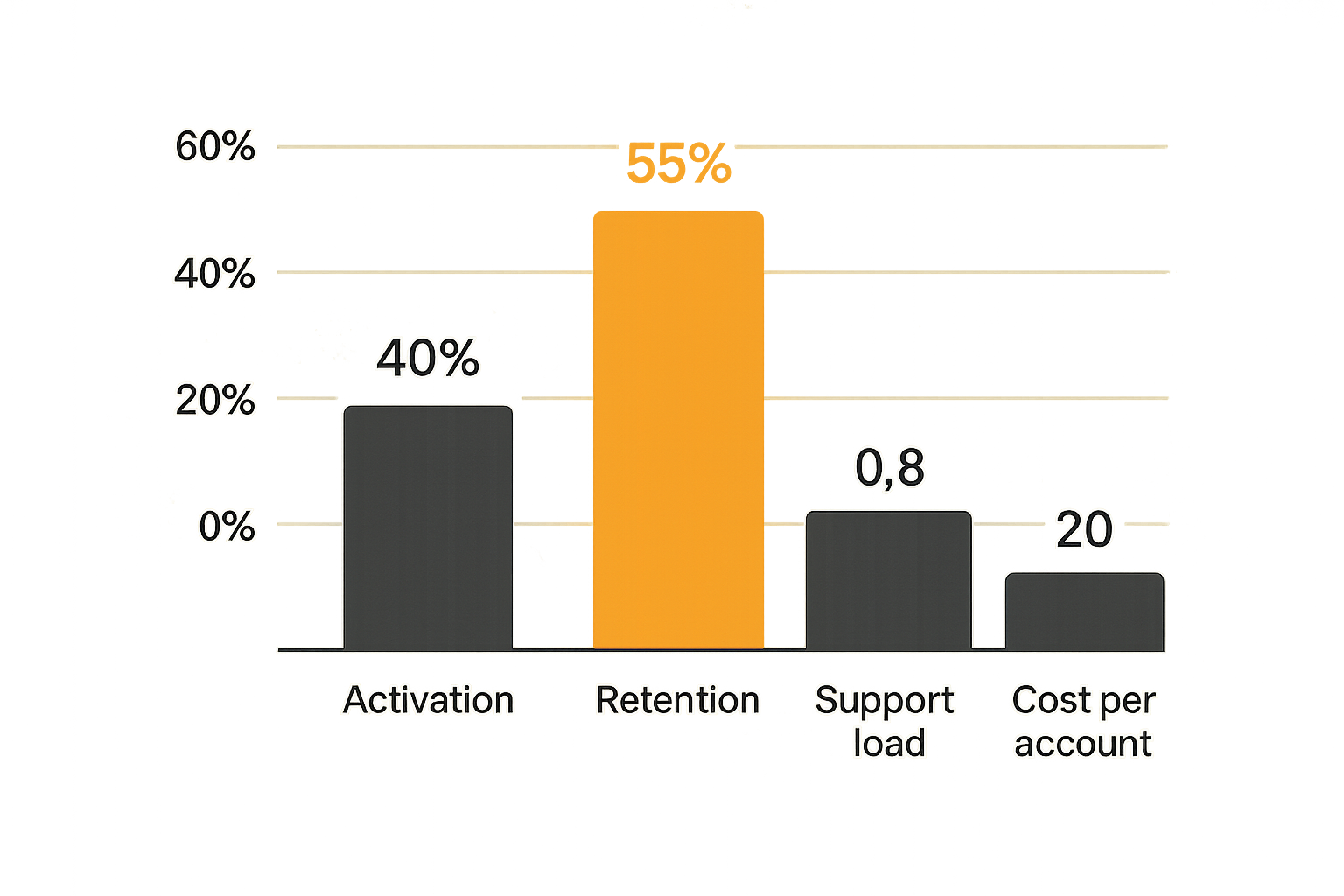
Metrics should reduce argument quality problems. They should help the team decide what to keep, change, fix, or stop doing. They should not become a dashboard decoration habit.
When scaling a software product, the best metrics connect user progress to operational load.
Activation, retention, and expansion
Activation tells you whether new users reach the first meaningful outcome. Retention tells you whether that outcome remains valuable. Expansion tells you whether customers find more value over time.
These are not abstract SaaS words. They should map to your actual product.
For example:
- Activation: user publishes first page, invites first teammate, connects first integration, or completes first transaction.
- Retention: user returns to the core workflow weekly, renews a subscription, or continues sending data through the system.
- Expansion: account adds seats, increases usage, upgrades plan, or adopts more workflows.
The mistake teams make is measuring generic events without knowing the user promise. A signup is not activation. A login is not retention. A plan upgrade is not always expansion if it was forced by a confusing limit.
Operational metrics that expose drag
Product metrics show value. Operational metrics show friction. You need both.
Track a small set of operational indicators:
- Support tickets per active account.
- Time to first response and time to resolution.
- Bug reports per release.
- Rollbacks or hotfixes per month.
- Manual interventions per account.
- Failed jobs, webhook retries, or stuck workflows.
- Refunds, disputes, or billing confusion.
These metrics expose scaling drag before it appears in revenue. If support tickets per active account rise while activation stays flat, the product is getting harder to operate. If manual interventions increase with every new customer, you are not scaling software. You are scaling hidden labor.
Common failure modes when growth arrives
Growth does not create all problems. It reveals the ones the team could previously absorb manually.
A founder can personally onboard ten customers. They cannot personally rescue every confusing workflow forever. An engineer can manually fix a few failed jobs. They cannot become the permanent queue processor. A product manager can remember key requests from twenty conversations. They cannot manage strategy from memory at scale.
What fails when growth arrives early
Early growth is exciting, but it can push a product into a market before the system is ready. Common failure modes include:
- Onboarding depends on founder calls.
- Support depends on one person knowing every workaround.
- Feature requests bypass prioritization because the customer is important.
- Billing plans are negotiated manually.
- Releases ship without observability because speed feels more important.
- Product positioning attracts users the product cannot serve well.
None of these are moral failures. They are normal. The danger is leaving them invisible.
What fails when process arrives late
The other failure mode is adding process only after trust has eroded. Then every new rule feels like slowdown. Engineers resent tickets. Product resents interruptions. Support resents vague releases. Founders resent losing direct control.
Late process often looks like:
- Heavy planning meetings without better decisions.
- Roadmaps that list output but not evidence.
- QA checklists nobody owns.
- Analytics dashboards nobody uses.
- Documentation sprints that never stay current.
- Customer feedback databases that become junk drawers.
The problem is not process itself. The problem is process that does not remove pain from the workflow.
What works instead
What works is adding small operating primitives before the team is desperate:
- A release owner for each meaningful change.
- A feedback triage model with clear buckets.
- Feature flags for risky behavior.
- Support tags that map to product areas.
- Simple entitlement logic for plans and roles.
- A changelog that connects releases to user-facing changes.
- A monthly review of support load, activation, retention, and manual work.
For teams that also publish launch content, positioning updates, or changelogs as part of the release motion, the same operating mindset applies. A controlled AI publishing shipping software workflow can keep launch communication from turning into scattered drafts and last-minute announcements.
The goal is not to look like a bigger company. The goal is to preserve the good parts of a small team: speed, context, and responsibility.
Product-fit: how sh1pt.com thinks about scaling
Scaling content about software products should not pretend that every founder needs the same playbook. A bootstrapped solo product, a venture-backed SaaS company, an agency-built tool, and a technical side project all have different constraints.
But they share one reality: shipping is the point where strategy becomes operational.
Where launch strategy meets operating cadence
At sh1pt.com, scaling a software product is treated as a shipping system problem. Launches, feedback loops, product workflows, positioning, release notes, and growth tactics are connected. If they are handled as separate chores, the founder gets pulled into everything.
The useful questions are practical:
- What are we shipping next?
- What user behavior should change?
- What evidence will we trust?
- What will support need to know?
- What does the public story need to explain?
- What should we stop doing if the signal is weak?
That is the connective tissue many teams miss. The product is not just the codebase. It is the operating rhythm around the codebase.
Use the site as a shipping reference
sh1pt.com is built for people building and launching software products who want clearer shipping strategies, product development processes, and growth tactics. The focus is practical: how to move from idea to market, how to avoid scattered execution, and how to make launch decisions with more context.
If you are scaling a software product in 2026, the work is not to copy a generic maturity model. The work is to build the smallest operating system that keeps your team honest: clear scope, observable releases, useful feedback, support visibility, understandable packaging, and metrics that connect growth to workload.
Try sh1pt.com
sh1pt.com is for people building and launching software products who want practical shipping strategies, product development processes, and growth tactics. If you are scaling a software product, use it as a reference for turning launch work into an operating cadence: Try sh1pt.com.